Advanced Plus Security Brambedkar59's Security Config 2026

Last updated
Nov 7, 2025
How it's used?
For home and private use
Operating system
Windows 11
Other operating system
2 older laptops running Win 10 (one with F-secure and other Kaspersky Free)
On-device encryption
N/A
Log-in security
    • Biometrics (Windows Hello PIN, TouchID, Face, Iris, Fingerprint)
    • Basic account password (insecure)
Security updates
Check for updates and Notify
Update channels
Allow stable updates only
User Access Control
Notify me only when programs try to make changes to my computer
Smart App Control
Off
Network firewall
Enabled
Real-time security
Avast Premium
Firewall security
Other - Internet Security (3rd-party)
About custom security
Persistent cache enabled for all scans
Periodic malware scanners
Norton Power Eraser
EEK
Malware sample testing
I do not participate in malware testing
Environment for malware testing
N/A
Browser(s) and extensions
Common extension/Search in all browsers: Bitwarden, Bing Search
Edge (Default): uBlock Origin (MV2), Shazam (enabled only on usage), Bypass Paywalls Clean ( (enabled only on usage))
Firefox (Secondary): uBlock Origin
Secure DNS
NextDNS
Desktop VPN
Proton VPN
Password manager
Bitwarden
Maintenance tools
Biweekly run: Windows Built-in, CCleaner, WiseCare 365 (Rarely used), Driver Store Explorer [RAPR] (for deleting old drivers not needed)
For finding program updates: UCheck & RuckZuck
HiBit Uninstaller
File and Photo backup
Google Drive, OneDrive
Subscriptions
    • None
System recovery
Hasleo Backup Suite
Risk factors
    • Browsing to popular websites
    • Working from home
    • Making audio/video calls
    • Opening email attachments
    • Buying from online stores, entering banks card details
    • Logging into my bank account
    • Downloading software and files from reputable sites
    • Sharing and receiving files and torrents
    • Gaming
    • Gaming with third-party mods
    • Streaming audio/video content from trusted sites or paid subscriptions
Computer specs
11400H (UV via ThrottleStop), 3050Ti (UV via G-Helper), 16 GB, 0.5TB + 1 TB NVMe, 1 TB & 4 TB HDD (for image backup and downloads)
Notable changes
Kaspersky Free to AVG IS
AVG IS to Kaspersky Free
Kaspersky Free to Avast Premium
What I'm looking for?

Looking for medium feedback.

@brambedkar59 Hey man are you noticed sudden ping timeouts or DNS resolving timeouts with NextDNS?
Hey bro, what's up? No, I have not seen any DNS timeouts with NextDNS or any slowdown.

Edit: I am seeing much higher ping to Singapore (instead of 80 ms I am getting 180 ms). Dunno if it is related to NextDNS or some weird Excitel routing.

Edit2: Something messed up with the routing. Even with ISP DNS and Cloudflare DNS I am seeing much higher ping than normal. Route to EU/US doesn't seem to be affected.
 
Last edited:
Hey bro, what's up? No, I have not seen any DNS timeouts with NextDNS or any slowdown.

Edit: I am seeing much higher ping to Singapore (instead of 80 ms I am getting 180 ms). Dunno if it is related to NextDNS or some weird Excitel routing.

Edit2: Something messed up with the routing. Even with ISP DNS and Cloudflare DNS I am seeing much higher ping than normal. Route to EU/US doesn't seem to be affected.
At nighttime DNS performance is not the best for me also quite often. What's your lowest ping here? @Vasudev
Share a screenshot of the result.
 
At nighttime DNS performance is not the best for me also quite often. What's your lowest ping here? @Vasudev
Share a screenshot of the result.
1761452114207.png
 
Your closest servers are both ultralow 1 and 2. So you just need to use:
You can also force it to use a specific server like this,
Or force ultralow 1 or 2 like this:
Forcing specific server is not required in your case, I think. ultralow should pick one of them by default.
If your ISP provide IPv6 then you would also see IPv6 servers in ping.nextdns.io
 
Your closest servers are both ultralow 1 and 2. So you just need to use:

You can also force it to use a specific server like this,

Or force ultralow 1 or 2 like this:

Forcing specific server is not required in your case, I think. ultralow should pick one of them by default.
If your ISP provide IPv6 then you would also see IPv6 servers in ping.nextdns.io
I am already using NextDNS Ultralow servers. I should have been clearer in my post #261. I was not talking about ping to DNS servers but AWS servers located in those regions.
 
I am already using NextDNS Ultralow servers. I should have been clearer in my post #261. I was not talking about ping to DNS servers but AWS servers located in those regions.
Oh, I see. I was wondering why it was not auto using the closest servers for you since they are very close to you. Does EDNS/ECS on NextDNS work for you?
 
Last edited:
Last edited:
  • Like
Reactions: SeriousHoax
I have read this article, it was good. A bit too technical in the end for me though. Still don't understand why on NextDNS ECS is not working?
From my understanding they use ECS but in an anonymized way (don't ask me how they actually do this. Too technical for me also). Maybe that's why those test pages do not detect it as it was modified for privacy.

The setting in NextDNS clearly says it does use ECS:
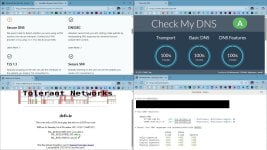
Screenshot 2025-11-01 113314.png
 
From my understanding they use ECS but in an anonymized way (don't ask me how they actually do this. Too technical for me also). Maybe that's why those test pages do not detect it as it was modified for privacy.

The setting in NextDNS clearly says it does use ECS:
View attachment 292568
Anonymized doesn't mean it's not visible/hidden, it just means that instead of using your exact IP or IP subnet it uses the ASN number of that region or something like that. I don't fully understand ASN number yet, but some details are present in the NextDNS article you gave above, as well as in this AdGuard article.
AdGuard took inspiration from NextDNS's approach and made some tweak of their own to further improve cache hit ratio.

My IP address starts with 103 while the ECS that I get from AdGuard starts with 203. Both IP belongs to my country, but they are not the same, hence still private to some extent. So when DNS is queried with the ECS IP subnet, the DNS server still knows that it's coming from my country and serve IPs for/closest to my location if available.
So the ECS shouldn't be hidden to a testing site as far as I understand. No issue while using AdGuard DNS on that site, who is doing almost exactly the same thing as NextDNS.

Besides, NextDNS has their own testing site,
You should see an ECS entry here if ECS is working for you. If you see, then the previous testing site has an issue.
Here's mine. No sign of ECS here.
2.png

The nice thing is, you can use this site to test ECS with any DNS provider.
Here's the same site with AdGuard DNS, and there we have ECS. You can test with Google DNS, Quad9 with ECS or anything else.
4.png

Another method that is given in the NextDNS article is by using DIG. This method is applicable to NextDNS only.
dig malwaretips.com CHAOS
I already have dig installed on my Windows. You will have to install it for testing. Here from the result we have another confirmation that ECS is not being sent when I am using NextDNS.
1.png

So you can try these methods to see it's actually working for you.
ECS not working for many users is a long known issue. It never ever worked for me.