New Update Brave Adds Protections Against GPU Fingerprinting

Parkinsond

Level 65
Thread author
Verified
Top Poster
Well-known
Dec 6, 2023
5,403
17,256
6,369
The latest version of the privacy-focused Brave web browser includes new protections against GPU and graphics driver fingerprinting.

“WebGL and WebGPU APIs expose detailed information about users’ graphics cards and drivers that tracking companies use for browser fingerprinting,” Brave vice president of privacy and security Shivan Kaul Sahib explains. “Brave now de-identifies the vendor and renderer strings these APIs report, and adds noise to the list of supported extensions to combat fingerprinting while preserving website functionality.”

Starting with Brave 1.93, these protections are being enabled by default in the desktop and Android versions of the browser, though they’re rolling out over the next several days.

 
Upon further investigation, I discovered that WebGPU Protection is already enabled in the stable release.

Here is the test that reveals this:

WebGPU adapter info test

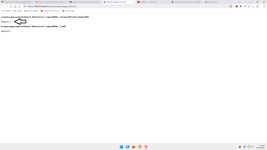
This is the value obtained without protection:

1.png

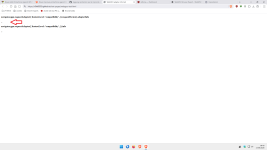
With Brave Protection:

2.png

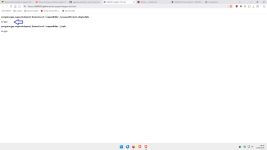
Here is the protection achieved in the Firefox style:

3.png

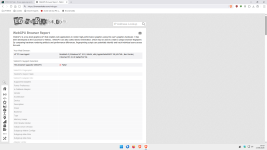
In the BrowserLeak GPU test, there is no change in the parameters whether Brave's protection is on or off:

WebGPU Browser Report - WebGPU Fingerprinting - WebGPU Test

So, in my opinion, even though all Brave browsers behave the same way,as demonstrated by the Browserleaks GPU test,the set of values that don't change when you reload the page or after closing and reopening the browser can still allow some websites to create an accurate digital fingerprint of your device.

I prefer Firefox-style protection, so I won't be testing WebGL protection.

If any forum users would like to test this protection, I'll be interested to hear about it.
Have a great day, everyone.:)
 
Last edited:
Upon further investigation, I discovered that WebGPU Protection is already enabled in the stable release.

Here is the test that reveals this:

WebGPU adapter info test

This is the value obtained without protection:

View attachment 299450

With Brave Protection:

View attachment 299451

Here is the protection achieved in the Firefox style:

View attachment 299452

In the BrowserLeak GPU test, there is no change in the parameters whether Brave's protection is on or off:

WebGPU Browser Report - WebGPU Fingerprinting - WebGPU Test

I prefer Firefox-style protection, so I won't be testing WebGL protection.

If any forum users would like to test this protection, I'll be interested to hear about it.
Have a great day, everyone.:)
It's like this in Firefox for me. Is this good or bad?

Screenshot_1.png
 
It's like this in Firefox for me. Is this good or bad?

View attachment 299453

If you run the GPU BrowserLeaks test and your values don't change when you reload the page or after closing and reopening the browser, you're still susceptible to fingerprinting.
I prefer to set WebGPU to “false.”

Firefox and Brave

4.png

Firefox:

about:config

Code:
dom.webgpu.enabled set to false
 
If you run the GPU BrowserLeaks test and your values don't change when you reload the page or after closing and reopening the browser, you're still susceptible to fingerprinting.
I prefer to set WebGPU to “false.”

Firefox and Brave

View attachment 299454

Firefox:

about:config

Code:
dom.webgpu.enabled set to false
It doesn't change for me, but that's alright. I prefer balanced privacy protection anyway. I feel like whenever we're talking about disabling some kind of web standard, we have to mention the side effects too. In this case, reduced performance and more power consumption especially on laptops.
 
It doesn't change for me, but that's alright. I prefer balanced privacy protection anyway. I feel like whenever we're talking about disabling some kind of web standard, we have to mention the side effects too. In this case, reduced performance and more power consumption especially on laptops.

Privacy is different from fingerprinting.
And I’m not convinced by “all Brave browsers have the same…” either.
You showed in the Brave test that Firefox browsers also all behave the same way.
So it’s an inconclusive test.

In any case, I always maintain that everyone can make whatever choices they want on their own PC.;)(y)
 
  • Like
Reactions: Parkinsond
Privacy is different from fingerprinting.
But the reason you want to get rid of fingerprinting is privacy, right?

The problem with fingerprinting in general is it's impossible to block. You may try to disable every web technology in existence, websites will still have a pretty good idea who you are. The only thing that will change is your ability to surf the web to worse. We already saw what Brave's aggressive fingerprinting does—gives you captcha on every site as server thinks you're a bot.
 
But the reason you want to get rid of fingerprinting is privacy, right?

The problem with fingerprinting in general is it's impossible to block. You may try to disable every web technology in existence, websites will still have a pretty good idea who you are. The only thing that will change is your ability to surf the web to worse. We already saw what Brave's aggressive fingerprinting does—gives you captcha on every site as server thinks you're a bot.

Yes, in fact, in my opinion, it’s necessary to reduce fingerprinting, especially when it comes to the techniques that some websites use most frequently.

Privacy protection, on the other hand, is certainly a more personal matter.
And it’s usually achieved through other means as well.

But let’s not get into philosophical discussions.;)
 
  • Like
Reactions: Parkinsond
But the reason you want to get rid of fingerprinting is privacy, right?

The problem with fingerprinting in general is it's impossible to block. You may try to disable every web technology in existence, websites will still have a pretty good idea who you are. The only thing that will change is your ability to surf the web to worse. We already saw what Brave's aggressive fingerprinting does—gives you captcha on every site as server thinks you're a bot.
That is why fingerprint protection should be website specific, like with Privacy Inspector. One specific website choses a few data points to track (returning) visitors. Reducing these data points can help to blurr your fingerprint a little. Although some websites react by for instance not showing pictures or playing movies when you block some fingerprint datapoints.

In other post I explained it in detail, only websites which you visit often but never log in to and whoose business is based on advertisements fingerprint protection is useful. Not because they can't identify you but because your interest profile is poluted (which makes serving ads less profitable, because conversion and click ratio's are low and advertisers don't want to pay for it)

The question is not can I browse incognito (no you can not) or is my browsing private (no that is also a lost battle), but can they create an accurate interest profile.
 
Last edited: