New Update Brave Adds Protections Against GPU Fingerprinting

Parkinsond

Level 66
Thread author
Verified
Top Poster
Well-known
Dec 6, 2023
5,557
17,721
6,469
The latest version of the privacy-focused Brave web browser includes new protections against GPU and graphics driver fingerprinting.

“WebGL and WebGPU APIs expose detailed information about users’ graphics cards and drivers that tracking companies use for browser fingerprinting,” Brave vice president of privacy and security Shivan Kaul Sahib explains. “Brave now de-identifies the vendor and renderer strings these APIs report, and adds noise to the list of supported extensions to combat fingerprinting while preserving website functionality.”

Starting with Brave 1.93, these protections are being enabled by default in the desktop and Android versions of the browser, though they’re rolling out over the next several days.

 
Upon further investigation, I discovered that WebGPU Protection is already enabled in the stable release.

Here is the test that reveals this:

WebGPU adapter info test

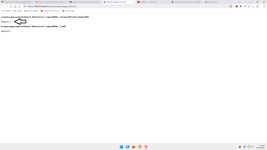
This is the value obtained without protection:

1.png

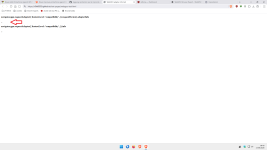
With Brave Protection:

2.png

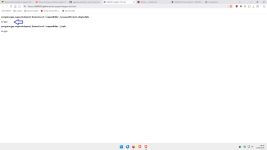
Here is the protection achieved in the Firefox style:

3.png

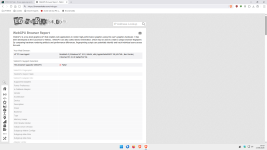
In the BrowserLeak GPU test, there is no change in the parameters whether Brave's protection is on or off:

WebGPU Browser Report - WebGPU Fingerprinting - WebGPU Test

So, in my opinion, even though all Brave browsers behave the same way,as demonstrated by the Browserleaks GPU test,the set of values that don't change when you reload the page or after closing and reopening the browser can still allow some websites to create an accurate digital fingerprint of your device.

I prefer Firefox-style protection, so I won't be testing WebGL protection.

If any forum users would like to test this protection, I'll be interested to hear about it.
Have a great day, everyone.:)
 
Last edited:
Upon further investigation, I discovered that WebGPU Protection is already enabled in the stable release.

Here is the test that reveals this:

WebGPU adapter info test

This is the value obtained without protection:

View attachment 299450

With Brave Protection:

View attachment 299451

Here is the protection achieved in the Firefox style:

View attachment 299452

In the BrowserLeak GPU test, there is no change in the parameters whether Brave's protection is on or off:

WebGPU Browser Report - WebGPU Fingerprinting - WebGPU Test

I prefer Firefox-style protection, so I won't be testing WebGL protection.

If any forum users would like to test this protection, I'll be interested to hear about it.
Have a great day, everyone.:)
It's like this in Firefox for me. Is this good or bad?

Screenshot_1.png
 
It's like this in Firefox for me. Is this good or bad?

View attachment 299453

If you run the GPU BrowserLeaks test and your values don't change when you reload the page or after closing and reopening the browser, you're still susceptible to fingerprinting.
I prefer to set WebGPU to “false.”

Firefox and Brave

4.png

Firefox:

about:config

Code:
dom.webgpu.enabled set to false
 
If you run the GPU BrowserLeaks test and your values don't change when you reload the page or after closing and reopening the browser, you're still susceptible to fingerprinting.
I prefer to set WebGPU to “false.”

Firefox and Brave

View attachment 299454

Firefox:

about:config

Code:
dom.webgpu.enabled set to false
It doesn't change for me, but that's alright. I prefer balanced privacy protection anyway. I feel like whenever we're talking about disabling some kind of web standard, we have to mention the side effects too. In this case, reduced performance and more power consumption especially on laptops.
 
It doesn't change for me, but that's alright. I prefer balanced privacy protection anyway. I feel like whenever we're talking about disabling some kind of web standard, we have to mention the side effects too. In this case, reduced performance and more power consumption especially on laptops.

Privacy is different from fingerprinting.
And I’m not convinced by “all Brave browsers have the same…” either.
You showed in the Brave test that Firefox browsers also all behave the same way.
So it’s an inconclusive test.

In any case, I always maintain that everyone can make whatever choices they want on their own PC.;)(y)
 
Privacy is different from fingerprinting.
But the reason you want to get rid of fingerprinting is privacy, right?

The problem with fingerprinting in general is it's impossible to block. You may try to disable every web technology in existence, websites will still have a pretty good idea who you are. The only thing that will change is your ability to surf the web to worse. We already saw what Brave's aggressive fingerprinting does—gives you captcha on every site as server thinks you're a bot.
 
But the reason you want to get rid of fingerprinting is privacy, right?

The problem with fingerprinting in general is it's impossible to block. You may try to disable every web technology in existence, websites will still have a pretty good idea who you are. The only thing that will change is your ability to surf the web to worse. We already saw what Brave's aggressive fingerprinting does—gives you captcha on every site as server thinks you're a bot.

Yes, in fact, in my opinion, it’s necessary to reduce fingerprinting, especially when it comes to the techniques that some websites use most frequently.

Privacy protection, on the other hand, is certainly a more personal matter.
And it’s usually achieved through other means as well.

But let’s not get into philosophical discussions.;)
 
But the reason you want to get rid of fingerprinting is privacy, right?

The problem with fingerprinting in general is it's impossible to block. You may try to disable every web technology in existence, websites will still have a pretty good idea who you are. The only thing that will change is your ability to surf the web to worse. We already saw what Brave's aggressive fingerprinting does—gives you captcha on every site as server thinks you're a bot.
That is why fingerprint protection should be website specific, like with Privacy Inspector. One specific website choses a few data points to track (returning) visitors. Reducing these data points can help to blurr your fingerprint a little. Although some websites react by for instance not showing pictures or playing movies when you block some fingerprint datapoints.

In other post I explained it in detail, only websites which you visit often but never log in to and whoose business is based on advertisements fingerprint protection is useful. Not because they can't identify you but because your interest profile is poluted (which makes serving ads less profitable, because conversion and click ratio's are low and advertisers don't want to pay for it)

The question is not can I browse incognito (no you can not) or is my browsing private (no that is also a lost battle), but can they create an accurate interest profile.
 
Last edited:
AliExpress, the online marketplace owned by Alibaba Group, has come under scrutiny after researchers and browser maker Brave reported finding silent Web Audio processing on the site that could help fingerprint visitors’ devices.
The audio processing did not record people through their microphones. Instead, it generated and processed an inaudible signal, then measured small, repeatable differences in the way a browser and device handled it.
Browser fingerprinting is a way for websites to identify devices and recognize returning visitors without relying on conventional cookies. It works by using information about a device and browser to create a unique signature.
The AliExpress website was found processing a fixed audio waveform and examining the resulting numerical values. Tiny differences can arise from the browser, operating system, CPU behavior, audio hardware, and drivers. When combined with other signals, they become another input that can contribute to a browser or device identifier.
Investigation of the page’s code reportedly found audio-processing graphs that were set to zero volume but remained connected to the system audio output. That explains why a user could hear nothing, and why muting a browser tab would not necessarily prevent the processing. All the relevant work was occurring within the Web Audio graph rather than through a conventional media player.
And audio measurements were only one part of the reported data collection. The scripts also gathered information tied to canvas rendering, WebGL, display settings, hardware configuration, WebRTC behavior and user interactions. Together, those signals can create a more detailed profile of a device than any one signal would provide on its own.
Fingerprinting can be used for legitimate purposes such as fraud prevention, bot detection, and risk assessment. It can help companies spot suspicious transactions or automated activity even when cookies have been deleted or accounts have changed. But it also raises privacy concerns because users may not know the tracking is happening and have limited control over it.
Earlier studies have shown that visitors’ choices about allowing cookies were ignored in more than half the cases studied. Fingerprinting adds another privacy concern because it can allow websites to recognize visitors without relying on cookies at all.
How to protect yourself
The alleged AliExpress implementation is a useful example of how modern tracking can be both silent and technically legitimate at the API level while still raising privacy concerns.
Brave says its browser blocks the AliExpress scripts responsible for the audio-based tracking. Other steps you can take include:
Use content blockers and anti-tracking extensions to limit the information websites can collect about your browser and device.
Keep your browser up to date since browser vendors continually change privacy defenses as fingerprinting methods evolve.
Use a separate browser or browser profile for shopping, ideally without signing in to other services in the same profile.
 
I wonder why they even bother with sneaky actions that make things look worse. I just checked, and my primary and secondary browsers already give me away through multiple paths (tested by AmIUnique). Only Tor made any dent against fingerprinting.
 
  • Like
Reactions: Khushal