It looks like it is. I haven’t tried it yet. Good catch.Is it this flag?
View attachment 298013


Open MalwareTips from your Home Screen or desktop. Follow discussions, find answers and pick up where you left off.
If you cannot find an install option, update your browser or use its bookmark option to keep MalwareTips close.
After installation, open the app and sign in. Enable push notifications in Preferences if you want alerts. On iPhone and iPad, push requires a Home Screen web app and iOS or iPadOS 16.4 or later.
Sign in to manage notificationsInstallation is optional. Your notification settings stay under your control.
 Thread starter
lokamoka820
Thread starter
lokamoka820
It looks like it is. I haven’t tried it yet. Good catch.Is it this flag?
View attachment 298013

Yes.Is it this flag?
View attachment 298013


I have the containers in the settings, but how do get the popup to choose? When I open a bookmark in a container it is not remembered

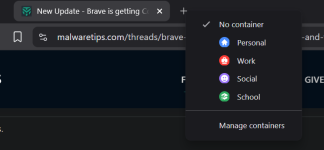
This is what Google AI said, as when I created a MT's link into a Personal container, it didn't open in that container when I went to this site from a different tab, I had to right-click the tab and "open in" the Personal container (which has a blue Personal icon, image below):I have the containers in the settings, but how do get the popup to choose? When I open a bookmark in a container it is not remembered
Currently, Brave does not automatically open specific websites in specific containers (often called auto-container rules). Brave's native container feature requires you to manually right-click an existing tab and select "Open in container". The reason the site is not logging in is that each container creates an isolated session. Your login cookies, which authenticate you on that website, are sitting in your default/main browsing session, not inside the new container tab.
Parts that are still Work-in-Progress (WIP):
Opening a container isn't as straightforward as it could be. To open a container, you must first have the website you want opened in a non-container tab, then you will right click that tab, then will you have the option to open the tab in a container. Different to Firefox where you can right click or press and hold the New Tab button and your container list would appear.
It's still very much a work in progress. I'm surprised they're aiming for wide rollout in v19.2 because it will still probably be unfinished with all the features they've targeted. It's just clunky the way it works, like it's not fully integrated into the browser.


The first should be fine. I always enable this in Chromium browsers. I'm not sure as to the second. I know that one doesn't hide IP adresses.Do you think activating the first two alongside Containers is a balanced approach for daily use?
I enable it same as the first one.how is the compatibility when blocking document.write in practice?


Thanks for the heads-up about the Containers flag! It's a great step for those of us looking for Firefox-style isolation without having to resort to multiple Chromium profiles.
Now that Enable Containers is available in the flags, I've been checking brave://flags to see what other options could complement it in terms of security. I'm thinking of combining it with these three:
Do you think activating the first two alongside Containers is a balanced approach for daily use? And how is the compatibility when blocking document.write in practice?
- Strict-Origin-Isolation: Reinforces process isolation by origin, adding hardware-level security.
- Anonymize local IPs exposed by WebRTC: Prevents local IP leaks via mDNS, useful for hiding network topology.
- Block scripts loaded via document.write: Blocks old and heavy scripts, although it might break legacy sites (government portals or payment gateways that still rely on this technique).
I'd love to know what you think! 🛡
Thanks for the info, @Sampei.Nihira . I was looking into WebRTC IP leaks in Brave and came across something that seems related.To remove the public IP exposed by WebRTC, you need to use a rule in uBo or the AG browser extension.
As for uBoL, I’m not sure if the script required for removal still works, since I haven’t tested it in a while.

Thanks for sharing these suggestions, LinuxFan58! I'm currently going through Brave's flags and your list came at the perfect time.@Halp2001 I also picked up below flags posted by various members
View attachment 298025
Enable below flags only when you have sufficient memory (e,g 16 GB RAM+)
View attachment 298026
Thanks for the info, @Sampei.Nihira . I was looking into WebRTC IP leaks in Brave and came across something that seems related.
In uBlock Origin, there are global rules like *$webrtc, but from what I've read they can be quite aggressive and may break video calling sites.
A more balanced option in Brave might be going to Settings → Privacy and security → "WebRTC IP handling policy" and setting it to "Disable non-proxied UDP". If I understand it correctly, this helps prevent WebRTC from bypassing a VPN connection, while Brave already hides local IP addresses through mDNS.
Up until now, I was using the WebRTC Protect extension, but it looks like Brave's native setting may provide similar protection. I'm still learning about this topic, though.
Which method do you use to check for WebRTC leaks or protect against them? I'd appreciate any advice.

Also interesting flag settings to harden and privatize Brave.I also picked up below flags posted by various members
but I see those are enabled by defaut now (you are probably an early adopter )Members who viewed this thread in the last 5 minutes