
New Update You can now block automatic extension updates in Brave Browser

lokamoka820

Level 46
Thread author
Verified
Top Poster
Well-known
Mar 1, 2024
3,552
3
12,067
4,469
Banana Republic
Most modern browsers install extension updates automatically. The developers claim that this improves security, and this is true to a degree. However, automatic extension updates do open a whole new can of worms, as problematic updates do get installed automatically as well.

Consider this: when an extension gets bought, the new owner may push updates and these will get installed on user systems, often without users knowing about the change in owner. The same is true for extensions that get hijacked or when a developer introduces features that are unwanted.

Firefox is the gold standard when it comes to controlling extensions. Users of the browser can block automatic updates for extensions entirely or for specific add-ons installed in the browser.

Chromium-based browsers do not have these native capabilities. The workaround until now was to install an extension through sideloading. These bypassed the entire updating mechanics, but it also meant that the browser might show a reminder that developer extensions are running.

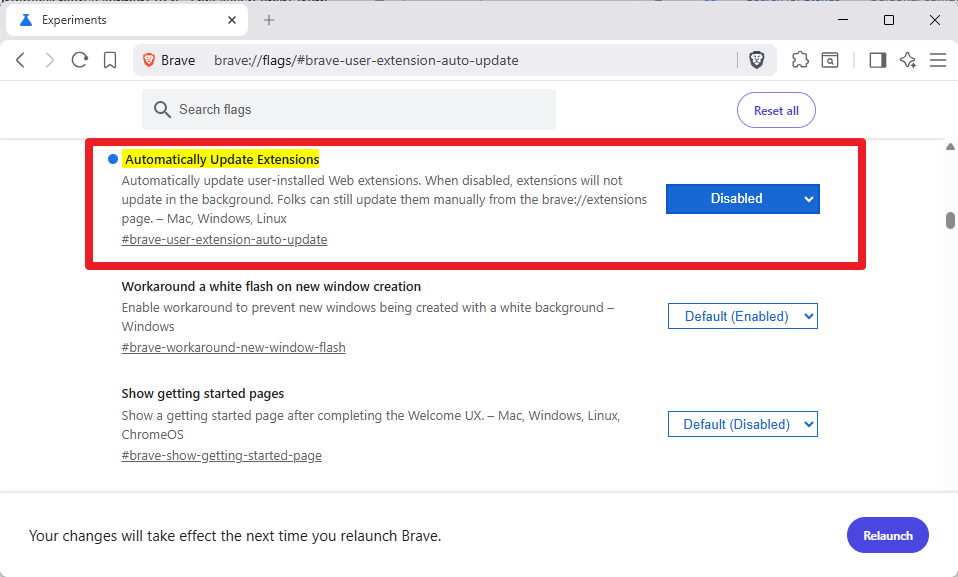
The most recent update of Brave Browser introduces native support to it. This sets it apart from other Chromium-based browsers, which do not offer this feature.
 
Extensions in Ungoogled Chromium don't get to update automatically. You need to do a manual update

The use of Chromium Web Store extension merely

- Allows installing extensions directly from chrome web store.
- Automatically checks for updates to your installed extensions and displays them on the badge.

As for Helium it updates extensions automatically
 
Last edited:
You may need extension like for a Password Manager.

Dark Reader extension is needed on Windows to display both MWT alert icons and other websites in dark mode.
The 2 main extensions I absolutely need to have, install on Brave. (besides the F-Secure browser extension)
 
Last edited:
Great news from Brave; giving that control to the user is a huge win for security.

Plus, anything that helps save us from installing extra extensions is always welcome. As a general tip for the dark mode here on MalwareTips: once we log into our member account, the forum enables the option to switch to dark mode directly in the style preferences. It's perfect for browsing at night natively without relying on third-party extensions. 🦁🌑
 
Great news from Brave; giving that control to the user is a huge win for security.

Plus, anything that helps save us from installing extra extensions is always welcome. As a general tip for the dark mode here on MalwareTips: once we log into our member account, the forum enables the option to switch to dark mode directly in the style preferences. It's perfect for browsing at night natively without relying on third-party extensions. 🦁🌑
Yep, but what about the other websites I visit daily, this is where Dark Reader is a very nice extension, with its settings and all :)
 
  • Like
Reactions: Halp2001
Yep, but what about the other websites I visit daily, this is where Dark Reader is a very nice extension, with its settings and all :)
That's a very fair point, @Jonny Quest! For all other websites, if you want to keep the browser extension-free, you can always use the built-in Chromium flag: chrome://flags/#enable-force-dark. Setting it to "Enabled" forces a native dark mode on every site you visit. It's super snappy and saves you from running background extensions! 🧭⚡
 
That's a very fair point, @Jonny Quest! For all other websites, if you want to keep the browser extension-free, you can always use the built-in Chromium flag: chrome://flags/#enable-force-dark. Setting it to "Enabled" forces a native dark mode on every site you visit. It's super snappy and saves you from running background extensions! 🧭⚡
Good to know! And just in case anyone wants to give it a try but is worried about how it looks, reverting it is just as easy.

You only need to go back to chrome://flags (or brave://flags), search for "Dark Mode" again, and switch the option from "Enabled" back to "Default". One quick restart of the browser and everything returns to its traditional look. Always nice to have a native alternative! 🧭👍
 

You may also like...