


Most modern browsers install extension updates automatically. The developers claim that this improves security, and this is true to a degree. However, automatic extension updates do open a whole new can of worms, as problematic updates do get installed automatically as well.
Consider this: when an extension gets bought, the new owner may push updates and these will get installed on user systems, often without users knowing about the change in owner. The same is true for extensions that get hijacked or when a developer introduces features that are unwanted.
Firefox is the gold standard when it comes to controlling extensions. Users of the browser can block automatic updates for extensions entirely or for specific add-ons installed in the browser.
Chromium-based browsers do not have these native capabilities. The workaround until now was to install an extension through sideloading. These bypassed the entire updating mechanics, but it also meant that the browser might show a reminder that developer extensions are running.
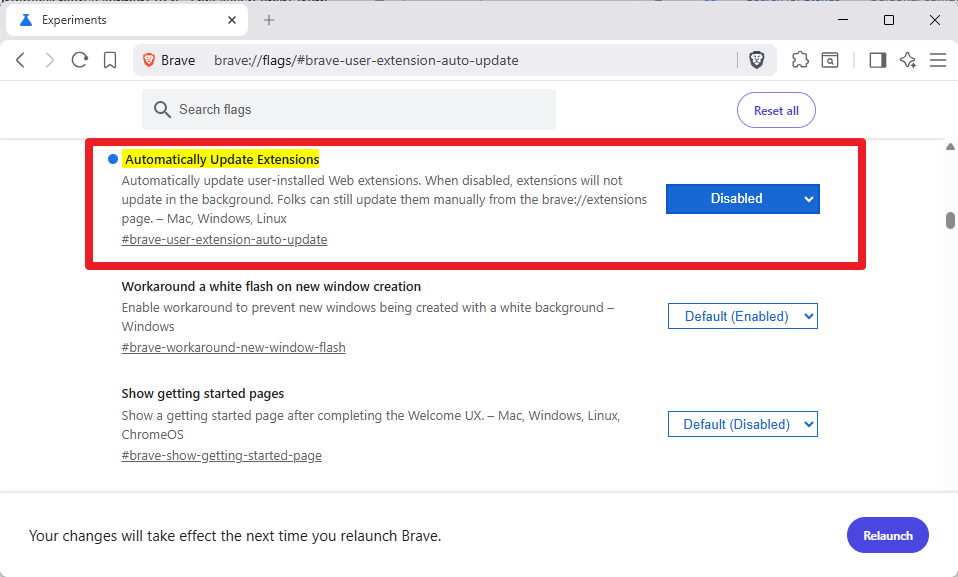
The most recent update of Brave Browser introduces native support to it. This sets it apart from other Chromium-based browsers, which do not offer this feature.
You can now block automatic extension updates in Brave Browser - Chipp.in Tech News and Reviews
Most modern browsers install extension updates automatically. The developers claim that this improves security, and this is true to a degree. However, automatic extension updates...
 chipp.in


