Solved Browser opening by itself alternating between 2 malicious web page (FRST.txt and Addition.txt included)

Funny thing is that I recognize that domain. It's a domain that gives tutorials for rooting and flashing android devices.

My question still stands, once Malwarebytes expires do you think the web page will open on itself again?
 
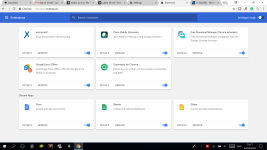
These are my Chrome extensions. Also, I got another block notification from Malwarebytes today with yet another website.
 

Attachments

  • Extension.png
    Extension.png
    282.9 KB · Views: 13
Will do. On a side note, Malwarebytes gave me a shocking 22 web page blocks on 24th of April and 9 web page blocks on 25th of April. All of them from the same website with different ports. This is frustrating.
 
Sorry for double post, I've deactivated all my extensions (not removed, just deactivated) but Malwarebytes just gave me another web page blocks.
 
Is it happening only in one browser?


FRST.gif
Scan with Farbar Recovery Scan Tool

Please re-run Farbar Recovery Scan Tool to give me a fresh look at your system.
  • Right-click on
    FRST.gif
    icon and select
    RunAsAdmin.jpg
    Run as Administrator to start the tool.
    (XP users click run after receipt of Windows Security Warning - Open File).
  • Make sure that Addition.txt option is checked.

    2873ryc.png

  • Press Scan button and wait.
  • The tool will produce two logfiles on your desktop: FRST.txt and Addition.txt.
Please attach report into your next reply.
 
I think it's only happening in Chrome because I had it set as the default browser. Sorry for the late reply, but I've been waiting for the web pages to pop up but there wasn't any despite of the blocks from Malwarebyte. Thank you so much, I think my problem is solved.
 

Recently browsing

Members who viewed this thread in the last 5 minutes

Back
Top