
Solved Can not remove xscBrwse 3.5.7 Chrome Extension from Birch Grove Software

austinz

New Member
Thread author
Apr 12, 2015
6
0
3
37
around 4/8/15 i believe. I had noticed some malware, ran malwarebytes and AVG Tuneups and it removed some programs that I believe were bundled with an Adobe program that I noticed downloaded when a website was visited (not sure what site) . Anyway I was able to remove everything except this one chrome extension. I have tried everything including running the two recommenced programs from this forum. I reinstalled chrome, wipped my chrome account , and no matter what this extension remains. Now when I run malwarebytes it picks the file up in UserData ->Google-> in a folder that keeps coming back.

There is another closed thread on this case.
The file that Malwarebytes Anti-Malware is picking up from Vendor

PUP.Optional.XscBrwse.A all from todays date. (after removal , it comes back) 4/12/15

One File , and several folders
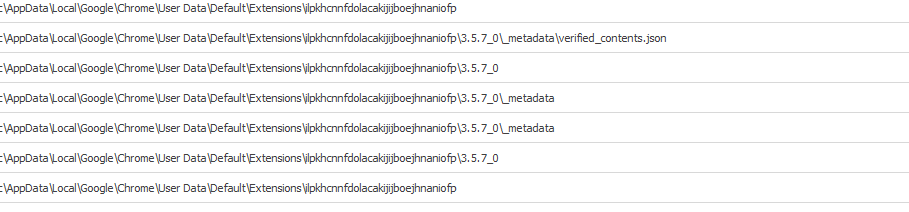
cd6d7b0dc968308a8f31c8ae15d95f11.png


C:\users\....\AppData
 

Attachments

Also tried Zoek and Farbar:
createsrpoint;
autoclean;
emptyalltemp;
ipconfig /flushdns;b
 
Hello,

Re-run zoek and run this script:

Code:
ilpkhcnnfdolacakijijboejhnaniofp;chr
lmjegmlicamnimmfhcmpkclmigmmcbeh;chr
createsrpoint;
autoclean;
emptyalltemp;
emptyfolderscheck;delete
 
Please close thread, problem fixed. I downloaded ActivTrak then removed software. Then shreded that file. Is there anything else I should do. It deleted the extension.

Thanks
 
Okay.

ilpkhcnnfdolacakijijboejhnaniofp;chr > It is a problem of extension

xscBrwse - csgomartpc\AppData\Local\Google\Chrome\User Data\Default\Extensions\ilpkhcnnfdolacakijijboejhnaniofp


Download DelFix by Xplode and save it to your desktop.
  • Run the tool by right click on the
    51a5ce45263de-delfix.png
    icon and Run as administrator option.
  • Make sure that these ones are checked:
    • Remove disinfection tools
    • Purge system restore
    • Reset system settings
  • Push Run and wait until the tool completes his work.
  • All tools we used should be gone. Tool will create an report for you (C:\DelFix.txt)
The tool will also record healthy state of registry and make a backup using ERUNT program in %windir%\ERUNT\DelFix
Tool deletes old system restore points and create a fresh system restore point after cleaning.
 
Last edited:
