Can't remove Adware:Win32/UnfriendChecker and BetterSurf

Thank you. In progress now, will post results.

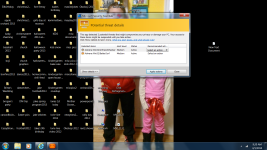
Also, here is a screen shot of the issue.
 

Attachments

  • pic.png
    pic.png
    719.8 KB · Views: 88
Last edited:
Download attached fixlist.txt on the same location as FRST (otherwise the fix won't work)

Open FRST, and click Fix. Attach me that report after it is finished.


Please download AdwCleaner by Xplode and save to your Desktop.

Double click on AdwCleaner.exe to run the tool.
  • Click on the Scan button.
  • After the scan has finished click on the Clean button.

Press OK when asked to close all programs and follow the onscreen prompts.
Press OK again to allow AdwCleaner to restart the computer and complete the removal process.

  • After rebooting, a logfile report (AdwCleaner[S0].txt) will open automatically.
  • Post logfile will also be saved in the C:\AdwCleaner folder.
 

Attachments

  • Like
Reactions: Jesse Cervene
Download attached fixlist.txt on the same location as FRST (otherwise the fix won't work)

Open FRST, and click Fix. Attach me that report after it is finished.


Please download AdwCleaner by Xplode and save to your Desktop.

Double click on AdwCleaner.exe to run the tool.
  • Click on the Scan button.
  • After the scan has finished click on the Clean button.

Press OK when asked to close all programs and follow the onscreen prompts.
Press OK again to allow AdwCleaner to restart the computer and complete the removal process.

  • After rebooting, a logfile report (AdwCleaner[S0].txt) will open automatically.
  • Post logfile will also be saved in the C:\AdwCleaner folder.
Oops, try these. Disregard. I misunderstood. Trying now.
 

Attachments

Please download zoek.zip or zoek.rar by smeenk (
Zoek_icon.png
) from here or here and save it to your Desktop.
Unpack the archive...
  • Close any open browsers
  • Temporarily disable your AntiVirus program. (If necessary)
    If you are unsure how to do this please read this or this Instruction.
  • Double click on zoek.exe to run the tool .
    Please wait while the tool does not start...
  • Copy the text present inside the code box below and paste it into the large window in the zoek tool:

    Code:
    createsrpoint; 
    StandardSearch; 
    emptyfolderscheck; 
    installer-list; 
    installedprogs; 
    uninstall-list;
  • Click on
    Run%20Script%20by%20zoek.png
    button.
    Please wait until a logreport will open (this can be after reboot)
  • Save notepad to your Desktop and attach here zoek-results.log
    Note: It will also create a log in the C:\ directory named "zoek-results.log"
 
  • Like
Reactions: Jesse Cervene
I decided to try and remove both using the MSE option to remove so far so good. If it pops up again I will proceed to your next recommended step and post the results as asked.

I just wanted to take a moment to say thank you. Hopefully I won't be back for awhile :)