

This is my current Laptop security config for 2021
At-Risk carl fish security config 2021
- Thread starter carl fish
- Start date
You are using an out of date browser. It may not display this or other websites correctly.
You should upgrade or use an alternative browser.
You should upgrade or use an alternative browser.
- Last updated
- Dec 12, 2021
- How it's used?
- For home and private use
- Operating system
- macOS 15 Sequoia
- On-device encryption
- Log-in security
- Security updates
- Allow security updates and latest features
- User Access Control
- Always notify
- Smart App Control
- Network firewall
- Real-time security
- Trend Micro Maximum security
voodooshield pro 6.82 Beta
- Firewall security
- About custom security
- Enabled Core Isolation
enabled Force randomization for images mandatory (ASLR)
- Periodic malware scanners
- Malwarebytes latest version
- Malware sample testing
- I do not participate in malware testing
- Browser(s) and extensions
- Microsoft Edge
Firefox
added ad gard
- Secure DNS
- express vpn
- Desktop VPN
- express vpn
- Password manager
- Last Pass
- Maintenance tools
- Cleaner
- File and Photo backup
- external hard drive
macrium reflect 8 home
- System recovery
- external hard drive
macrium reflect 8 home
- Risk factors
- Browsing to popular websites
- Opening email attachments
- Buying from online stores, entering banks card details
- Logging into my bank account
- Sharing and receiving files and torrents
- Streaming audio/video content from trusted sites or paid subscriptions
- Computer specs
- HP Notebook - 15-db1006ax
Windows 10 Pro 64-bit Version: 19043.1023
AMD Ryzen 3 3200U with Radeon Vega Mobile Gfx
8GB Hynix 2400MHz
AMD Radeon(TM) 530 series, AMD Radeon(TM) Vega 3 Graphics
- Notable changes
- Enabled Core Isolation
enabled Force randomization for images mandatory (ASLR)
Firefox latest and ad block plus
installed windows 11 latest build
Enabled these optional features:
hyper v
Guarded host
Microsoft defender application guard
Windows sandbox
Trend Micro Maximum security
voodooshield pro 6.82 Beta
removed hit man pro
removed ad block plus for adgard
- What I'm looking for?
Looking for maximum feedback.


- Apr 28, 2015
- 9,398
- 1
- 84,824
- 8,389
In Personal Files & Photos backup, You may also use cloud services...
And in Device recovery & backup, You should use full backup system image solution, such as Macrium Reflect or AOEMI BackUpper...
Thanks for sharing
And in Device recovery & backup, You should use full backup system image solution, such as Macrium Reflect or AOEMI BackUpper...
Thanks for sharing
F
ForgottenSeer 85179
So you use ISP DNS right?DNS:
none
If your VPN is always-on, it may already have a secure DNS configured at the network adapter level.
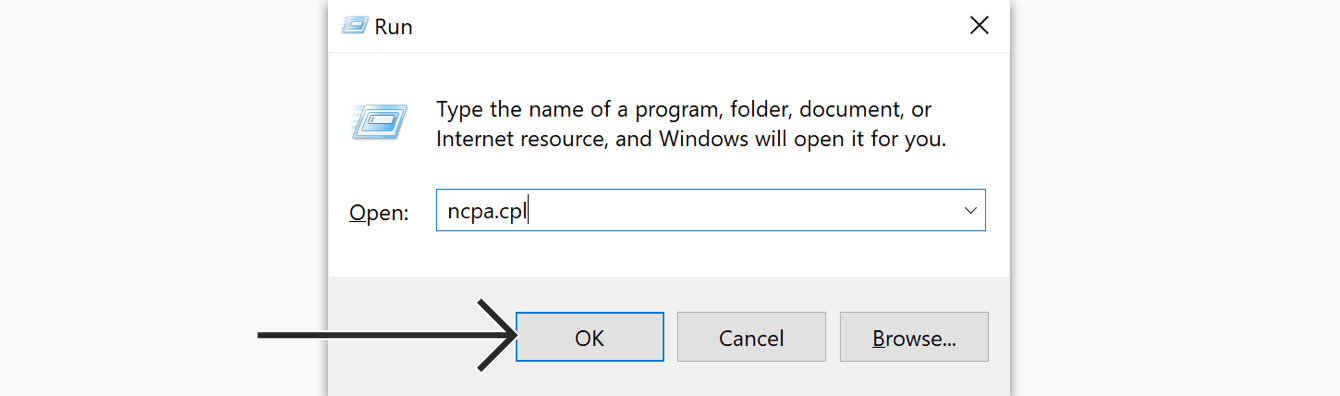
 www.expressvpn.com
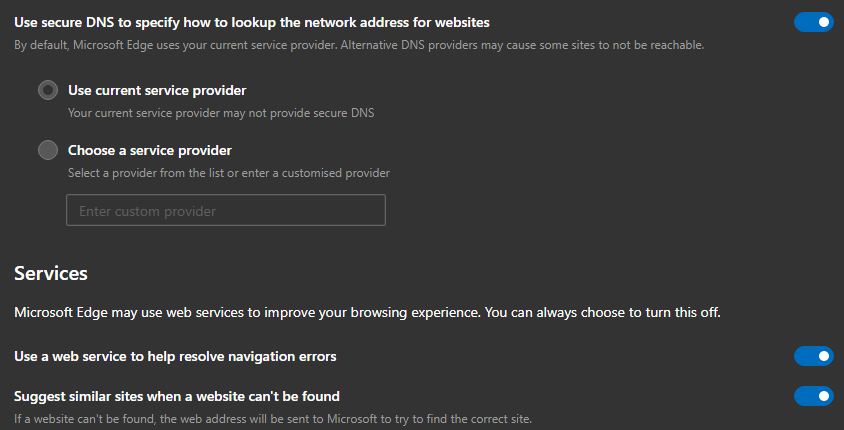
Alternatively, Microsoft Edge can change your browser's DNS settings. Go to Edge Settings > Privacy > Secure DNS > Choose a service provider.
How to Change DNS Settings On Windows | ExpressVPN
Learn how to change the DNS settings on your Windows device.
www.expressvpn.com
Alternatively, Microsoft Edge can change your browser's DNS settings. Go to Edge Settings > Privacy > Secure DNS > Choose a service provider.

I would use NextDNS instead of express VPN. This way you don't even need Norton safe web extension.
You get the safe web browsing, less attack surface and incredible browsing speed without ads.
You get the safe web browsing, less attack surface and incredible browsing speed without ads.
I just installed windows 11 latest build on my laptop is there anything else I add in terms of security?
F
ForgottenSeer 85179
take a look at beerisgood/Windows10_HardeningI just installed windows 11 latest build on my laptop is there anything else I add in terms of security?
It's still for Windows 10 but 11 is based on 10 and no new stuff is released yet.
is adding WiseVector StopX or Crystal Security to my setup on top of Norton and vs pro overkill, which av engines does wise vector use looks like 360 security to me?

- Aug 17, 2014
- 12,743
- 123,908
- 8,399
is adding WiseVector StopX or Crystal Security to my setup on top of Norton and vs pro overkill, which av engines does wise vector use looks like 360 security to me?
Norton together with VoodooShield is really more than enough protection!
WiseVector offers very good protection overall, but it's redundant if you will keep Norton as your AV.
Crystal Security looks like on inactive development:
Source: Crystal SecurityFebruary 23rd, 2019
Crystal Security 3.7.0.40 - What's new
- Updated File Handling System.
Crystal Security looks like on inactive development you are right not updated since 2019
Is Crystal Security the only software apart from secure a plus to virus total in the cloud?
Its a shame that crystal security isn't updated anymore
Its a shame that crystal security isn't updated anymore
Last edited:
G
Guilhermesene
Good configuration and you gave me an idea but also a question. I was reading the tip from members here in the community and I was in doubt, which would be better: ESET + NextDNS or Norton + NextDNS?
For dns i would say next dns and for antivirus Norton for me is good apart from when it's fixing items sometimes it will only give you the option of rescan or exclude
It is also based on personal preference eset would be powerful better detection bult in hips etc
It is also based on personal preference eset would be powerful better detection bult in hips etc
Last edited:
Hi everyone I have changed back to Kaspersky internet security, I was using Norton for a little while but I like Kaspersky more.
Last edited:
Is there anything else I should add, I have set kaspersky to untrusted for unknown program's along with vs installed
- Apr 28, 2015
- 9,398
- 1
- 84,824
- 8,389
You can also un tick: Trust in digitally signed apps, but this will lead to block (moved to Untrusted) some legit apps which are unsigned... that's it how I have mine
But probably no need if also running VS...
But probably no need if also running VS...
I have done that as wellYou can also un tick: Trust in digitally signed apps, but this will lead to block (moved to Untrusted) some legit apps which are unsigned... that's it how I have mine
But probably no need if also running VS...
Are there any group policies I should add to protect my system?

yes I like it a lot more than comodo and it works great with Kaspersky's application control
Last edited:
You may also like...
-
 On Sale! Windows 11 Home OEM + Office 2021 Pro Plus OEM Bundle €23.80
- Started by Brownie2019
- Replies: 4
-
 Advanced Plus Security Devjit’s Gaming PC 2026
- Started by devjitdutta2025
- Replies: 44
-
 App Review The biggest risk with Windows: LOLBINS
- Started by monkeylove
- Replies: 227
-
 Advanced Plus Security Divine_Barakah's Second Laptop Security Config
- Started by Divine_Barakah
- Replies: 93
-
 Advanced Security tharunnamboothiri Personal DELL Laptop config
- Started by tharunnamboothiri
- Replies: 14