Solved Chrome redirect websites and some ads appear unexpectedly

aminjba

New Member
Hi
this Maleware drives me crazy. it redirects websites to some other pages and some ads appear unexpectedly.
i have done lots of scans as i described. i am really need your help
i have uploaded your requested files
my adwcleaner scan did not found any issues.
thanks
 

Attachments

Hello,


51a612a8b27e2-Zoek.png
Scan with ZOEK

Please download ZOEK by Smeenk and save it to your desktop.
Temporary disable your AntiVirus and AntiSpyware protection - instructions here.

  • Right-click on
    51a612a8b27e2-Zoek.png
    icon and select
    RunAsAdmin.jpg
    Run as Administrator to start the tool.
  • Wait patiently until the main console will appear, it may take a minute or two.
  • In the main box please paste in the following script:
    Code:
    createsrpoint;
    autoclean;
    emptyclsid;
    emptyalltemp;
    ipconfig /flushdns >>"%temp%\log.txt";b
  • Make sure that Scan All Users option is checked.
  • Push Run Script and wait patiently. The scan may take a couple of minutes.
  • When the scan completes, a zoek-results logfile should open in notepad.
  • If a reboot is needed, it will be opened after it. You may also find it at your main drive (usually C:\ drive)

Upload it in your next reply.
 
hi. as i supposed ,the maleware is back. i think i could remove it again with your given instruction above but i think it is tepmrorary.is there any permanent solution?
 
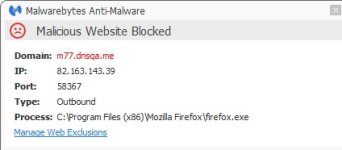
Yes, It happens in all browsers.I tested Mozila and IE, too. ads appear in both of them.MalewareBytes block IE and Mozila from accessing these sites. i have attached the malware byte warning while blocking.zemana and malewarebyte log attached too.

previous week i found that windows 8 shows my Chrome, Mozila and IE as new program installed recently by highlighting them( after pressing start button in keyboard and moving through the application ).I reinstall Chrome twice. Maybe it helps.
 

Attachments

In fact maleware byte does not find any threat.
Zemana just find a bad shortcut for chrome and a bad setting for chrome. with my little knowledge, these were not trojan or maleware and they have been noted in zemana log.
this maleware has came back with full power and redirects most of my websites and shows ads.
any help will be appreciated
 
FRST.gif
Scan with Farbar Recovery Scan Tool

Please re-run Farbar Recovery Scan Tool to give me a fresh look at your system.
  • Right-click on
    FRST.gif
    icon and select
    RunAsAdmin.jpg
    Run as Administrator to start the tool.
    (XP users click run after receipt of Windows Security Warning - Open File).
  • Make sure that Addition.txt option is checked.

    2873ryc.png

  • Press Scan button and wait.
  • The tool will produce two logfiles on your desktop: FRST.txt and Addition.txt.
Please attach report into your next reply.
 
FRST.gif
Fix with Farbar Recovery Scan Tool

icon_exclaim.gif
This fix was created for this user for use on that particular machine.
icon_exclaim.gif

icon_exclaim.gif
Running it on another one may cause damage and render the system unstable.
icon_exclaim.gif
​

Download attached fixlist.txt file and save it to the Desktop:

Both files, FRST and fixlist.txt have to be in the same location or the fix will not work!

  • Right-click on
    FRST.gif
    icon and select
    RunAsAdmin.jpg
    Run as Administrator to start the tool.
    (XP users click run after receipt of Windows Security Warning - Open File).
  • Press the Fix button just once and wait.
  • If for some reason the tool needs a restart, please make sure you let the system restart normally. After that let the tool complete its run.
  • When finished FRST will generate a log on the Desktop, called Fixlog.txt.

Please attach it to your reply.
 

Attachments

Recently browsing

Members who viewed this thread in the last 5 minutes

Back
Top