Chrome using CPU when uninstalled

RaZKaLz

New Member
Thread author
May 12, 2018
3
0
1
Canada
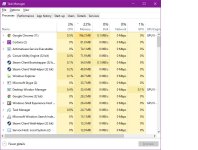
Hi I just noticed that my chrome is using over 50% of my CPU. I closed it and it was still the task manager. I uninstalled it and it still doing it. I tried to see if it wasn't doing it without internet and it wasn't doing it. While reading FRST & Addition i noticed that chrome was wrong and I found the folder gportable and deleted it but it came back.
 

Attachments

What could be the problem though? Could it be a miner and I dont know about it or it would have detected it? Someone here earlier gave me a link about the reporter tools of google could it be that even though it is uninstalled?
 
I noticed that the process start around 6:30PM EST and doesn't stop until i close my pc. Even if I restart it still does it. Though if I close 1 of the process instead of the 2, the one using a lot of my CPU, and let the other one that use 0% the other process doesn't appear again. It's really confusing, I even made a post on the official chrome forums to see if something can be done, otherwise I will just format and be done with this lol.

PS: It's around 10pm EST and it's not doing it at the moment. Though even if i close the one using 0% it keeps coming back but it's not using anything.process 2.jpg
 
FRST.gif
Scan with Farbar Recovery Scan Tool

Please re-run Farbar Recovery Scan Tool to give me a fresh look at your system.
  • Right-click on
    FRST.gif
    icon and select
    RunAsAdmin.jpg
    Run as Administrator to start the tool.
    (XP users click run after receipt of Windows Security Warning - Open File).
  • Make sure that Addition.txt option is checked.

    2873ryc.png

  • Press Scan button and wait.
  • The tool will produce two logfiles on your desktop: FRST.txt and Addition.txt.
Please attach report into your next reply.