
Open MalwareTips from your Home Screen or desktop. Follow discussions, find answers and pick up where you left off.
If you cannot find an install option, update your browser or use its bookmark option to keep MalwareTips close.
After installation, open the app and sign in. Enable push notifications in Preferences if you want alerts. On iPhone and iPad, push requires a Home Screen web app and iOS or iPadOS 16.4 or later.
Sign in to manage notificationsInstallation is optional. Your notification settings stay under your control.
I get same results in Firefox as you get in Edge. I suggest you leave it as is as blocking random browser APIs could make some websites unusable for you. You won't gain anything extra on privacy, but could slow down some websites that heavy rely on API.Why not good?
Should not to pass the test to get "request blocked"!
I get same results in Firefox as you get in Edge. I suggest you leave it as is as blocking random browser APIs could make some websites unusable for you. You won't gain anything extra on privacy, but could slow down some websites that heavy rely on API.
From what I understand, beacon API just sends minimal information to developers of the website once user leaves it. Example: I'm on MT and beacon API would allow Jack to see how long I'm here, did I encounter any errors and such. Nothing privacy groundbreaking.It is not good for privacy to have the Beacon API sending clicks on the links you visit, as is also the case with Ping.
Instead, browsers block third-party CSP reports by default (without the need for any extensions).
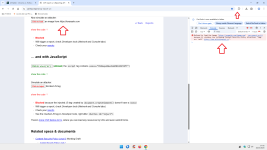
View attachment 292082
Result when Block CSP reports is disabledIt is not good for privacy to have the Beacon API sending clicks on the links you visit, as is also the case with Ping.
Instead, browsers block third-party CSP reports by default (without the need for any extensions).
View attachment 292082
Which one should be disabled to avoid decreased website performance?Even if you disable beacon API, website will obtain the same information by other, slower means, which could sometimes decrease performance of the websites. Keep that in mind.
Beacon API.
From what I understand, beacon API just sends minimal information to developers of the website once user leaves it. Example: I'm on MT and beacon API would allow Jack to see how long I'm here, did I encounter any errors and such. Nothing privacy groundbreaking.
Even if you disable beacon API, website will obtain the same information by other, slower means, which could sometimes decrease performance of the websites. Keep that in mind.
I'm sorry, but I'm struggling to see why are you allowing CSP reports and blocking beacon API. Both functionalities don't really benefit you and are exclusively used by website developer for gathering information and setting set of rules for the website.
I do not even know what you are talking about guys, it is above my paygrade, but you are right, as long as it works for you, great.I block Ping, Beacon but not CSP reports.
Anyway, I repeat, everyone does what they want on their own PC.
You continue to do what you think is right.
No such option in uBO settings!Beacon API.
Well, because it's the default option in uBO and it never caused me any issues that would make me disable it.I'm sorry, but I don't understand why you block first-party CSPs.
I've already explained that third-party CSPs are blocked by the browser itself.
We're even, aren't we?
My wife is calling me for dinner. I'll read your reply tomorrow afternoon.
Have a nice day.![]()
You're supposed to enable/disable it in browser settings. I don't know for Chromium, but in Firefox you're going to about:config and enabling/disabling beacons there.No such option in uBO settings!
Settings of Edge do not have one; and flags are untouched.Well, because it's the default option in uBO and it never caused me any issues that would make me disable it.
You're supposed to enable/disable it in browser settings. I don't know for Chromium, but in Firefox you're going to about:config and enabling/disabling beacons there.
Just use uBO.Settings of Edge do not have one; and flags are untouched
I do; the regular version, not the lite one.Just use uBO.
Well, because it's the default option in uBO and it never caused me any issues that would make me disable it.
You're supposed to enable/disable it in browser settings. I don't know for Chromium, but in Firefox you're going to about:config and enabling/disabling beacons there.
Members who viewed this thread in the last 5 minutes