

The MalwareTips app
Your community, one tap away.
Open MalwareTips from your Home Screen or desktop. Follow discussions, find answers and pick up where you left off.
- Home Screen access
- Optional push alerts
- Your community
You're ready to explore.Explore what's new
Installation instructions
iPhone & iPad
- Open MalwareTips in Safari and tap Share. You may need to open the Page Menu first.
- Choose Add to Home Screen. If it is not listed, use Edit Actions to add it.
- Keep Open as Web App enabled if shown, then tap Add.
Android
- Open MalwareTips in Chrome or another browser that supports app installation.
- Open the browser menu and look for Install app, Install and create shortcut, or Add to Home screen.
- Choose Install and confirm. Wording varies by browser.
Desktop
- Chrome: use the install icon in the address bar, or the menu under Cast, save and share.
- Edge: open the menu, then More tools, Apps and Install this site as an app.
- Safari on Mac: choose Share or File, then Add to Dock. Firefox on Windows: look for the web apps button in the address bar.
If you cannot find an install option, update your browser or use its bookmark option to keep MalwareTips close.
Keep up with your conversations
After installation, open the app and sign in. Enable push notifications in Preferences if you want alerts. On iPhone and iPad, push requires a Home Screen web app and iOS or iPadOS 16.4 or later.
Sign in to manage notificationsInstallation is optional. Your notification settings stay under your control.
You are using an out of date browser. It may not display this or other websites correctly.
You should upgrade or use an alternative browser.
You should upgrade or use an alternative browser.
Comparison Chrome vs. Firefox vs. Edge in 2026 — Which Browser Should Home Users Trust?
-
 Thread starter
Bot
Thread starter
Bot
- Start date
- 311 Replies
- 48,179 Views
Thread details
- Products to compare
- Chrome vs. Firefox vs. Edge in 2026
- Platform(s)
- Any platform
- Any platform


It is uBO, not Librewolf.
However, AG uses 350-500+ MB RAM and considerable CPU fraction, while uBO uses 80-100 MB RAM (the lite version only 30-40 MB RAM only when scrolling) and minimal CPU utilization.AG no longer has a custom rule for CSP blocking
However, AG lists are more optimized than that of uBO; so I use uBO with AG and Easylist lists.

Alright. Can you explain to me as a user why should I enable CSP reports? How do I benefit from it? Thanks!
I already pointed this out in the test I brought to your attention in this thread because first-party CSP need to be allowed.
Read this and you'll be convinced:
Blocking CSP report · Issue #2452 · AdguardTeam/AdguardBrowserExtension
You don't have any security/privacy policies.I always block csp reports, ping and beacon using latest edge 141.0.3537.85 on windows 11 24h2 iot ltsc, with UBO and custom filters, if CSP not enabled in extension csp reports failed on pingspotter, this is why i always block-it.
View attachment 292103View attachment 292104
If you haven't implemented them with Command Line Switches, you have less protection than I do using Chrome.
Check a few pages back to see if your sandbox level is correct compared to mine.

But can you tell me why CSP reports need to be allowed? What's in it for me?I already pointed this out in the test I brought to your attention in this thread because first-party CSP need to be allowed.
Read this and you'll be convinced:
Blocking CSP report · Issue #2452 · AdguardTeam/AdguardBrowserExtension
No hard feelings, I still can't understand why are you allowing CSP reports (doesn't matter to which party), when you have beacons API disabled. Both technologies are used by website developers to gather information on how website behaves to a user and user doesn't gain anything from these being enabled/disabled. It's purely a tool for developers only, not for you as a user.
I read the link you posted and I still don't understand what's in it for me, what benefits do I get from enabling/disabling those APIs. The link only mentiones that someone requested AdGuard to block CSP reports, and nothing else. It doesn't explain anything really.
Last edited:
But can you tell me why CSP reports need to be allowed? What's in it for me?
No hard feelings, I still can't understand why are you allowing CSP reports (doesn't matter to which party), when you have beacons API disabled. Both technologies are used by website developers to gather information on how website behaves to a user and user doesn't gain anything from these being enabled/disabled. It's purely a tool for developers only, not for you as a user.
I read the link you posted and I still don't understand what's in it for me, what benefits do I get from enabling/disabling those APIs. The link only mentiones that someone requested AdGuard to block CSP reports, and nothing else. It doesn't explain anything really.
Why are you blocking Ping?
You don't block first-party cookies on your browser, but I hope you block third-party cookies.
No hard feelings, but I have to go to lunch now.
This argument is boring me...
Because browser blocks it by default for me. I never adjusted any setting that would specifically disable ping. Doing so also didn't break anything for me so I never had desire to allow it. In fact, I had no idea ping was blocked by Firefox.Why are you blocking Ping?
If something is blocked by web browser developers, then it's probably blocked for a good reason.
Nope, I allow first-party cookies, but they are deleted as I close the browser (except for sites that are on my exceptions list). I use Firefox ETP set to Strict meaning third-party cookies are enabled but isolated (so they can't track me across the web).You don't block first-party cookies on your browser, but I hope you block third-party cookies.
I am now testing blocking all cross-site cookies to see how many websites will be broken.
Bon Appétit!No hard feelings, but I have to go to lunch now.
This argument is boring me...
Argument? What argument? We're just discussing, not arguing...

A tour in Comodo threads redefines "argument"Argument? What argument? We're just discussing, not arguing

Because browser blocks it by default for me. I never adjusted any setting that would specifically disable ping. Doing so also didn't break anything for me so I never had desire to allow it. In fact, I had no idea ping was blocked by Firefox.
If something is blocked by web browser developers, then it's probably blocked for a good reason.
Nope, I allow first-party cookies, but they are deleted as I close the browser (except for sites that are on my exceptions list). I use Firefox ETP set to Strict meaning third-party cookies are enabled but isolated (so they can't track me across the web).
I am now testing blocking all cross-site cookies to see how many websites will be broken.
Bon Appétit!
Argument? What argument? We're just discussing, not arguing...

Well, you specified it yourself, so you agree to first-party CSPs, don't block them with uBo, considering that, I repeat for the second time, they are set to true in your browser.
If something (CSP) is allowed by web browser developers, then it's probably allowed for a good reason.
Period.
______________________________________________________________
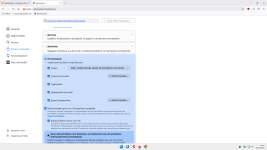
I, on the other hand, use this custom setting.
My third-party cookies in Firefox are blocked.
No problem with the websites I usually visit.
I try to have almost the same settings in my two browsers.
Last edited:

Some background information about the FF setting security.csp.reporting.enabled (default: false):
 bugzilla.mozilla.org
1964249 - Add pref to disable CSP Level 2 Reporting
RESOLVED (tschuster) in Core - DOM: Security. Last updated 2025-05-27.
bugzilla.mozilla.org
Some background information about the FF setting security.csp.reporting.enabled (default: false):
1964249 - Add pref to disable CSP Level 2 Reporting
RESOLVED (tschuster) in Core - DOM: Security. Last updated 2025-05-27.
It is set to true by default.
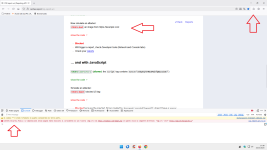
Every third-party CSP is blocked by FF without the need for extensions:
Last edited:
You asked me about ping and why I have it blocked. Because it was blocked by default by Firefox.
Well, you specified it yourself, so you agree to first-party CSPs, don't block them with uBo, considering that, I repeat for the second time, they are set to true in your browser.
Period.
For same reason I block CSP reports; because they were blocked by default by uBO. I still haven't found any info how enabling CSP reports would benefit me as a user; all I saw is CSP reports benefiting web developers and no one else. Yet again, I don't see why should I enable them honestly.

The Custom settings you set are exactly the same as they are when you enable Strict mode. With those, 3rd party cookies aren't blocked, but isolated. Your web browser still accepts them. More precise, Firefox only rejects tracking cookies, not all 3rd party cookies.I, on the other hand, use this custom setting.
My third-party cookies in Firefox are blocked.
No problem with the websites I usually visit.
I try to have almost the same settings in my two browsers.
View attachment 292119
Visit this website and it will tell you if your web browser accepts 3rd party cookies: Are Third-Party cookies enabled in my web browser?
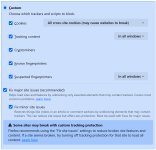
I used Strict setting, but for now I switched to Custom with this configuration. Those settings completely block all cross-site cookies.
Some background information about the FF setting security.csp.reporting.enabled:
bugzilla.mozilla.org
1964249 - Add pref to disable CSP Level 2 Reporting
RESOLVED (tschuster) in Core - DOM: Security. Last updated 2025-05-27.
bugzilla.mozilla.org
You asked me about ping and why I have it blocked. Because it was blocked by default by Firefox.
For same reason I block CSP reports; because they were blocked by default by uBO. I still haven't found any info how enabling CSP reports would benefit me as a user; all I saw is CSP reports benefiting web developers and no one else. Yet again, I don't see why should I enable them honestly.
The Custom settings you set are exactly the same as they are when you enable Strict mode. With those, 3rd party cookies aren't blocked, but isolated. Your web browser still accepts them. More precise, Firefox only rejects tracking cookies, not all 3rd party cookies.
Visit this website and it will tell you if your web browser accepts 3rd party cookies: Are Third-Party cookies enabled in my web browser?
I used Strict setting, but for now I switched to Custom with this configuration. Those settings completely block all cross-site cookies.
View attachment 292127
Mozilla Firefox Browser Stable Version Releases
So we agree at least on something.
So we agree at least on something.
I discovered it.
Not you.
April 2025, FF 137.
Recently browsing
Members who viewed this thread in the last 5 minutes
