
I want to change my vote from EDGE browser to Firefox & Brave. Sometimes I also use Vivaldi.


Open MalwareTips from your Home Screen or desktop. Follow discussions, find answers and pick up where you left off.
If you cannot find an install option, update your browser or use its bookmark option to keep MalwareTips close.
After installation, open the app and sign in. Enable push notifications in Preferences if you want alerts. On iPhone and iPad, push requires a Home Screen web app and iOS or iPadOS 16.4 or later.
Sign in to manage notificationsInstallation is optional. Your notification settings stay under your control.
 Thread starter
Bot
Thread starter
Bot

A new election is needed with detailed choices (choice 4 to be split into several ones).I want to change my vote from EDGE browser to Firefox & Brave. Sometimes I also use Vivaldi.

Indeed, I use 5 browsers, but I consider them like apps, we are not in 90s anymore.A new election is needed with detailed choices (choice 4 to be split into several ones).
I need to know the relative frequncy of using each of the browsers included collectively under choice number 4.Indeed, I use 5 browsers, but I consider them like apps, we are not in 90s anymore.
View attachment 295229
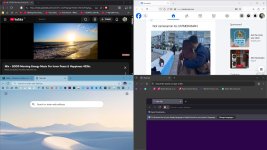
That is hard to tell, people generally respond to a main browser. I use my screen as 50:50, like Youtube/Edge or Streaming/FB. We do not talk about TOR.I need to know the relative frequncy of using each of the browsers included collectively under choice number 4.




I cannot use split screen or even vertical tabs; make me confusedThat is hard to tell, people generally respond to a main browser. I use my screen as 50:50, like Youtube/Edge or Streaming/FB. We do not talk about TOR.
View attachment 295230 View attachment 295233 View attachment 295232

Well I have only one eye, so even 24" monitor is too big for me, but I sit pretty close, so it will do.I cannot use split screen or even vertical tabs

 www.elevenforum.com


Let's say I logged into a site and decided I don't want to delete its cookies when I exit my browser. If I add that site into the save cookie on exit Edge policy before closing my browser, will my cookie for that site remain safe or be deleted when I close my browser? Does the policy come in effect even when Edge is running or do I have to close it at least once for the new policy to take effect?Cookies exceptions were supposed to fix that, but Edge is currently all or nothing.
View attachment 295228
Microsoft Edge Browser Policy Documentation SaveCookiesOnExit
Windows and Mac documentation for supported Microsoft Edge Browser policy: Save cookies when Microsoft Edge closeslearn.microsoft.com
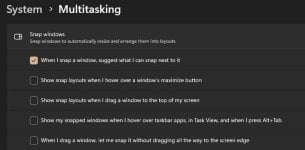
I have snap windows feature disabled all the time.Well I have only one eye, so even 24" monitor is too big for me, but I sit pretty close, so it will do.
Snap windows into Layouts in Windows 11
This tutorial will show you different ways to Snap windows into zone layouts for your account in Windows 11. You can use Snap windows in Windows 11 to automatically resize and arrange all your open windows into zone layouts using the mouse (drag), keyboard, or the Snap Assist feature. Snap...
View attachment 295236 View attachment 295237
In that case always on top feature comes to mind, I am sure it is available for browsers via extensions or apps. I use it to watch movies while browsing.I have snap windows feature disabled all the time.


Let's say I logged into a site and decided I don't want to delete its cookies when I exit my browser. If I add that site into the save cookie on exit Edge policy before closing my browser, will my cookie for that site remain safe or be deleted when I close my browser? Does the policy come in effect even when Edge is running or do I have to close it at least once for the new policy to take effect?
Same question for @Sampei.Nihira and Chrome.
I'm not a multi-tasker.In that case always on top feature comes to mind, I am sure it is available for browsers via extensions or apps. I use it to watch movies while browsing.
View attachment 295238

Well men generally are not.I'm not a multi-tasker.


 www.bbc.com
Men are high-performance single core, single thread cpu.Well men generally are not.
And that is saying something, men and women use Windows and browsers differently. But it is never taken into an account, but to be fair, I have never seen women around.Women 'better at multitasking' than men, study finds
It is not a myth - women really are better than men at multitasking and employers should bear this in mind, say the authors of a new study.
As a surprise, Yandex is the only browser which applies "delete cookies on exit" properly for me.Funnily enough, the cookie deleting option in Firefox also has issues. It will delete most of cookies on exit, but not all of them. Some websites stay on the list.
Funnily enough, the cookie deleting option in Firefox also has issues. It will delete most of cookies on exit, but not all of them. Some websites stay on the list.


Because Yandex safely stored the copies on their servers.As a surprise, Yandex is the only browser which applies "delete cookies on exit" properly for me.

Yes. I have a list of websites whose cookies and site data shouldn't be deleted. After lenghty browsing session and exiting the browser, these websites are still present on the list, along tens of others that aren't on the exceptions list. It clearly says 1 cookie is saved with the storage part empty.Strange, are you sure?

Members who viewed this thread in the last 5 minutes


