Solved CIS Defense always disable when startup

Status
Not open for further replies.

muhammadariif

New Member
Thread author
Aug 3, 2011
138
0
9
28
Earth
Hi guys, since this week i find my CIS defense always disable when startup and everytime i reboot my computer i always need to enable back my defense+. I set my defense setting to paranoid, this setting will cause this problem? Another thing that i hate is my Action Center always give me this message 'turn on windows defender' i get this message over and over i dont want use windows defender cause i already have CIS as real-time protection, and Malwarebytes Pro work at the same times.is there a way to handle this problem?:huh: any help apprecite :D
 
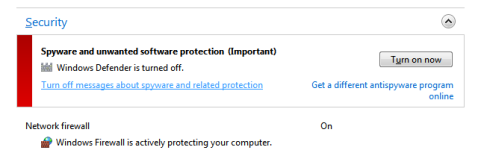
Open the Action Center and under Security (for Windows Defender) you can Turn off messages about spyware and related protection.

attachment.php


Did you follow any guide when configuring Comodo Internet Security? Make sure the setting to Disable Defense+ isn't checked.
 

Attachments

  • windef-actioncenter.png
    windef-actioncenter.png
    10.8 KB · Views: 892
Upvote 0
Yes, i follow the guide, but everytime i enable it, and an hour later it autamatically disable it, maybe i should try uninstall it and install back :s
 
Upvote 0
muhammadariif said:
Yes, i follow the guide, but everytime i enable it, and an hour later it autamatically disable it, maybe i should try uninstall it and install back :s

unistall it with revo uninstaller and delete the registry keys :)
 
Upvote 0
Yes, i uninstall it with Revo Uninstaller and its work, and i no longer get that messages again, maybe this happen when i accidentally disable defense or antivirus for a longtime and action canter can't find that i already have spyware protection, thank you for reply guys :)
 
Upvote 0
Status
Not open for further replies.