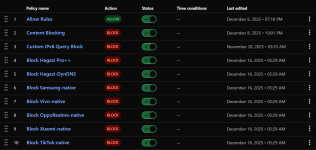
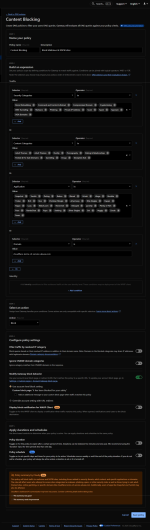
Are you using the same 10 policies for both of your devices?I use two DNS location for these two devices to easily separate them in the query log.
My policies look like this:
Yeah, same. I didn't specify DNS location in these policies, so they are applied to all of them by default.Are you using the same 10 policies for both of your devices?
Cloudflare Gateway allows a maximum of 300,000 domains for the free plan and 1,000 domains in a file list.but it looks complicated to set up due to Cloudflare rules limit.
I'm currently exploring this GitHub repository.Is there a guide how to set it up using GitHub?
UnlimitedAlso, are there limits or free plan of Cloudflare Gateway is unlimited regarding queries?
Both. The block page requires Cloudflare certificate installation, which you generate from your Cloudflare Gateway account. You have a default, redirect, or custom block page.Does Cloudflare block DNS requests with 0.0.0.0 IP or it shows their block page for blocked domains?
name: Update Filter Lists
on:
schedule:
- cron: "30 21 * * *" # Runs daily at 21:30 UTC (03:00 IST)
push:
branches:
- main
workflow_dispatch:
concurrency:
group: ${{ github.workflow }}-${{ github.ref }}
cancel-in-progress: true
env:
NODE_ENV: production
jobs:
cgps:
runs-on: ubuntu-latest
steps:
- name: Checkout
uses: actions/checkout@v4 # Using v4 (downgraded from v6)
with:
repository: "mrrfv/cloudflare-gateway-pihole-scripts"
ref: "6d3025bf07d2ae9c6dfc9f7a74df4176295a2742" # Specific commit hash
- name: Install Node.js
uses: actions/setup-node@v4 # Using v4 (downgraded from v6)
with:
node-version: '24' # Using Node.js version 24
- name: Install npm dependencies
run: npm ci
- name: Download blocklists
run: |
touch allowlist.txt # Ensures empty allowlist file exists
npm run download:blocklist
env:
BLOCKLIST_URLS: ${{ vars.BLOCKLIST_URLS }}
ALLOWLIST_URLS: "" # Empty string disables allowlist functionality
- name: Create or update rules and lists
run: npm run cloudflare-create
env:
CLOUDFLARE_API_TOKEN: ${{ secrets.CLOUDFLARE_API_TOKEN }}
CLOUDFLARE_ACCOUNT_ID: ${{ secrets.CLOUDFLARE_ACCOUNT_ID }}
keepalive:
if: github.event_name == 'schedule'
runs-on: ubuntu-latest
permissions:
actions: write
steps:
- uses: liskin/gh-workflow-keepalive@v1
For my script, the order is maintained by the order I have put the filter list in the script. So, the rule that is created first will be first. The manually created content blocking rules and others order remains the same.@SeriousHoax, I tested your script and the mrrfv repo. I used DeepSeek AI; it helped me update the script for my timezone and policy name. Your script worked, but the Cloudflare policy order changed after blocklist updates; it moved to the bottom. Changing the policy name back didn't fix the order issue. DeepSeek's other suggestions also failed. It also suggested adding Cloudflare's policy precedence expression to the script. I didn't try this; it wouldn't work if I added another policy. A new policy would change the precedence value.
Yeah, I heard that's the advantage of using NPM with separate js files for it to process that it will be quicker than an all-in-one script. I also have a 0.25 sec delay between every Cloudflare API calls. Gemini told me that excessive API calls in a short amount of time could trigger Cloudflare's anti-bot/DDOS protection.Your script took roughly 3 minutes, while mrrfv's took around 1 to update Hagezi Multi Pro.
https://raw.githubusercontent.com/hagezi/dns-blocklists/main/wildcard/pro.plus-onlydomains.txt
It's understandable why they did that, but AI bots don't know the context behind using the cdn links.AIs suggest using the githubusercontent link instead of jsdelivr, which you use; the GitHub one is better for this method.
https://cdn.jsdelivr.net/gh/hagezi/dns-blocklists@latest/wildcard/pro.plus-onlydomains.txt https://raw.githubusercontent.com/hagezi/dns-blocklists/main/wildcard/pro.plus-onlydomains.txt
Nice! I will check this out.I created a new private repository. It includes mrrfv's specific commit (Commits on Dec 11, 2025) hash (static, no auto-update to new commits). I also added changes to the YAML file. These changes include daily updates in my time zone. I removed the allowlist and some extras.
Check this guide. It's pretty good.I still have no idea how to set it up.
I registered for Cloudflare account, set up Zero Trust dashboard. Under Network -> Resolver & Proxies, I created DNS location and got DNS IP, DoH and DoT addresses. What now @rashmi?
I already have GitHub account; I believe I need help with GitHub repository and Actions. Why did you opt for that one commit specifically? Can I avoid the limit of 300.000 domains with creating multiple policies (like, each policy for different block list)?
There's a particular site that I sometimes visit which gets auto blocked by cloudflare and triggers a rubbish cloudflare related stream.ts file download from the link "cloudflare-terms-of-service-abuse.com". So, I simply blocked it to prevent that annoying download.What are the upsides of blocking the "cloudflare-terms-of-service-abuse.com" domain?
Do you by any chances have a links you used to "tutor" AI into giving you complete and correct instruction? I tried ChatGPT and IT SUCKS. It gives me options that no longer exist in Cloudflare Dashboard (from old UI) and doesn't even know how to set up settings. I barely got to set up DNS location with its help.For my script, the order is maintained by the order I have put the filter list in the script. So, the rule that is created first will be first. The manually created content blocking rules and others order remains the same.
Yeah, I heard that's the advantage of using NPM with separate js files for it to process that it will be quicker than an all-in-one script. I also have a 0.25 sec delay between every Cloudflare API calls. Gemini told me that excessive API calls in a short amount of time could trigger Cloudflare's anti-bot/DDOS protection.
It probably won't in our case.
It's understandable why they did that, but AI bots don't know the context behind using the cdn links.
Hagezi got a warning from GitHub regarding traffic usage of his repo. His lists are very popular as you know and used by many people. So too much traffic could cause an issue with GitHub. They could rate limit his repo or some other things. So, he recommends everyone to not use the GitHub links anymore. The jsdelivr links are now the default link. So, you should use the cdn links. Otherwise use GitLab or Codeberg mirrors. Hagezi always force remove cache for the cdn link, so they will always be up to date.
Nice! I will check this out.
Check this guide. It's pretty good.
Then you ask chatbots to create you a full guide on how to set it up. Give them the link of the guide. I even found a couple of other guides on google. I gave them links to those guides as well. That's how I did it initially to understand how to start doing things. You can try this if needed.![]()
cloudflare-gateway-pihole-scripts/extended_guide.md at main · mrrfv/cloudflare-gateway-pihole-scripts
Use Cloudflare Gateway DNS/VPN to block ads, malware and tracking domains - free alternative to NextDNS, Pi-hole and AdGuard - mrrfv/cloudflare-gateway-pihole-scriptsgithub.com
In my case, Grok Expert provided the best guide, followed by Gemini Pro. That was Gemini 2.5 Pro. 3.5 Pro is even better now.
There's a particular site that I sometimes visit which gets auto blocked by cloudflare and triggers a rubbish cloudflare related stream.ts file download from the link "cloudflare-terms-of-service-abuse.com". So, I simply blocked it to prevent that annoying download.
This is Grok's guide.Do you by any chances have a links you used to "tutor" AI into giving you complete and correct instruction? I tried ChatGPT and IT SUCKS. It gives me options that no longer exist in Cloudflare Dashboard (from old UI) and doesn't even know how to set up settings. I barely got to set up DNS location with its help.
I'm trying Gemini now.
That's odd. I didn't give any credit/debit card info but can use all the free featuresI tried to do everything from scratch, however I kept getting 405 error in Actions log. After hours of debugging with Gemini, we came to a conclusion that it happens because my account doesn't have access to Gateway due to not adding credit/debit card. Gemini made me a correct script, but without verifying credit/debit card, I can't do a thing and no domains are getting into Gateway.
So anyone wanting to try this, if you're not willing to add credit/debit card to the account, you won't get far. And while you can get to Cloudflare Zero Trust dashboard without paying (by selecting option cancel and exit at the top of the page), you can't get to Gateway, the most important part for this.
You probably made an account before credit/debit card was needed, right?That's odd. I didn't give any credit/debit card info but can use all the free features![]()
I remember it asking for credit card details. I don't remember what I did after that. Probably the same as you did, I mean the cancel option because I didn't entered my card details.You probably made an account before a credit/debit card was needed, right?
I'm talking about you not getting access to the free features, while @rashmi and I have, without needing to provide credit card details. The reason is unclear.I doubt it has something to do with location. It probably has to do with abuse.
https://one.dash.cloudflare.com/your-account-id/traffic-policies/policies
I have access to policies, firewall policies. And I did managed through GitHub to get a list there, however, the list was always with 0 entries. GitHub Actions ran for a few minutes, and then it threw bunch of 405 errors. After consulting with Gemini, and trying to rewrite the script, nothing helped and Gemini told me to go to Gateway section which didn't exist in my account. Then when I told it, it doesn't exist, it said that Cloudflare changed UI for some accounts and now requires credit/debit card to verify and unlock the section.I'm talking about you not getting access to the free features, while @rashmi and I have, without needing to provide credit card details. The reason is unclear.
After logging in, can you go to this page? Add your id in the link. You should see it in your browser address bar.
Code:https://one.dash.cloudflare.com/your-account-id/traffic-policies/policies
Step 1: Fetching list...
Found 190333 domains.
Step 2: Getting List ID...
Clearing list...
Syncing 190333 domains...
Chunk 0 failed (405):
Chunk 1000 failed (405):
Chunk 2000 failed (405):
Chunk 3000 failed (405):
Chunk 4000 failed (405):
Chunk 5000 failed (405):
Chunk 6000 failed (405):
Chunk 7000 failed (405):
Chunk 8000 failed (405):
Chunk 9000 failed (405):
Chunk 10000 failed (405):
Chunk 11000 failed (405):
Chunk 12000 failed (405):
Chunk 13000 failed (405):
Chunk 14000 failed (405):
Chunk 15000 failed (405):
Chunk 16000 failed (405):
Chunk 17000 failed (405):
Chunk 18000 failed (405):
Chunk 19000 failed (405):
Chunk 20000 failed (405):
Chunk 21000 failed (405):
Chunk 22000 failed (405):
Chunk 23000 failed (405):
Chunk 24000 failed (405):
Chunk 25000 failed (405):
Chunk 26000 failed (405):
Chunk 27000 failed (405):
Chunk 28000 failed (405):
Chunk 29000 failed (405):
Chunk 30000 failed (405):
Chunk 31000 failed (405):
Chunk 32000 failed (405):
Chunk 33000 failed (405):
Chunk 34000 failed (405):
Chunk 35000 failed (405):
Chunk 36000 failed (405):
Chunk 37000 failed (405):
Chunk 38000 failed (405):
Chunk 39000 failed (405):
Chunk 40000 failed (405):
Chunk 41000 failed (405):
Chunk 42000 failed (405):
Chunk 43000 failed (405):
Chunk 44000 failed (405):
Chunk 45000 failed (405):
Chunk 46000 failed (405):
Chunk 47000 failed (405):
Chunk 48000 failed (405):
Chunk 49000 failed (405):
Chunk 50000 failed (405):
Chunk 51000 failed (405):
Chunk 52000 failed (405):
Chunk 53000 failed (405):
Chunk 54000 failed (405):
Chunk 55000 failed (405):
Chunk 56000 failed (405):
Chunk 57000 failed (405):
Chunk 58000 failed (405):
Chunk 59000 failed (405):
Chunk 60000 failed (405):
Chunk 61000 failed (405):
Chunk 62000 failed (405):
Chunk 63000 failed (405):
Chunk 64000 failed (405):
Chunk 65000 failed (405):
Chunk 66000 failed (405):
Chunk 67000 failed (405):
Chunk 68000 failed (405):
Chunk 69000 failed (405):
Chunk 70000 failed (405):
Chunk 71000 failed (405):
Chunk 72000 failed (405):
Chunk 73000 failed (405):
Chunk 74000 failed (405):
Chunk 75000 failed (405):
Chunk 76000 failed (405):
Chunk 77000 failed (405):
Chunk 78000 failed (405):
Chunk 79000 failed (405):
Chunk 80000 failed (405):
Chunk 81000 failed (405):
Chunk 82000 failed (405):
Chunk 83000 failed (405):
Chunk 84000 failed (405):
Chunk 85000 failed (405):
Chunk 86000 failed (405):
Chunk 87000 failed (405):
Chunk 88000 failed (405):
Chunk 89000 failed (405):
Chunk 90000 failed (405):
Chunk 91000 failed (405):
Chunk 92000 failed (405):
Chunk 93000 failed (405):
Chunk 94000 failed (405):
Chunk 95000 failed (405):
Chunk 96000 failed (405):
Chunk 97000 failed (405):
Chunk 98000 failed (405):
Chunk 99000 failed (405):
Chunk 100000 failed (405):
Chunk 101000 failed (405):
Chunk 102000 failed (405):
Chunk 103000 failed (405):
Chunk 104000 failed (405):
Chunk 105000 failed (405):
Chunk 106000 failed (405):
Chunk 107000 failed (405):
Chunk 108000 failed (405):
Chunk 109000 failed (405):
Chunk 110000 failed (405):
Chunk 111000 failed (405):
Chunk 112000 failed (405):
Chunk 113000 failed (405):
Chunk 114000 failed (405):
Chunk 115000 failed (405):
Chunk 116000 failed (405):
Chunk 117000 failed (405):
Chunk 118000 failed (405):
Chunk 119000 failed (405):
Chunk 120000 failed (405):
Chunk 121000 failed (405):
Chunk 122000 failed (405):
Chunk 123000 failed (405):
Chunk 124000 failed (405):
Chunk 125000 failed (405):
Chunk 126000 failed (405):
Chunk 127000 failed (405):
Chunk 128000 failed (405):
Chunk 129000 failed (405):
Chunk 130000 failed (405):
Chunk 131000 failed (405):
Chunk 132000 failed (405):
Chunk 133000 failed (405):
Chunk 134000 failed (405):
Chunk 135000 failed (405):
Chunk 136000 failed (405):
Chunk 137000 failed (405):
Chunk 138000 failed (405):
Chunk 139000 failed (405):
Chunk 140000 failed (405):
Chunk 141000 failed (405):
Chunk 142000 failed (405):
Chunk 143000 failed (405):
Chunk 144000 failed (405):
Chunk 145000 failed (405):
Chunk 146000 failed (405):
Chunk 147000 failed (405):
Chunk 148000 failed (405):
Chunk 149000 failed (405):
Chunk 150000 failed (405):
Chunk 151000 failed (405):
Chunk 152000 failed (405):
Chunk 153000 failed (405):
Chunk 154000 failed (405):
Chunk 155000 failed (405):
Chunk 156000 failed (405):
Chunk 157000 failed (405):
Chunk 158000 failed (405):
Chunk 159000 failed (405):
Chunk 160000 failed (405):
Chunk 161000 failed (405):
Chunk 162000 failed (405):
Chunk 163000 failed (405):
Chunk 164000 failed (405):
Chunk 165000 failed (405):
Chunk 166000 failed (405):
Chunk 167000 failed (405):
Chunk 168000 failed (405):
Chunk 169000 failed (405):
Chunk 170000 failed (405):
Chunk 171000 failed (405):
Chunk 172000 failed (405):
Chunk 173000 failed (405):
Chunk 174000 failed (405):
Chunk 175000 failed (405):
Chunk 176000 failed (405):
Chunk 177000 failed (405):
Chunk 178000 failed (405):
Chunk 179000 failed (405):
Chunk 180000 failed (405):
Chunk 181000 failed (405):
Chunk 182000 failed (405):
Chunk 183000 failed (405):
Chunk 184000 failed (405):
Chunk 185000 failed (405):
Chunk 186000 failed (405):
Chunk 187000 failed (405):
Chunk 188000 failed (405):
Chunk 189000 failed (405):
Chunk 190000 failed (405):
SUCCESS: List fully updated.
import os
import requests
import time
# Configuration
CF_API_TOKEN = os.environ.get('CF_API_TOKEN', '').strip()
CF_ACCOUNT_ID = os.environ.get('CF_ACCOUNT_ID', '').strip()
LIST_NAME = "HaGeZi_Wildcard_Pro_Plus"
BLOCKLIST_URL = "https://cdn.jsdelivr.net/gh/hagezi/dns-blocklists@latest/wildcard/pro.plus-onlydomains.txt"
headers = {
"Authorization": f"Bearer {CF_API_TOKEN}",
"Content-Type": "application/json"
}
def get_list_id():
url = f"https://api.cloudflare.com/client/v4/accounts/{CF_ACCOUNT_ID}/gateway/lists"
resp = requests.get(url, headers=headers)
if not resp.ok: return None
for lst in resp.json().get('result', []):
if lst['name'] == LIST_NAME: return lst['id']
return None
def create_list():
print(f"Creating list: {LIST_NAME}")
url = f"https://api.cloudflare.com/client/v4/accounts/{CF_ACCOUNT_ID}/gateway/lists"
payload = {"name": LIST_NAME, "type": "DOMAIN", "description": "HaGeZi Pro++"}
resp = requests.post(url, headers=headers, json=payload)
return resp.json()['result']['id']
def update_items(list_id, domains):
# This specific URL and the PATCH method are required for bulk updates
items_url = f"https://api.cloudflare.com/client/v4/accounts/{CF_ACCOUNT_ID}/gateway/lists/{list_id}/items"
print(f"Syncing {len(domains)} domains...")
# We use 1000 per chunk.
# PATCH with 'append' is the standard for zero trust lists.
chunk_size = 1000
for i in range(0, len(domains), chunk_size):
chunk = domains[i:i + chunk_size]
# KEY CHANGE: Wrapping items in 'append' and using PATCH
payload = {"append": [{"value": d} for d in chunk]}
# Use PATCH instead of POST to avoid the 405 error
resp = requests.patch(items_url, headers=headers, json=payload)
if resp.status_code == 429:
print("Rate limited. Waiting 15s...")
time.sleep(15)
resp = requests.patch(items_url, headers=headers, json=payload)
if not resp.ok:
# If PATCH fails, we try POST with the same structure as a fallback
resp = requests.post(items_url, headers=headers, json=payload)
if not resp.ok:
print(f"❌ Chunk {i} failed ({resp.status_code}): {resp.text}")
elif i % 10000 == 0:
print(f"Progress: {i}/{len(domains)} synced...")
# Execution
print("Step 1: Fetching list...")
raw_data = requests.get(BLOCKLIST_URL).text
domains = [d.strip() for d in raw_data.splitlines() if d and not d.startswith('#') and '.' in d]
print(f"Found {len(domains)} domains.")
list_id = get_list_id() or create_list()
if list_id:
# Clear list before starting
print("Clearing existing list entries...")
items_url = f"https://api.cloudflare.com/client/v4/accounts/{CF_ACCOUNT_ID}/gateway/lists/{list_id}/items"
requests.delete(items_url, headers=headers)
time.sleep(3)
update_items(list_id, domains)
print("✅ SUCCESS: List synced.")