Serious Discussion Cloudflare Gateway Free Plan

May I know why did you use specific commit and Node v24 instead of the latest one?
DeepSeek AI suggested:

1. Node v4—more proven and stable than v6.
2. Node v24—a specific version instead of a new version, which may have bugs.
3. Specific commit—no auto-update to new commits. I can replace the "hash" in the script if I want new features from the new commits.
 
  • Like
Reactions: simmerskool
Does entire HaGeZi blocklist gets imported (number of rules in GitHub actions is equal to the number in the HaGeZi blocklist) or there's some domains missing like in my case?

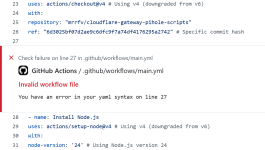
Btw your workflow script doesn't work for me.

Screenshot_3.png

The block that you wrote for disabling allowlist also doesn't work.
 
Last edited:
Does entire HaGeZi blocklist gets imported (number of rules in GitHub actions is equal to the number in the HaGeZi blocklist) or there's some domains missing like in my case?
I haven't looked into this. How did you check it?

Btw your workflow script doesn't work for me.

The block that you wrote for disabling allowlist also doesn't work.
When you paste the script or blocklist for disabling the allowlist into your repo, does it have red underlines?
 
Last edited:
  • Like
Reactions: simmerskool
I haven't looked into this. How did you check it?
Check out GitHub Actions, under Create or update rules and lists there's number of processed domains. Then open HaGeZi's list in the browser and see the number of entries. The number needs to be exact match, however, it's always 80-90 off meaning some domains aren't added to the list for some reason. I haven't been able to figure out which exactly, but something is missing.
When you paste the script or blocklist for disabling the allowlist into your repo, does it have red underlines?
No, I don't see anything underlined. The problem arrives when I save the changes and the action fails immediately and throws an error from screenshot.
 
I'll check it and update here.


Provide your YAML file here.
My current one that works? That would the original file you linked in your guide (with cron execution time changed).

As for your one, I literally copied and pasted it into GitHub editor. The only thing I changed is cron execution time so it starts every 4 hours. That one doesn't work for me while the original one works without any issues.
Code:
name: Update Filter Lists

on:
schedule:
- cron: "0 */4 * * *" # Runs every 4 hours
push:
branches:
- main
workflow_dispatch:

concurrency:
group: ${{ github.workflow }}-${{ github.ref }}
cancel-in-progress: true

env:
NODE_ENV: production

jobs:
cgps:
runs-on: ubuntu-latest
steps:
- name: Checkout
uses: actions/checkout@v4 # Using v4 (downgraded from v6)
with:
repository: "mrrfv/cloudflare-gateway-pihole-scripts"
ref: "6d3025bf07d2ae9c6dfc9f7a74df4176295a2742" # Specific commit hash

- name: Install Node.js
uses: actions/setup-node@v4 # Using v4 (downgraded from v6)
with:
node-version: '24' # Using Node.js version 24

- name: Install npm dependencies
run: npm ci

- name: Download blocklists
run: |
touch allowlist.txt # Ensures empty allowlist file exists
npm run download:blocklist
env:
BLOCKLIST_URLS: ${{ vars.BLOCKLIST_URLS }}
ALLOWLIST_URLS: "" # Empty string disables allowlist functionality

- name: Create or update rules and lists
run: npm run cloudflare-create
env:
CLOUDFLARE_API_TOKEN: ${{ secrets.CLOUDFLARE_API_TOKEN }}
CLOUDFLARE_ACCOUNT_ID: ${{ secrets.CLOUDFLARE_ACCOUNT_ID }}

keepalive:
if: github.event_name == 'schedule'
runs-on: ubuntu-latest
permissions:
actions: write
steps:
- uses: liskin/gh-workflow-keepalive@v1
 
Check out GitHub Actions, under Create or update rules and lists there's number of processed domains. Then open HaGeZi's list in the browser and see the number of entries. The number needs to be exact match, however, it's always 80-90 off meaning some domains aren't added to the list for some reason. I haven't been able to figure out which exactly, but something is missing.
I wonder if there is a minimum-entries rule for a file list. If a file list needs at least 100 entries, it will skip a list with less, so I have 162 lists.

I use Hagezi Multi Pro, which currently shows 162043 entries.
GitHub shows 161971 entries and 162 lists.
The difference is 72 entries.
 
I wonder if there is a minimum-entries rule for a file list. If a file list needs at least 100 entries, it will skip a list with less, so I have 162 lists.

I use Hagezi Multi Pro, which currently shows 162043 entries.
GitHub shows 161971 entries and 162 lists.
The difference is 72 entries.
I don't think so, I successfully created a list with just one domain. It wouldn't make sense to have minimum set. I think it's the script acting up.

I'm getting ready for the job, do you have time to test if it's happening with @SeriousHoax script too?
 
As for your one, I literally copied and pasted it into GitHub editor. The only thing I changed is cron execution time so it starts every 4 hours. That one doesn't work for me while the original one works without any issues.
You may test this; it's my YAML file with no comments.
name: Update Filter Lists

on:
schedule:
- cron: "30 21 * * *"
push:
branches:
- main
workflow_dispatch:

concurrency:
group: ${{ github.workflow }}-${{ github.ref }}
cancel-in-progress: true

env:
NODE_ENV: production

jobs:
cgps:
runs-on: ubuntu-latest
steps:
- name: Checkout
uses: actions/checkout@v4
with:
repository: "mrrfv/cloudflare-gateway-pihole-scripts"
ref: "6d3025bf07d2ae9c6dfc9f7a74df4176295a2742"

- name: Install Node.js
uses: actions/setup-node@v4
with:
node-version: '24'

- name: Install npm dependencies
run: npm ci

- name: Download blocklists
run: |
touch allowlist.txt
npm run download:blocklist
env:
BLOCKLIST_URLS: ${{ vars.BLOCKLIST_URLS }}
ALLOWLIST_URLS: ""

- name: Create or update rules and lists
run: npm run cloudflare-create
env:
CLOUDFLARE_API_TOKEN: ${{ secrets.CLOUDFLARE_API_TOKEN }}
CLOUDFLARE_ACCOUNT_ID: ${{ secrets.CLOUDFLARE_ACCOUNT_ID }}

keepalive:
if: github.event_name == 'schedule'
runs-on: ubuntu-latest
permissions:
actions: write
steps:
- uses: liskin/gh-workflow-keepalive@v1

I'm getting ready for the job, do you have time to test if it's happening with @SeriousHoax script too?
I'll try @SeriousHoax's script later today.

You asked in a post which is better: mrrfv's script, SeriousHoax's one, or any other. All script methods for ad blocking in Cloudflare Gateway are the same, except for SeriousHoax's. DeepSeek AI said SeriousHoax's is a superior and excellent Python script; it is one script compared to multiple ones in mrrfv's. I would need files in my repo for some functions, like location-based filtering, with mrrfv's method, which is not the case with SeriousHoax's.
 
@SeriousHoax, I retested your script, and the policy order problem in Cloudflare persisted. I have only changed the following in the script.

My policy order in Cloudflare is:
Search
YouTube
Allow
Block

I place the "Hagezi" policy above "Block," but when I run the workflow again, the Hagezi policy moves to the bottom.

# Define blocklists with names, primary URLs, and backup URLs
blocklists: List[Dict[str, str]] = [
{
"name": "Hagezi Multi Pro",
"url": "https://raw.githubusercontent.com/hagezi/dns-blocklists/main/wildcard/pro-onlydomains.txt",
"backup_url": "https://gitlab.com/hagezi/mirror/-/raw/main/dns-blocklists/wildcard/pro-onlydomains.txt"
}
]
 
I tried @SeriousHoax's script.

Hagezi Multi Pro
Total domains: 162861

SeriousHoax
Total domains: 162,733
Lists created: 163

mrrfv
Total domains: 162788
Lists created: 163
Interesting. Now I really wonder what happened to the missing domains.

I thought that some domains are included in Cloudflare's filtering categories so that's the reason why they aren't showing up, but I disabled all categories and still some domains were missing.

I asked mrrfv about this, we'll see.
 
@SeriousHoax, I retested your script, and the policy order problem in Cloudflare persisted. I have only changed the following in the script.

My policy order in Cloudflare is:
Search
YouTube
Allow
Block

I place the "Hagezi" policy above "Block," but when I run the workflow again, the Hagezi policy moves to the bottom.
Oh, I see. That's expected. In my script at least, the hagezi policy is deleted every time github action runs and then is created again with the latest filter. So, it will go to the bottom as it's created last. But that's not an issue. Your other rules abvove the block rule as well as the hagezi rules all of them should work correctly.
All rules are processed before answering a DNS query.
I would put your Allow rules on top to make sure they are processed first and always allowed.
 
so a sidenote: from this vantage point, chatGPT was correct, there does seem to be a complexity to cloudflare zero-trust, that would not necessarily benefit my setup... :unsure:
 
I asked ChatGPT and Gemini what could be the reason for missing domains from policies and they both agree it's regex for detecting domains, it's too harsh so it ignores any domain that looks weird.
 
@rashmi @SeriousHoax An update...

I asked mrrfv how to stop importing allowlist, the solution is to replace
Code:
- name: Download allowlists
          run: npm run download:allowlist
          env:
            ALLOWLIST_URLS: ${{ vars.ALLOWLIST_URLS }}
with
Code:
- name: Create empty allowlist
          run: echo '' > allowlist.txt

Regarding missing domains:
The script cleans up all lists before uploading to Cloudflare (otherwise they wouldn't be accepted), which includes removing duplicates and unnecessary subdomains. Also, the missing domains could be included in one of the default allowlists.
I asked if example.com domain is on the list and something.example.com as well, will script send both or just example.com and the answer is just example.com goes to the Cloudflare.
 
Last edited:
Although I have a Bachelor in IT (but only worked 1,5 year as programmer, 3.5 year as designer before becoming a program manager and have not done anything in IT for at least 35 years) and a Master in Business Administration, it took me an hour to configure cloudflare zero trust. There are so many options to choose from and offers so much granular control that I am very impressed by the members who have set it up in just 10 minutes. :oops:
 
Last edited:
Although I have a Bachelor in IT (but only worked 1,5 year as programmer, 3.5 year as designer before becoming a program manager and have not done anything in IT for at least 35 years) and a Master in Business Administration, it took me an hour to configure cloudflare zero trust. There are so many options to choose from and offers so much granular control that I am very impressed by the members who have set it up in just 10 minutes. :oops:
Whenever I found myself in unfamiliar UI I go everywhere in it to get familiar with it. I did same with Cloudflare because it's UI drastically changed since the last time I used it and it get many new features I have no idea what they are about. Once you get familiar with UI, it's relatively easy.
 
Whenever I found myself in unfamiliar UI I go everywhere in it to get familiar with it. I did same with Cloudflare because it's UI drastically changed since the last time I used it and it get many new features I have no idea what they are about. Once you get familiar with UI, it's relatively easy.
Let's agree it's not for the average user (the majority of users); okay for advanced ones.
Average user can barely copy a dns address to be pasted in the browser settings; even setting dns in modem router could be considered to ba an above-average user task.
 
Let's agree it's not for the average user (the majority of users); okay for advanced ones.
Average user can barely copy a dns address to be pasted in the browser settings; even setting dns in modem router could be considered to ba an above-average user task.
Average user doesn't even know what DNS is and uses the ISP provided ones.