Serious Discussion Cloudflare Gateway Free Plan

I'm not sure what you're asking exactly but Cloudflare for Families only relies on Cloudflare's threat intelligence and website classification with no additional blocklists.
You could enhance protection, by using Zero Trust and adding additional blocklists hence increase the level of protection. I myself have it set up like that.

So;
Cloudflare for Families = only Cloudflare's threat intelligence and website classification service
Cloudflare Zero Trust = Cloudflare's threat intelligence + website classification service + your own blocklist (if you set it up that way)

Thank you for your reply.(y);)
I don't use CloudFlare for families or CZT.

So if we take the results of that test as valid, you who use CZT have (estimated) 95.82% protection, plus a certain percentage of protection offered by the chosen filter list.
 
  • Like
Reactions: rashmi and Marko :)
So if we take the results of that test as valid, you who use CZT have (estimated) 95.82% protection, plus a certain percentage of protection offered by the chosen filter list.
Exactly.

I personally don't care about malware blocking ability. The only reason why I set those security categories is because sometimes ad domains are classified as malware, especially those on piracy sites, so these usually cover both malware and ads.
 
I created Allowlist in Firewall policy, Selector: Domain -> Operator: is -> domain.com,
The "Operator" "in" allows multiple domains within the "Value" field.

Explore the "Applications" category to block or allow specific apps and websites. This category manages both apps/websites and their related domains, including tools like Google Analytics.

@rashmi Did you connect your devices to Zero Trust through WARP app? Or are you just using your Zero Trust DoH server?
I'm using PrivateDNS on Android phones, Configurator Profile on iPads, and YogaDNS Pro on Windows 11 systems. The Windows 11 network/native DoH configuration is network specific, which I don't like. I've configured Cloudflare Gateway, NextDNS, and AdGuard DNS profiles in the YogaDNS app. I've set YogaDNS as a Windows service.
 
The "Operator" "in" allows multiple domains within the "Value" field.
I will try this. Currently I use "Domain" -> "is" -> "example.com". I tried to add multiple entries and it didn't let me so each time I wanted to unblock a domain, I had to create another "Or" entry.
Explore the "Applications" category to block or allow specific apps and websites. This category manages both apps/websites and their related domains, including tools like Google Analytics.
I am already using categories in Firewall policies.
I'm using PrivateDNS on Android phones, Configurator Profile on iPads, and YogaDNS Pro on Windows 11 systems. The Windows 11 network/native DoH configuration is network specific, which I don't like. I've configured Cloudflare Gateway, NextDNS, and AdGuard DNS profiles in the YogaDNS app. I've set YogaDNS as a Windows service.
I'm using Rethink DNS app on Android and WARP app in Windows. It's nice to have DNS and VPN in one app.
Ads blocking is essentially cosmetic filtering and therefore significantly inefficient at the DNS level.
It is, but the main goal is to prevent connection to ad and tracking servers. They don't need to know your IP and your browsing habits. Ad blocker then only needs to hide leftover ad placeholders.

But yeah, DNS ad blocking is far from ideal. Ad blocker in web browser does majority of the job.
 
I will try this. Currently I use "Domain" -> "is" -> "example.com". I tried to add multiple entries and it didn't let me so each time I wanted to unblock a domain, I had to create another "Or" entry.

I am already using categories in Firewall policies.

I'm using Rethink DNS app on Android and WARP app in Windows. It's nice to have DNS and VPN in one app.

It is, but the main goal is to prevent connection to ad and tracking servers. They don't need to know your IP and your browsing habits. Ad blocker then only needs to hide leftover ad placeholders.

But yeah, DNS ad blocking is far from ideal. Ad blocker in web browser does majority of the job.

This is often the case, but not always.
It is difficult to find the right balance at the DNS level.

I already have the HaGeZi Multi Ultimate filter list, which also includes EasyList and other sources that block ads:

dns-blocklists/sources.md at main · hagezi/dns-blocklists


That's enough.

Then it's more important to find a balance in adblocking.;)

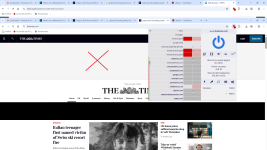
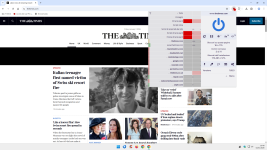
Here are two websites where you can verify, using the correct method, whether the DNS-level ad blocking + cosmetic filtering by adblock is insufficient:


Web Browsers

Latest news & breaking headlines

2.png

3.png

4.png

As you can see, with the right cosmetic filtering, the blocks on The Times website double.
We need to find the right balance, which is obviously personal to each of us.(y)
 
Last edited:
  • Like
Reactions: rashmi
This is often the case, but not always.
It is difficult to find the right balance at the DNS level.

I already have the HaGeZi Multi Ultimate filter list, which also includes EasyList and other sources that block ads:

dns-blocklists/sources.md at main · hagezi/dns-blocklists


That's enough.

Then it's more important to find a balance in adblocking.;)

Here are two websites where you can verify, using the correct method, whether the DNS-level ad blocking + cosmetic filtering by adblock is insufficient:


Web Browsers

Latest news & breaking headlines

View attachment 294207

View attachment 294208

View attachment 294209

As you can see, with the right cosmetic filtering, the blocks on The Times website double.
We need to find the right balance, which is obviously personal to each of us.(y)
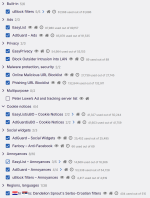
I'm not sure I understand what you're trying to tell me with these websites. I use HaGeZi Pro++ as the only blocklist in Zero Trust DNS and uBlock Origin with following filters:

Screenshot_3.png

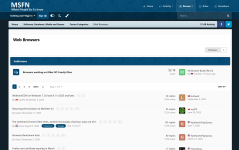
As you can see on the screenshots, websites load fine for me, without any ad placeholders left.

Screenshot_1.png Screenshot_2.png

I always said that DNS and ad blocking extensions complement each other. DNS will do blocking on network-level, while extension will take care of resources DNS can't block without breaking a website and ad placeholders.

Could be because I use Firefox and uBlock Origin works best in Firefox as it was confirmed by gorhill. ➡️ uBlock Origin works best on Firefox
 
I'm not sure I understand what you're trying to tell me with these websites. I use HaGeZi Pro++ as the only blocklist in Zero Trust DNS and uBlock Origin with following filters:

View attachment 294210

As you can see on the screenshots, websites load fine for me, without any ad placeholders left.

View attachment 294211 View attachment 294212

I always said that DNS and ad blocking extensions complement each other. DNS will do blocking on network-level, while extension will take care of resources DNS can't block without breaking a website and ad placeholders.

Could be because I use Firefox and uBlock Origin works best in Firefox as it was confirmed by gorhill. ➡️ uBlock Origin works best on Firefox

They load well for obvious reasons.
You don't need ad filtering (or filtering in other areas) at the DNS level.
If you use DNS, you can significantly reduce your rules in uBo and and eliminate malware/phishing rules.

But this topic is off-topic, and I apologize to everyone for my digression.
 
Any further rules to be spared?
Not many rules, if you understand that DNS only works at the domain level.
And if a malicious script or tracker is served from the same domain as the site (same-origin) or from a legitimate and necessary domain, DNS cannot distinguish it from good traffic.
Blocking that domain via DNS would mean breaking the site and also blocking legitimate content.
It is therefore better to use adblock in those areas where DNS cannot do anything.
The combination is a winning one.;)
 
I reviewed some Python scripts and tried to create a fresh Python script and YAML file including essential features and my preferences with Gemini and DeepSeek. Cloudflare "Locations" is tricky; it didn't work after trying many AI-generated scripts. Everything worked—the non-JSON/SSH/hash/file version/file list logic—but the script couldn't create the policy. The script also failed to create a policy for the Cloudflare Policy "Description" method. I'll try again when I have more time.
Were you able to have add locations to your script?
I have started using Cloudflare Zero Trust on my router also. I needed to add the Hagezi DoH/VPN/TOR/Proxy Bypass filter so that it's harder to bypass the DNS. Cloudflare's own DNS category is not complete so I have added the Hagezi filter for one specific location only.
This exposes the name of the location, but since no one can do anything without knowing the Cloudflare account ID and API token, it's not an issue to expose the location name.
The location name can be hidden too by adding it as a GitHub secret environment variable and modifying the code accordingly, but I'm skipping that for now.
Search for, "location" to check the code.

 
  • +Reputation
  • Like
Reactions: rashmi and Miravi
Were you able to have add locations to your script?
I haven't tested it since my last attempt. I'm currently using mrrfv's script with my preferences and am satisfied with its performance. It runs smoothly and appears to be well-structured for reliability. I may try the PowerShell method again as I plan to upgrade to the updated free plan from Cloudflare. I'll also try to check your script for Cloudflare locations.
 
  • Like
Reactions: SeriousHoax
I haven't tested it since my last attempt. I'm currently using mrrfv's script with my preferences and am satisfied with its performance. It runs smoothly and appears to be well-structured for reliability. I may try the PowerShell method again as I plan to upgrade to the updated free plan from Cloudflare. I'll also try to check your script for Cloudflare locations.
I have updated my script further. It now also uses diff-based method which doesn't delete existing lists. It just patches them with the changes so, zero-downtime.
In my main branch I have only kept Hagezi Pro++ list now, so that anyone may use the script if they like. I have moved the script with locations and two other Hagezi filters into a separate personal branch.
With diff-based approach it's even faster now. With my three Hagezi filters it's taking less than 30 seconds for the whole github action task. With Pro++ filter only, it's even less than that.
I have also created another version which stores version information in the policy description in Cloudflare Gateway like you wanted to do instead of saving on the JSON file. I haven't put this in my GitHub yet. I will have to test it more to check if it always works reliably. This will become the default.
Another thing I should say is that I noticed that the CDN link of Hagezi's filter is often outdated in the last few days. It takes about 2 hours for it to become up to date. So, I have changed from the CDN link to the GitLab mirror in my script. GitLab mirror is always updated at the same time as GitHub.
 
Last edited:
I have updated my script further. It now also uses diff-based method which doesn't delete existing lists. It just patches them with the changes so, zero-downtime.
I tested the script from your GitHub personal branch. It's the same as the main branch one but has more filters and locations, right? Everything worked well: the diff-based method, fresh start, and locations. Your script runs faster than mrrfv's; his takes about a minute, and yours takes about 30 seconds. I switched to your script and will update you after a few scheduled Hagezi Pro blocklist updates. The cleanup script is also quick and works well. I'm using the requirements and JSON files.

I have also created another version which stores version information in the policy description in Cloudflare Gateway like you wanted to do instead of saving on the JSON file. I haven't put this in my GitHub yet. I will have to test it more to check if it always works reliably. This will become the default.
How's the "policy description" script working? I'll test the script once you upload it to your GitHub repo.
 
I have updated my script further. It now also uses diff-based method which doesn't delete existing lists. It just patches them with the changes so, zero-downtime.
In my main branch I have only kept Hagezi Pro++ list now, so that anyone may use the script if they like. I have moved the script with locations and two other Hagezi filters into a separate personal branch.
With diff-based approach it's even faster now. With my three Hagezi filters it's taking less than 30 seconds for the whole github action task. With Pro++ filter only, it's even less than that.
I have also created another version which stores version information in the policy description in Cloudflare Gateway like you wanted to do instead of saving on the JSON file. I haven't put this in my GitHub yet. I will have to test it more to check if it always works reliably. This will become the default.
Another thing I should say is that I noticed that the CDN link of Hagezi's filter is often outdated in the last few days. It takes about 2 hours for it to become up to date. So, I have changed from the CDN link to the GitLab mirror in my script. GitLab mirror is always updated at the same time as GitHub.
Thanks for sharing it with us. Would a simular script importing Hagezi-TIF increase the security?
(I can hardly imagine that an individual would have access to more malware feeds than a large company)