Serious Discussion Cloudflare Gateway Free Plan

I didn't want to say this, and I've been mostly respectful to everyone in this forum.
But I need to ask you to stop being a "smartass" on every thread and every topic. Only few of us are using Cloudflare Zero Trust
[snip] So yeah, stop trying to start an argument on every thread for the sake of it.
@SeriousHoax, fwiw, I thought that @Divergent's post you commented on was a legitimate comment / question not intended to start an argument. I briefly looked at CZT and find this thread interesting and needed if user wants to try / use CZT.
 
The pros & cons of using external scripts have not clarified yet. :)
Pros: With a script, you can configure ads, tracking, malicious site blocking by using a high-quality DNS filter like, Hagezi Multi Pro++ or OISD or others. 300,000 unique domain is the limit for free tier.

Cons: Manual labor, like creating an API token in your Zero Trust account.
Here's a guide: cloudflare-gateway-pihole-scripts/extended_guide.md at main · mrrfv/cloudflare-gateway-pihole-scripts
The environment variable part is only necessary if you want to set up GitHub actions.
@SeriousHoax, fwiw, I thought that @Divergent's post you commented on was a legitimate comment / question not intended to start an argument. I briefly looked at CZT and find this thread interesting and needed if user wants to try / use CZT.
Firstly, you need to create an account. They may ask for credit card info, though they won't charge you. Adding card info can be avoided too.
Then get into, Network -> Resolver & Proxies to create a DNS location. Set up only DoH and DoT.
Then, in your account, you may experiment with different DNS policies by going into Traffic policies -> Firewall policies. Remember you have to use OR condition not AND to have multiple conditions under same rule.

Setting it up is not as simple as other providers. That's why no one has really recommended it to anyone here. Only if you're curious you can try. I know you like to experiment with new things and learn about them so you may like it.
 
The pros & cons of using external scripts have not clarified yet. :)
Okay this is my serious anwer :-) (I still think the tongue-in-cheek version removed by mods was more amuzing)

Pro's & Con's of forking external scripts from usage perspective

Cons:
  1. Adding external scripts/code always has a security risk, especially when it is added to one of the layers used for security
  2. Reuse of the code should fit the use case of the person reusing it, hence the person reusing the code should be qualified enough to determine this use case fit
Pro's:
  1. Reuse of code saves times and effort, it is a coding best practice (one of the leading development principles of Google is to use what is already available)
  2. Reuse of code makes functionality available to people incapable (time, money or knowledge wise) of coding it themselves
Risk Mitigations for using Github based automations in Cloudflare
  • The code is open source, so anyone can check the source code
  • With AI even people not able to read or understand the code themselves can check the code using AI
  • Re use of code is done by forking which means you get a static copy, which you have to update manually (reducing the risk of using code turning rogue)
  • For Github automations to use, people need to get a github account, fork the repo and perform some actions which require mediate IT-skills. This probably is a threshold for average users to implement this. It is much easier to use free ControlD malware blocking with third-part Hagezi's Pro Plus filter than to set up free Cloud Flare Zero Trust firewall policies with SeriousHoax github automation.

Conclusion:
The concern raised by @Divergent is valid in general, but for this Cloudflare Free Zero Trust with @SeriousHoax HageziPro+ automations not a real concern.
 
Last edited:
You're right. When I just copy a site name from the Hagezi filter, I see a nice block page,
View attachment 294653
but if I add https in the link, then you're right, I see the certificate error.
mrrfv's script also enables block page for his adblocking script, btw. Did you have any issue with it? I didn't enable it till now because it's easier for me to check on my PC and router's DNS logs to look for 0.0.0.0 to identify what has been blocked. Also, 0.0.0.0 has the advantage of dropping the connection almost instantly.
I'll revert this change. Thanks.
The block page (with Cloudflare certificate) is beneficial, as it provides a link to domain info. In the absence of an ad-blocking extension or a browser's built-in ad-blocking, the empty blocks (removed ads) replaced with the block page make websites look untidy; the empty/white blocks look much cleaner.

For ad blocking, the block page is informational or beneficial for a full page/redirected page, but not for ads within a website for the reasons above.

I suggest adding the block page codes in the script but setting it to false. It would be better not to add a message or customization for the block page. Users can enable the block page if they want, and they will see the Cloudflare default or their customized block page.
 
@SeriousHoax, I'm using the previous block page enabled commit, but I removed the blocked reason line. I think you should keep this commit with the block page set to false and remove the blocked reason line or comment it out.

The script works exceptionally! Here is one last update.

adb.png
 
The block page (with Cloudflare certificate) is beneficial, as it provides a link to domain info. In the absence of an ad-blocking extension or a browser's built-in ad-blocking, the empty blocks (removed ads) replaced with the block page make websites look untidy; the empty/white blocks look much cleaner.

For ad blocking, the block page is informational or beneficial for a full page/redirected page, but not for ads within a website for the reasons above.

I suggest adding the block page codes in the script but setting it to false. It would be better not to add a message or customization for the block page. Users can enable the block page if they want, and they will see the Cloudflare default or their customized block page.
But that code would not serve any purpose really. One would still have to modify one's own script to achieve a block page. Having the code but setting it to false is the same as not having the code.
Also, if you just enable the block page in the script without a block message and manually type your block message in the policy in a browser, the next time you run the script, your block message will be empty again.
So it's either both or none. Since the Hagezi filter is going to block ads and trackers that will be blocked repeatedly many times throughout the day, using the default 0.0.0.0 with no block page option is better for everybody. I also never used the block page in NextDNS.
So I think I will keep it in its current form for the best result.
 
But that code would not serve any purpose really. One would still have to modify one's own script to achieve a block page. Having the code but setting it to false is the same as not having the code.
Also, if you just enable the block page in the script without a block message and manually type your block message in the policy in a browser, the next time you run the script, your block message will be empty again.
So it's either both or none. Since the Hagezi filter is going to block ads and trackers that will be blocked repeatedly many times throughout the day, using the default 0.0.0.0 with no block page option is better for everybody. I also never used the block page in NextDNS.
So I think I will keep it in its current form for the best result.
I agree. The less code for the same job, the better. To be honest, your script does everything I need from the script. And if it was up to me, I'd definitely keep it in current form.
 
You are right, thanks.
It's done now. Added an action workflow for the cleanup script which can be run manually if required to delete all lists and policies created by the main script.
Does this thing makes your DNS resolution slow? I tried this kind of script last year
 
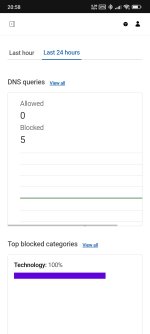
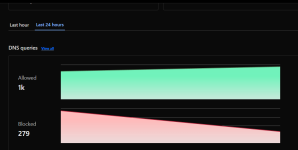
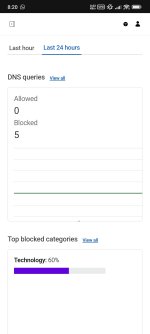
Hmm... Something weird is happening to me. Filtering suddenly stopped, I don't know when or why, but it started working again at 20:00 CET. Stats for the last 24h cleared.

Any ideas what could be happening?

View attachment 294698
WoW! That is very odd. So, blocking stopped completely and logs are also gone?
Everything is fine in my case.
1768507899839.png1768507943404.png
 
Try creating a new location and use that.
I will. Could it be because script got Error 503 on first try? Nothing else is falling to my mind. It says script finished successfully, and the rules are there.

I used the old version of the script with the block page. Now I updated it to the latest one without block page.
 
Last edited:
I will. Could it be because script got Error 503 on first try? Nothing else is falling to my mind. It says script finished successfully, and the rules are there.

I used the old version of the script with the block page. Now I updated it to the latest one without block page.
503 means server unreachable. So maybe a monentery server side issue.
If you used the block page, then apps like Rethink DNS are unlikely to count them as a block. Usually, 0.0.0.0 or NXDOMAIN for some clients is counted as a block. With the block page enabled, it returns a different IP, so it looks like any other normal DNS response.
But in Cloudflare's dashboard, they are counted as blocks. So, I don't know what happened there for you.
Is your issue fixed now?
 
503 means server unreachable. So maybe a monentery server side issue.
If you used the block page, then apps like Rethink DNS are unlikely to count them as a block. Usually, 0.0.0.0 or NXDOMAIN for some clients is counted as a block. With the block page enabled, it returns a different IP, so it looks like any other normal DNS response.
Yeah, and it seems like the script recovered from the error on second try.

Code:
2026-01-15 15:16:45,188 - 🚿 Extracted version from blocklist: 2026.0115.1417.03
2026-01-15 15:16:45,539 - 🎯 Target domains: 197,983
2026-01-15 15:16:45,539 - ℹ️ Found 200 existing lists for Hagezi Pro++
2026-01-15 15:16:45,539 - 📡 Fetching current list contents from Cloudflare...
2026-01-15 15:16:46,330 - ⚠️ Server error 503. Retry 1/3...
2026-01-15 15:16:51,809 - ⚖️ Diff analysis:
2026-01-15 15:16:51,810 -   ➖ To remove: 538
2026-01-15 15:16:51,810 -   ➕ To add:    2994
2026-01-15 15:16:51,810 -   🟰 Unchanged: 194989
2026-01-15 15:16:51,811 - ⚡ Executing 197 patches...
If you used the block page, then apps like Rethink DNS are unlikely to count them as a block. Usually, 0.0.0.0 or NXDOMAIN for some clients is counted as a block. With the block page enabled, it returns a different IP, so it looks like any other normal DNS response.
But in Cloudflare's dashboard, they are counted as blocks. So, I don't know what happened there for you.
Is your issue fixed now?
I haven't used block page at all, script did enable it though.

Yes, Rethink DNS treats requests that result as 0.0.0.0 as blocked, but the domain in question wasn't blocked and it did actually resolve to a correct IP address. First I visited the Cloudflare dashboard, and when I saw the DNS log is literally empty, I went to check the app and that's when I found out that filtering wasn't working at all. By the time I realized this, filtering started to work again. In the meantime there was one script run, but it didn't update anything because HaGeZi didn't publish new version of the blocklist.
But in Cloudflare's dashboard, they are counted as blocks. So, I don't know what happened there for you.
Is your issue fixed now?
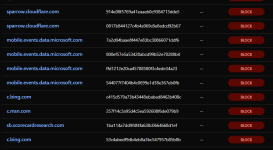
I don't log all requests, just blocked ones and the list of blocked ones was empty before it started working again.

It started working on its own and it does work correctly. At least for now. I'll continue to monitor the situation. I also created a new DNS location and deleted the old one.