Comodo CIS Bug fix policy

With all the complaints about Comodo, you don't see anybody running to MalwareTips complaining that they were infected with Comodo installed. You experience bugs? So what? Who cares? Those are your troubles. Figure it out. This is information security. That's what resourceful people do. They don't give up and they figure it out.
Yes, no one is infected because no one uses it. Same for North Korean SiliVaccine. No one is infected, because no one usеs it.
If you want 100% protection install SiliVaccine antivirus + Comodo Firewall.
 
I should have a look and compare how other AVs/FWs compare but just something I've observed in CS's CF tests. Currently looking at how to lock down Windows Firwall but given that I have the Home version of Win 11 I think my options are limited to firewall hardening blocking lolbins.
fwiw I got a little more into Windows Firewall Control WFC and it does have some firewall security features, but I do not know how effective they are. But I feel better enabling them :ROFLMAO:
 
  • Like
Reactions: wat0114 and ErzCrz
And even if you customize the Svchost (as you did in your post), at Comodo it can only be done in a generic way, for example, a simple “allow” “port: 53” (necessary for DNS) opens all comms for any malware.
Respectively, the rules for it can be more restrictive than this, as in my DNS rule I also restricted svchost to remote IP addresses cloudflare (1.1.1.1, 1.0.0.1).

I could have done the same, for example, for Windows time to remote port 123, and/or remote HTTP (port 80), but I chose not to. It is actually a lot of work to create rules like this for all running applications requiring network comms in any application firewall, including Windows firewall, but with a better interface, this work can be reduced. Windows firewall has the serious limitation of not supporting wildcards in path rules, and I seem to remember Comodo has a similar limitation - not quite the same - one that I posted elsewhere some time ago in another forum here:


Keep in mind also with Comodo, that all settings once configured can be backed up and restored at any time if necessary.

Btw, even though in Comodo, svchost rules can not be tied to specific services it hosts, I believe this is not a security issue. That's because any svchost rule in comodo will affect all services it is hosting. Windows firewall w/Advanced security has the option to tie svchost rules to specific services it hosts, but one can also create rules that affect all services:
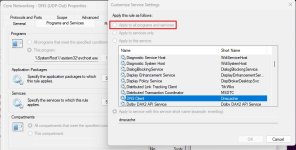
svchost-DNS Client firewall rule.jpg

Therefore the rule created this way would apply to all running svchost processes in Windows.

Not defending Comodo and those in charge of its development, just trying to state facts as I understand them. As for malicious processes harnessing svchost or any other Windows process for comms, well it should be contained in the sandbox with the Cruel setup or similar, thereby mitigating or eliminating that threat.

Assuming Melih is in charge, I would like to see him either:
  1. Spearhead an initiative to investigate and fix all reported bugs and shortcomings and provide a free version, or
  2. Spearhead an initiative to investigate and fix all reported bugs and charge a fee (freemium) for it, or
  3. Announce and discontinue the development of the free version and post a disclaimer to "use at your own risk"
 
The only remaining action is to combat the irresponsibility and immorality of Comodo and its fanatics, in order to prevent readers from being misled and deceived by these Comodo-garbage-threads.
It is irresponsible and immoral for Comodo anti-fanatics to make false statements. You make a lot of false statements about Comodo.

Yes, no one is infected because no one uses it. Same for North Korean SiliVaccine. No one is infected, because no one usеs it.
If you want 100% protection install SiliVaccine antivirus + Comodo Firewall.
Correction to your false statement. It is because that people use Comodo that they remain infection-free.

The claim that nobody uses it is a deliberate false statement on your part. CIS\CFW routinely has 25,000+ downloads per week in India alone. Lots of people use it there because it has a reputation for being zero cost (0 Rupees) while providing solid protection with CS settings. Indians are way more IT saavy and know how to figure out workarounds. The end objective is to find a solution instead of whining, complaining, and lying about Comodo.

You can keep trying by making more false statements. You do realize that lying is irresponsible and immoral, right?
 
True, they all gave up on Comodo CIS and started using other better and maintained solutions.
Correction to your statement. CIS\CFW have always had a strong user base. Just because you and others don't use it, that is not the reality for millions of other people in the world. They do use CIS\CFW and manage to have no problems with it.
 
  • Hundred Points
Reactions: rashmi
Just for info. CF does sandbox svchost sub-processes of malware or untrusted files and firewall alert pops up. Source: Comodo Firewall vs Data Stealer - Cruelsister

I should have a look and compare how other AVs/FWs compare but just something I've observed in CS's CF tests. Currently looking at how to lock down Windows Firwall but given that I have the Home version of Win 11 I think my options are limited to firewall hardening blocking lolbins.
Would the svchost FW alert also have been shown when FW was set to safe mode as svchost is a windows trusted service?
To my knowledge trusted things (like svchost) get unlimited internet access in containment with FW set to safe mode leaking (stolen) data.

Malware aside, Comodo CIS FW can't filter svchost traffic by parent process / service.
Do you (or others) know about what other (free) FW do allow / support svchost filtering by parent process / service?
Would be very glad to know that.

@Moderators, something went wrong with previous post #323, you may want to delete or keep post #323, thank you.
 
CIS\CFW have always had a strong user base.
With the emphasis on the past tense: had a strong user base.
Look at Comodo forum, user base has reduced to only one or two people.
The active and dynamic user base of the olden days is gone, no one believes in Comodo anymore.
I feel sorry for the one or two hamsters trapped in that Comodo CIS running wheel...
 
  • Love
Reactions: ForgottenSeer 67091
With the emphasis on the past tense: had a strong user base.
What is stated and the language I used is not past tense. It meant exactly what it meant - which is from Day 1 CIS\CFW has had a strong user base. If you do not know what that means in English, it means from the beginning to this very moment and beyond CIS\CFW totals in the millions.

The extent of participation on the Comodo forum is not an indication of anything. The total number of downloads per week is a much more realistic measure of the extent of the user base.

You can keep trying but it is not going to work.
 
Would the svchost FW alert also have been shown when FW was set to safe mode as svchost is a windows trusted service?
To my knowledge trusted things (like svchost) get unlimited internet access in containment with FW set to safe mode leaking (stolen) data.

Malware aside, Comodo CIS FW can't filter svchost traffic by parent process / service.
Do you (or others) know about what other (free) FW do allow / support svchost filtering by parent process / service?
Would be very glad to know that.

@Moderators, something went wrong with previous post #323, you may want to delete or keep post #323, thank you.
It was in Safe Mode in CS's tests as it is by default. Her setup has the Containment Level set as Restricted which doesn't allow the contained to connect out and you only see an alert for an untrusted file. Comparied with the default Partially limited when you have firewall alerts for the contained see: CF Containment Variations - Partially limited timestamp

I'm not sure, maybe a combination of HIPS or Firewall rule or Firewall set in Custom Mode and only tick the save rule box for connections you don't want repeated alerts for.
1725793249928.png
 
What is stated and the language I used is not past tense. It meant exactly what it meant - which is from Day 1 CIS\CFW has had a strong user base. If you do not know what that means in English, it means from the beginning to this very moment and beyond CIS\CFW totals in the millions.

The extent of participation on the Comodo forum is not an indication of anything. The total number of downloads per week is a much more realistic measure of the extent of the user base.

You can keep trying but it is not going to work.
CIS 2025 was downloaded only 541 times over the past 100 days. That's roughly 38 downloads per week that's indeed a very realistic measure of the extent of the user base.
Not one or two people are using it but there are only three of them using it.

Just stating the facts nothing more than that.
 
  • Love
Reactions: ForgottenSeer 67091
It was in Safe Mode in CS's tests as it is by default. Her setup has the Containment Level set as Restricted which doesn't allow the contained to connect out and you only see an alert for an untrusted file. Comparied with the default Partially limited when you have firewall alerts for the contained see: CF Containment Variations - Partially limited timestamp

I'm not sure, maybe a combination of HIPS or Firewall rule or Firewall set in Custom Mode and only tick the save rule box for connections you don't want repeated alerts for.
As I see it restricted has got nothing to do with Firewall behavior:

Restricted - The application is allowed to access very few operating system resources. The application is not allowed to execute more than 10 processes at a time and is run with very limited access rights. Some applications, like computer games, may not work properly under this setting.

Svchost is a system trusted service (executable) it could connect out in containment in FW safe mode, perhaps I'm missing something.
 
  • Hundred Points
Reactions: ForgottenSeer 67091
CIS 2025 was downloaded only 541 times over the past 100 days. That's roughly 38 downloads per week that's indeed a very realistic measure of the extent of the user base.
That is only for a single download node.

The total global downloads of CIS\CSF over the past 100 days is > 100,000 separate download instances. The average annual downloads have been consistently around 1.5 million per annum for a long time.

Just stating the facts. Nothing more. Nothing less.

You can keep trying but it is not going to work.
 
That is only for a single download node.

The total global downloads of CIS\CSF over the past 100 days is > 100,000 separate download instances. The average annual downloads have been consistently around 1.5 million per annum for a long time.

Just stating the facts. Nothing more. Nothing less.

You can keep trying but it is not going to work.
I'm only aware of two public download nodes, first node on Comodo forum second node on Comodo site and on both nodes people have troubles to find to correct download link. Also, CIS 2025 wasn't available on Comodo site for public download for some time when it was released.
I take your > 100,000 downloads with a grain of salt.
 
As I see it restricted has got nothing to do with Firewall behavior:

Restricted - The application is allowed to access very few operating system resources. The application is not allowed to execute more than 10 processes at a time and is run with very limited access rights. Some applications, like computer games, may not work properly under this setting.

Svchost is a system trusted service (executable) it could connect out in containment in FW safe mode, perhaps I'm missing something.
I'm referring to when it's a child process of unknown or malware, the svchost process is in Containment, virutalized and not allowed to connect out. e.g. running edge in the container which is a trusted file won't connect to the interenet if I don't allow it to via the firewall alert as below. If you change the Firewall Mode to Custom it will alert for every connection whether trusted or not .
1725802045575.png

Anyway, just informing of how CF works not trying to convince anyone here. Hopefully, whatever firewall you do use, alerts or blocks those svchost connecting you don't want. I like running CF in Custome Mode when I'm feeling paranoid but that's more for blocking windows privacy leaks.
 
Get ready to roll your eyes... he's back in town with his shady pals - Irresponsible, Immoral, Delusional, Fanatic, and Garbage - spreading a toxic blend of misinformation, fabricated stories, and manipulated data about COMODO Firewall, the celebrated cybersecurity! 😊
 
I'm referring to when it's a child process of unknown or malware, the svchost process is in Containment, virutalized and not allowed to connect out. e.g. running edge in the container which is a trusted file won't connect to the interenet if I don't allow it to via the firewall alert as below. If you change the Firewall Mode to Custom it will alert for every connection whether trusted or not .
Head scratching...
When I recall correctly in CS default settings FW is always on safe mode, why would a trusted file (like edge as you say) not be allowed to connect out in containment?
Am not talking about FW custom mode.
 
  • Like
Reactions: Divine_Barakah
Get ready to roll your eyes... he's back in town with his shady pals - Irresponsible, Immoral, Delusional, Fanatic, and Garbage - spreading a toxic blend of misinformation, fabricated stories, and manipulated data about COMODO Firewall, the celebrated cybersecurity! 😊
If @Decopi would make such derisive posts about VS in any Voodooshield discussion he would be banhammered. But since it is Comodo they are allowed to get away with it.
 
Totally different from Comodo... Voodooshield:

In short, Voodooshield is the opossite than Comodo.
Part of the reason why I bought what ended up being 2 years worth though I could see me grabbing many more years of it. It's effective and I agree in all your points here about CyberLock/VoodooShield and you can set it to create WF block rules. CF runs along side it just fine though probably overkill. I do also like CL/VS with DefenderUI and WFC.

Both are default deny approaches though so I depends what works best for people.
 
In short, Voodooshield is the opossite than Comodo.
It is a paid software. VS has revenue that pays for the development. Comodo does not have revenue for the software.7. Voodooshield users are normal persons, they are not emotionally attached to Voodooshield, criticism is not censored, there is no bullying, there is tolerance,
7. Voodooshield users are normal persons, they are not emotionally attached to Voodooshield, criticism is not censored, there is no bullying, there is tolerance,
Oh please. VS threads are locked more often than any other discussions at this forum because neither the developer nor its users can handle criticism.
5. Voodooshield never lies presenting itself "as the ultimate complete unbeatable security system";
Nobody ever said that Comodo is the ultimate, unbeatable security system. It is you that are the problem here - your interpretation of what other people say. You do know that there are those that state VS is "bullet proof" or "virtually bullet proof," right? So if you want to talk about lies you should start right there.
8. Voodooshield users are not fanatics, nor manipulators, nor irresponsible, they don't mislead other users, they don't try to convince other users to use Voodooshield;
Sure thing. You do realize that the Voodooshield developer uses MalwareTips as his own personal marketing platform, right? The whole reason they are here is to promote the product and convince users to use it. LOL.

Try harder.
