

You are using an out of date browser. It may not display this or other websites correctly.
You should upgrade or use an alternative browser.
You should upgrade or use an alternative browser.
- Status
- Not open for further replies.

No problem.... Any idea why is this tool in the "Small to Medium" Business Section? Isn't this meant to be a tool for "Home Users" ?HeffeD said:Sorry, I removed the direct links. Please do not re-add them...
It's a licensing situation guys.

Jack said:No problem.... Any idea why is this tool in the "Small to Medium" Business Section?
Likely because Comodo is worried that people who don't know what they're doing will damage their system while using it. There were concerns of whether or not it would actually be released to the general public because the potential for problems is very high if you don't know what you're doing.
I
illumination
Thread author
Jack said:No problem.... Any idea why is this tool in the "Small to Medium" Business Section? Isn't this meant to be a tool for "Home Users" ?HeffeD said:Sorry, I removed the direct links. Please do not re-add them...
It's a licensing situation guys.
My only guess with this is, because it is not a tool for novice users, aimed more for the IT type to diagnose problems. When first introduced in the Comodo forum, it was unsure if it was even going to be released to the public.
D
Deleted member 178
Thread author

The concept is a good one, but the design is not. A 180mb download is just ridiculous. They have cloud scanning in D+, so why not use that same exact technology for CCE? Kill Switch is fine as is the AV scan, but I will never use it unless I'm totally desperate on an infected machine......................Swing and a miss Comodo.
D
Deleted member 178
Thread author
CCE have both cloud and ground technologies, what truly makes CCE powerful is Killswitch.
CCE v1.5 had DACS ( a kind of multi-engine cloud scanner based from other vendors engines) but they removed it since v1.6.
CCE v1.5 had DACS ( a kind of multi-engine cloud scanner based from other vendors engines) but they removed it since v1.6.
D
Deleted member 178
Thread author
yes it is ^^ but no one knows when it will come... a simple description of DACS is that you will become part of an "multi_vendor cloud" where users of others vendors (Norton, Kaspersky, Avira, ans co) "share" their engines via a plug-in.
http://forums.comodo.com/news-announcements-feedback-cis/dacs-released-distributed-and-collaborative-scanning-t66827.0.html
http://forums.comodo.com/news-announcements-feedback-cis/dacs-released-distributed-and-collaborative-scanning-t66827.0.html
D
Deleted member 178
Thread author
yes or more like Virus Total in a cloud... i imagine already all Comodo's fanboys jumping to the curtains when it will be released (if realeased) ^^
Why is KillSwitch considered dangerous?It's basically an advance task manager (just like Process Hacker is)...I like the fact that it gives a rating for every service running.+1 
What other rating can it give?Dangerous,Suspicious,Unknown?
Did you ever saw or read a report of a false positive?
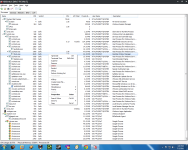
KillSwitch
[attachment=551]
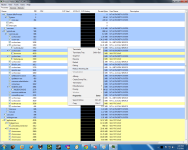
Process Hacker
[attachment=552]
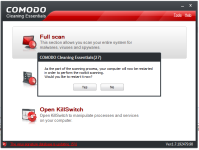
I didn't manage yet to play with CCE since it requires a restart in order to be able to complete a scan(which is not cool)..
[attachment=553]
Again what is your experience with this product?Any FP?
What other rating can it give?Dangerous,Suspicious,Unknown?
Did you ever saw or read a report of a false positive?
KillSwitch
[attachment=551]
Process Hacker
[attachment=552]
I didn't manage yet to play with CCE since it requires a restart in order to be able to complete a scan(which is not cool
)..[attachment=553]
Again what is your experience with this product?Any FP?
Attachments
D
Deleted member 178
Thread author
You find the point, with KS you can truly delete the process (see the link below) in addition to terminate it, imagine the beginner deleting some windows vital processes and after saying " hey my windows dont work ! "
http://help.comodo.com/topic-119-1-208-2102-Stopping,-Starting-and-Handling-the-Processes.html
The Verdict column indicate a file as 'safe' or 'unsafe' or like actually, on my system, i have 3 processes flagged at "FLS.unknown" (but i know what is it, luckily).
KS allow to upload the file directly to Virus Total or Jotti; not a useless feature.
post edited
http://help.comodo.com/topic-119-1-208-2102-Stopping,-Starting-and-Handling-the-Processes.html
The Verdict column indicate a file as 'safe' or 'unsafe' or like actually, on my system, i have 3 processes flagged at "FLS.unknown" (but i know what is it, luckily).
KS allow to upload the file directly to Virus Total or Jotti; not a useless feature.
post edited
I know this is not about CCE or KS.
 fftopic:
This is the same with Comodo Program Manager, Windows Services can be completely uninstalled.
Most of Comodo product shouldn't even be recommended for novice to intermediate/advanced users.
Just my view point of Comodo products.
fftopic:
fftopic:This is the same with Comodo Program Manager, Windows Services can be completely uninstalled.
Most of Comodo product shouldn't even be recommended for novice to intermediate/advanced users.
Just my view point of Comodo products.
fftopic:
D
Deleted member 178
Thread author
stormgtr said:Most of Comodo product shouldn't even be recommended for novice to intermediate/advanced users.
Yes you right Storm, Comodo products like CIS or CCE involve advanced knowledge for being used at maximum efficiency, some beginners illuminated by the "i want maximum protection, because it is coooool" use them and screw their system...

I hope and trust that COMODO will never flag a windows process as malicious but I see your point if a inexperienced user will install a legit but less know app. it might get that FLS.unknown and might consider deleting it.Don't really know if a beginner will ever download and use an advance taskmanager or if it will even consider deleting a process but we live in crazy world.umbrapolaris said:You find the point, with KS you can truly delete the process (see the link below) in addition to terminate it, imagine the beginner deleting some windows vital processes and after saying " hey my windows dont work ! "
http://help.comodo.com/topic-119-1-208-2102-Stopping,-Starting-and-Handling-the-Processes.html
The Verdict column indicate a file as 'safe' or 'unsafe' or like actually, on my system, i have 3 processes flagged at "FLS.unknown" (but i know what is it, luckily).
KS allow to upload the file directly to Virus Total or Jotti; not a useless feature.
post edited
The "delete" option looks very useful if you know what you are doing.
Delete - Deletes the selected (running or suspended) process(es) from the disk. KillSwitch can delete any process, including ones protected by rootkits or security software. You will be asked for confirmation before deleting a process. Your computer will need a restart for this action to take effect.
BTW If you chose to delete a process you'll get the "Are you sure?" message right?
D
Deleted member 178
Thread author
Yes Jack, you have the "are you sure..." box.
A quick review of CCE by betanews: http://www.betanews.com/article/Comodo-Cleaning-Essentials-Your-PCs-second-line-of-defense/1305093103
A quick review of CCE by betanews: http://www.betanews.com/article/Comodo-Cleaning-Essentials-Your-PCs-second-line-of-defense/1305093103
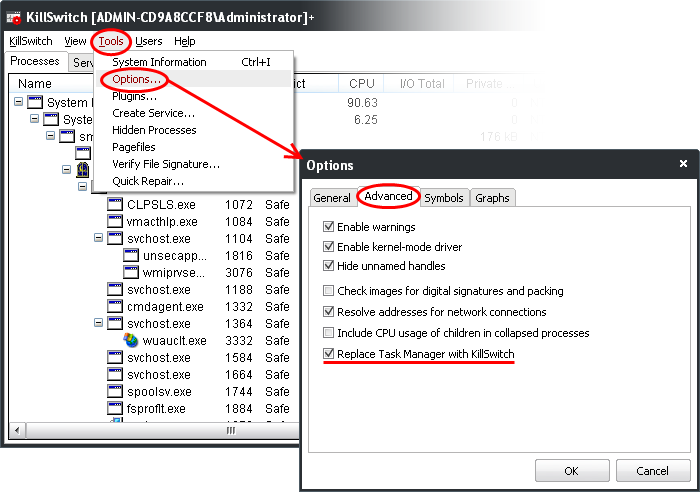
Was playing with KillSwitch and it turns out that there is a way to replace the standard Window taskmanager with KillSwitch.So now this software is my new taskmanager
D
Deleted member 178
Thread author
- Status
- Not open for further replies.
You may also like...
-
 Ending Soon Ashampoo UnInstaller 15 Limited offer for free
- Started by Brownie2019
- Replies: 0
-

-
 App Review Testing Orion Malware Cleaner Designed by Me
- Started by Trident
- Replies: 8
-
Serious Discussion Deep Research: McAfee GTI, JTI, Artemis and Other Technologies Explained
- Started by Trident
- Replies: 2
