Advice Request COMODO website filtering - Any settings to improve protection?

Please provide comments and solutions that are helpful to the author of this topic.
Status
Not open for further replies.

Prayag

Level 4
Thread author
Verified
Well-known
Mar 27, 2017
160
517
266
India
I want to use CIS instead of CFW with avast.
As most of you have known that it's web filtering protection isn't much good.
Can anyone tell me how to improve detection by website filtering module or if we can add filters then which do you recommend and how to add them?
 
Is there some other similar web page with some more bad web page/host like MVPS?

EDIT:
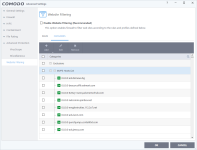
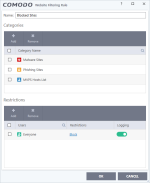
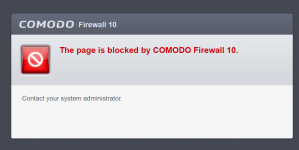
I just set Comodo like you suggest (with MVPS) and now every web page is blocked?

1.png 2.png 3.png
 
Last edited:
You have to check 'Enable Website Filtering' and remove all the 0 from your MVP host txt file.

Check this :
https://malwaretips.com/threads/how-to-block-malicious-websites-or-ads-with-COMODO-v7-v8-web-filter.23741/#post-170325

and this : https://malwaretips.com/threads/how...odo-v7-v8-web-filter.23741/page-2#post-170351


Is there some other similar web page with some more bad web page/host like MVPS?

EDIT:
I just set COMODO like you suggest (with MVPS) and now every web page is blocked?

View attachment 157494 View attachment 157495 View attachment 157496
 
Last edited:
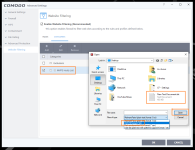
That didn't help, but I found what was wrong.
You must import that .txt as a HOSTS format (check image).

1.png
 
You have to check 'Enable Website Filtering' and remove all the 0 from your MVP host txt file.

You said : "that didn't help' but about importing the txt file as Host format , you could read on the second link I gave you.
Maybe you missed this link ? ;)

It was about that bold stuf ("...and remove all the 0 from your MVP host txt file").
Tnx anyway :)
 
Status
Not open for further replies.

You may also like...