

The MalwareTips app
Your community, one tap away.
Open MalwareTips from your Home Screen or desktop. Follow discussions, find answers and pick up where you left off.
- Home Screen access
- Optional push alerts
- Your community
You're ready to explore.Explore what's new
Installation instructions
iPhone & iPad
- Open MalwareTips in Safari and tap Share. You may need to open the Page Menu first.
- Choose Add to Home Screen. If it is not listed, use Edit Actions to add it.
- Keep Open as Web App enabled if shown, then tap Add.
Android
- Open MalwareTips in Chrome or another browser that supports app installation.
- Open the browser menu and look for Install app, Install and create shortcut, or Add to Home screen.
- Choose Install and confirm. Wording varies by browser.
Desktop
- Chrome: use the install icon in the address bar, or the menu under Cast, save and share.
- Edge: open the menu, then More tools, Apps and Install this site as an app.
- Safari on Mac: choose Share or File, then Add to Dock. Firefox on Windows: look for the web apps button in the address bar.
If you cannot find an install option, update your browser or use its bookmark option to keep MalwareTips close.
Keep up with your conversations
After installation, open the app and sign in. Enable push notifications in Preferences if you want alerts. On iPhone and iPad, push requires a Home Screen web app and iOS or iPadOS 16.4 or later.
Sign in to manage notificationsInstallation is optional. Your notification settings stay under your control.
You are using an out of date browser. It may not display this or other websites correctly.
You should upgrade or use an alternative browser.
You should upgrade or use an alternative browser.
Advice Request Compression tool with the best capacity to reduce folders dimension
- Thread starter aidunno
- Start date
System utilities
10 Replies
1,390 Views
Share practical recommendations that address the author's needs.

I've used 7-Zip in past with their 7z format and it gave me good results. How much it will be able to compress depends mostly on what kind of data you have in those folders.

7Z provides the best compression result with medium compression level.
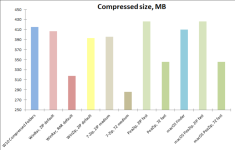
for a full comparison: Compression benchmark: 7-Zip, PeaZip, WinRar, WinZip comparison
for a full comparison: Compression benchmark: 7-Zip, PeaZip, WinRar, WinZip comparison

If your main target is the strength of password protection rather than size, try pea file format of Peazip, and change the encryption method in settings from default to AES, Serpent and Twofish.7Z provides the best compression result with medium compression level.
View attachment 290834
for a full comparison: Compression benchmark: 7-Zip, PeaZip, WinRar, WinZip comparison

7zip for best compression ratio

Depends in the content you are trying to compress. If you are trying to compress Video/Audio with something like 7zip or winrar, then don't. It's not worth the compute power or time.Hi,
I've got a problem. My ext hdd is a bit full. Which is the best software to compress folders I don't use?
For media files, I would suggest re-encoding with handbrake but it comes at a cost of reduced quality.
Good that you mentioned HandBrake for media files. I used it to re-encode 10 video files, their original size was 1.2 GB. After compression, they became 270 MB. I did not notice a change in quality, I think it depends on the video and the preset used in the encoding.For media files, I would suggest re-encoding with handbrake but it comes at a cost of reduced quality.
@aidunno Since we're talking about reducing space in general, you can use a feature called "Compact OS":
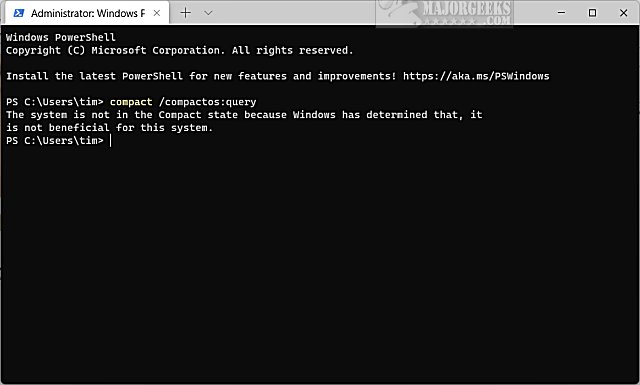
here is how to use it:Compact OS in Windows 11 is a feature that allows the operating system files to be installed as compressed files, helping to save disk space. It can be enabled or disabled at any time using the command line, making it useful for devices with limited storage.
How to Enable or Disable Compact OS in Windows 10 & 11 - MajorGeeks
Windows 10 and Windows 11 include tools to help you use less drive space, including Compact OS, which allows you to run the operating system from compressed files. When running CompactOS, Windows update can replace or remove individual files as needed to help maintain the drive footprint size...
www.majorgeeks.com
Can repeated compression/decompression cause excessive write to ssd?@aidunno Since we're talking about reducing space in general, you can use a feature called "Compact OS":
here is how to use it:
How to Enable or Disable Compact OS in Windows 10 & 11 - MajorGeeks
Windows 10 and Windows 11 include tools to help you use less drive space, including Compact OS, which allows you to run the operating system from compressed files. When running CompactOS, Windows update can replace or remove individual files as needed to help maintain the drive footprint size...www.majorgeeks.com
Can enabling compact OS negatively impact the performance?
No, it shouldn't. Compact OS only compresses the existing operating system files. This is a one-time operation that rewrites the files into a compressed form. It does not continuously recompress files that are already compressed. New Files and Future Windows updates are also installed in a compressed state. When you use a file, it is decompressed into RAM for use, and it remains compressed on the disk. But remember you are trading-off between the reduced disk reading and the increased CPU usage required for on-the-fly decompression.Can repeated compression/decompression cause excessive write to ssd?
Can enabling compact OS negatively impact the performance?

Compact OS, single-instancing, and image optimization
Windows 10 includes tools to help you use less drive space.
learn.microsoft.com

For applying CompactOS on other files on your harddisk, you may use this program. It also offers more compression algorithms

 github.com
GitHub - IridiumIO/CompactGUI: Reduce the space taken up by games and programs on disk by using native Windows APIs
Reduce the space taken up by games and programs on disk by using native Windows APIs - IridiumIO/CompactGUI
github.com
Recently browsing
Members who viewed this thread in the last 5 minutes
You may also like...
-

-

-

-

-
 Serious Discussion The new Malwarebytes Scam Guard within Browser Guard is amazing.