ConfigureDefender utility for Windows 10/11

@SeriousHoax You can view like this : explorer
C drive -> programdata -> Microsoft -> windows defender -> Platform - look inside folder what latest update is.
I'm not sure what you mean! I know the location of the folder. I was talking about changelog. I don't know what changes/bug fix this update has.
 
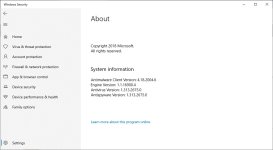
Version number is in Windows Security -> Settings -> About
 

Attachments

  • about.jpg
    about.jpg
    57.5 KB · Views: 270
The CPU load option only affects scanning, not real time protection, right? WD will always be heavy on resources...
Yes. Furthermore, it probably does not work properly on some computers. WD is not heavy on resources (RAM, CPU on idle, etc.). In fact, if you will not do management work with many files (copy, backup, install, full scan, open folders with many executables), the WD is one of the fastest AVs (system start, web browsing, launching installed applications, editing documents, watching media, playing games, etc.).
 
Maybe WD will also work better in next Windows 10 May 2020 Update, or version 2004 , it seems that windows computers with a HDD will run faster and smoother ....

 
Last edited:
Maybe WD will also work better in next Windows 10 May 2020 Update, or version 2004 , it seems that windows computers with a HDD will run faster and smoother ....

This isn't about WD. It's the Windows indexing service for Windows Search.
Anyway everyone can change the indexing folder to reduce the workflow too. Also the Indexer Diagnostics App from Microsoft can help too.
 
This isn't about WD. It's the Windows indexing service for Windows Search.
Anyway everyone can change the indexing folder to reduce the workflow too. Also the Indexer Diagnostics App from Microsoft can help too.
He @Pat MacKnife wrote "maybe" WD and didn't meant for sure ;)

Maybe WD will also work better in next Windows 10 May 2020 Update, or version 2004 , it seems that windows computers with a HDD will run faster and smoother ....
 
Yes. Furthermore, it probably does not work properly on some computers. WD is not heavy on resources (RAM, CPU on idle, etc.). In fact, if you will not do management work with many files (copy, backup, install, full scan, open folders with many executables), the WD is one of the fastest AVs (system start, web browsing, launching installed applications, editing documents, watching media, playing games, etc.).
Then why does everyone complain so much around here, saying it's one of the heaviest?
 
Last edited:
Then why does everyone complain so much around here, saying it's one of the heaviest?
Did you properly count complaints and positive opinions? I have the impression that there are more people on MT who do not complain or complain for other reasons (simplistic GUI, configuration problems, quarantine problems, etc.). Those who complain on resources usually have in mind the slow file management (many files - copy, install, full scan, etc.). Many users do such things sporadically, so they do not complain. See for example the old thread:
Anyway, the WD performance is well known from the professional tests, although different Labs can measure different parameters.
 
Then why does everyone complain so much around here, saying it's one of the heaviest?
I tried again WD after more of one year now. Is realy light on my system. Very fast boot compair with Avast , low ram usage , have some cpu spikes sometimes but is 10 sec for one time or two times the days. And the members he know me here i am sick with the performance. And i am stick with WD now.
 
I tried again WD after more of one year now. Is realy light on my system. Very fast boot compair with Avast , low ram usage , have some cpu spikes sometimes but is 10 sec for one time or two times the days. And the members he know me here i am sick with the performance. And i am stick with WD now.
The problem is that WD is weaker at protection.
I also think you will have better performance in gaming with this:

 
Last edited:
I tried again WD after more of one year now. Is realy light on my system. Very fast boot compair with Avast , low ram usage , have some cpu spikes sometimes but is 10 sec for one time or two times the days. And the members he know me here i am sick with the performance. And i am stick with WD now.
Do full scans when you are going to bed. You will sleep soundly and the scan will be already done when you will awake. :)
 
Last edited:
The problem is that WD is weaker at protection.
I also think you will have better performance in gaming with this:
That will depend on the chosen settings. WD on ConfigureDefender MAX Protection Level is similar to Avast on Max settings.
It would be better if you have something more than belief about WD gaming performance.
There is no reason for believing that Avast could have a better gaming performance than WD - Windows 10 has Game Mode turned on by default. Some people simply make a quick scan before gaming.
 
Last edited: