AV-Comparatives Consumer Summary Report 2025

Disclaimer
  1. This test shows how an antivirus behaves with certain threats, in a specific environment and under certain conditions.
    We encourage you to compare these results with others and take informed decisions on what security products to use.
    Before buying an antivirus you should consider factors such as price, ease of use, compatibility, and support. Installing a free trial version allows an antivirus to be tested in everyday use before purchase.

I still feel some residual disappointment that Avira doesn't at least fare better for system performance. It ranked 14 in the last AV-Comparatives performance test.

I had a fondness for Avira AntiVir many years back. Does anyone have some recent experience with it? Does the core product work any differently from the SDK?
I also too have the same fondness for Antivir from back around the 07-08 era. I have used the newest versions off and on through the last two years and I have never been too impressed, The detection lacking next to Avast/AVG, a noticeable system impact, and certain bugs that keep coming back from time to time. But, at the same time i don't want to see them just be another Avast/Avg under the hood either.
 
I also too have the same fondness for Antivir from back around the 07-08 era. I have used the newest versions off and on through the last two years and I have never been too impressed, The detection lacking next to Avast/AVG, a noticeable system impact, and certain bugs that keep coming back from time to time. But, at the same time i don't want to see them just be another Avast/Avg under the hood either.
With the presence of Gen Digital we still have access to other options: G Data, Bitdefender, Kaspersky, Eset, Trend Micro, Emsisoft, Webroot and Malwarebytes.
 
If you like Avira, then you should use F-Secure which is basically Avira with a better inflterface and does not come with any of Avira's bloat.
And IMO, has better online, browser protection as well as the excellent Banking protection, and Shopping protection.

Even though about 8 months ago they are now showing with ghost panels features that are missing from Internet Security compared to Total, it doesn't bother me. They are a company who wants people to be aware of the other options, for their benefit $$, and for our security benefit. But, there aren't any pop-ups or promotions at all.

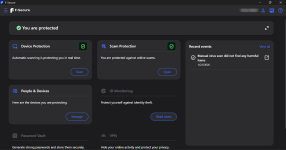
Edit: I included an image of I.S.

Screenshot 2026-01-22 123508.png
 
Last edited:
This has almost no impact. Currently my two streaming update folders combined is only 1.01 MB. That's the size of streaming updates they have released so far today.
ESET also has streaming updates called pico updates, but they are not quite the same as they download one every 10 minutes.

I gave this to ChatGPT and Gemini and both said that even though it's indirect disk writes, it is actual disk writes happening on your drive.

BTW, my answer about System Informer being fooled (fooled is not the correct word) by virtual disk writes as actual disk writes comes the AdGuard CTO, Andrey Meshkov. Someone already had asked him about AdGuard's I/O writes in 2016, and I asked if his 2016 answer is still valid in 2024 where I showed him that according to System Informer, AdGuard has very high disk writes. Basically, any write operation happening on the browser were being counted as AdGuard writes. While the same app in "Disk" section showed almost no writes from AdGuard. Only AdGuard writes were by very tiny cert.db and cert.db-journal files. They disappear even before windows explorer can refresh the screen to show them. I had to use the Everything app to see whether these cert.db and cert.db-journal file actually exists or not.

His original reply was, "Adguard service (working in user mode) communicates with the network driver (kernel mode) through a virtual device. In the task manager this communication is counted as usual IO, while in fact this has nothing to do with the HDD, it uses a shared memory object."

To my reply he added, "cert.db is an SQLite database where AdGuard stores domain certificates that are generates when conducting the filtering.
cert.db-journal is a temporary file that's generated by SQLite whenever you modify the database.
AG would generate a new cert every time you visit a new domain you've not visited before. However, the cert sizes are pretty small (about 2-4KB per domain) so the amount of disk writes will be relatively small. Also, the certs are cached and at some point there will be a very limited number of new writes."

So based on evidence, his answer was correct.

Same happens for Avast. If you watch a video on YouTube or something live like a football match or a stream on Twitch, System Informer shows that every MB that being downloaded to load those videos or stream are disk writes of Avast. You will actually see double disk writes. One by Avast, one by your browser. But in reality, Avast is not doing any writes. It's done by the "System" Process in your browser's cache folder. The cache is on Ramdisk Z: drive in my case.
View attachment 294734
Both having HTTPS scanning and both using kernel level network driver to intercept network requests make it look like to the sensor that they are causing disk writes.

BTW, System Informer are not using any special sensor. They get their data from Windows itself. Their dev told me that, "These statistics are maintained by the kernel independently of anything System Informer does". So, fooled is not the correct word. Windows itself is misleading it.
I realized that I was wrong about this analysis of mine. I mean writes are only being done in the browser cache, not by Avast is wrong. What System Informer's disk write column showed was double writes which is accurate. One by Browser, one by Avast. It seems System Informer's value is always accurate one way or another.

I noticed write activities from AVG in the temp folder while watching YouTube. So to properly measure, I opened a YouTube video and set Process Monitor to log activities of the AVG processes only. I played a video for 2-3 minutes. Saved the log as a CSV file and let Claude analyze it. I asked it to tell me about the disk writes.
avast.png
avast2.png

As you can see in the screenshot, AVG/Avast/Norton do their HTTPS scanning even on YouTube, and for doing so, they have to scan all the contents, including the video streams in real-time to look for malicious contents. This scanning cache for Avast is written in the temp folder, so in your SSD/HDD. Your browser already writes cache in its own cache folder, while this write from Avast is extra. So it seems, if you watch a 100 MB YouTube video, with Avast/AVG/Norton you will end up writing double the amount on your SSD.
I don't know why Avast thinks it's necessary to do HTTPS scanning on YouTube. ESET and Bitdefender, for example don't do it on YouTube, so they by default, avoid these excessive disk writes when you watch YouTube.
This is not just YouTube for Avast, any website you visit, anything that is loaded by your browser, is written temporarily in Avast's cache to be scanned by it. So this is the reason, Avast disk writes on System Informer always keeps increasing as you browse the web. I don't remember seeing this for other AV products with HTTPS scanning, like Bitdefender, ESET, and Kaspersky. Avast's HTTPS scanning method is different. It seems this method causes more disk writes than the methods used by Avast. Others may also cause writes when scanning a streamed content like a live sports match. I did a small test with ESET in a live sports streaming site where ESET was doing HTTPS scanning. ESET wrote 21 MB in 3-4 minutes in the Temp folder like Avast, but I thought I watched more than 21 MB worth of live streaming. So I need to test again.

I did a brief test with Bitdefender also, but Bitdefender doesn't do HTTPS scanning on 8/10 sites I visit, including my current go-to site for watching sports. So it not doing HTTPS scanning on most sites means they avoid these extra disk writes + faster web browsing in most cases.
I haven't tested Kaspersky. Kaspersky usually does HTTPS scanning on most websites, so it would be interesting for me to learn if it causes similar extra writes also.

Anyway, Avast is the biggest offender here. So if you're an Avast/AVG/Norton user, you may want to disable HTTPS scanning.

Avast support doc clearly states that there is a correlation between your internet speed, your HDD speed and Avast's webguard, impacting the speed.
 
I realized that I was wrong about this analysis of mine. I mean writes are only being done in the browser cache, not by Avast is wrong. What System Informer's disk write column showed was double writes which is accurate. One by Browser, one by Avast. It seems System Informer's value is always accurate one way or another.

I noticed write activities from AVG in the temp folder while watching YouTube. So to properly measure, I opened a YouTube video and set Process Monitor to log activities of the AVG processes only. I played a video for 2-3 minutes. Saved the log as a CSV file and let Claude analyze it. I asked it to tell me about the disk writes.
View attachment 295759View attachment 295760
As you can see in the screenshot, AVG/Avast/Norton do their HTTPS scanning even on YouTube, and for doing so, they have to scan all the contents, including the video streams in real-time to look for malicious contents. This scanning cache for Avast is written in the temp folder, so in your SSD/HDD. Your browser already writes cache in its own cache folder, while this write from Avast is extra. So it seems, if you watch a 100 MB YouTube video, with Avast/AVG/Norton you will end up writing double the amount on your SSD.
I don't know why Avast thinks it's necessary to do HTTPS scanning on YouTube. ESET and Bitdefender, for example don't do it on YouTube, so they by default, avoid these excessive disk writes when you watch YouTube.
This is not just YouTube for Avast, any website you visit, anything that is loaded by your browser, is written temporarily in Avast's cache to be scanned by it. So this is the reason, Avast disk writes on System Informer always keeps increasing as you browse the web. I don't remember seeing this for other AV products with HTTPS scanning, like Bitdefender, ESET, and Kaspersky. Avast's HTTPS scanning method is different. It seems this method causes more disk writes than the methods used by Avast. Others may also cause writes when scanning a streamed content like a live sports match. I did a small test with ESET in a live sports streaming site where ESET was doing HTTPS scanning. ESET wrote 21 MB in 3-4 minutes in the Temp folder like Avast, but I thought I watched more than 21 MB worth of live streaming. So I need to test again.

I did a brief test with Bitdefender also, but Bitdefender doesn't do HTTPS scanning on 8/10 sites I visit, including my current go-to site for watching sports. So it not doing HTTPS scanning on most sites means they avoid these extra disk writes + faster web browsing in most cases.
I haven't tested Kaspersky. Kaspersky usually does HTTPS scanning on most websites, so it would be interesting for me to learn if it causes similar extra writes also.

Anyway, Avast is the biggest offender here. So if you're an Avast/AVG/Norton user, you may want to disable HTTPS scanning.

Avast support doc clearly states that there is a correlation between your internet speed, your HDD speed and Avast's webguard, impacting the speed.
So Avast writes excessively for https scanning and B for updates; if I am going to disable https scanning of Avast, then its web protection is not superior to MD.
 
Anyway, Avast is the biggest offender here. So if you're an Avast/AVG/Norton user, you may want to disable HTTPS scanning.

Avast support doc clearly states that there is a correlation between your internet speed, your HDD speed and Avast's webguard, impacting the speed.
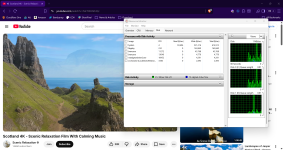
Interesting. I decided to try it for myself using Avast Premium, and Resource Monitor didn't reflect the behavior you describe.

HTTPS scanning is definitely enabled. I continuously played a 4K video in YouTube while watching Resource Monitor, and it showed zero disk writes from Avast's processes (AvastSvc.exe and aswEngSrv.exe).

From what I understand, Avast Intelligent Stream Scanning is explicitly designed to make this as efficient as possible.
 

Attachments

  • Screenshot 2026-02-18 121919.png
    Screenshot 2026-02-18 121919.png
    3.6 MB · Views: 97
I realized that I was wrong about this analysis of mine. I mean writes are only being done in the browser cache, not by Avast is wrong. What System Informer's disk write column showed was double writes which is accurate. One by Browser, one by Avast. It seems System Informer's value is always accurate one way or another.

I noticed write activities from AVG in the temp folder while watching YouTube. So to properly measure, I opened a YouTube video and set Process Monitor to log activities of the AVG processes only. I played a video for 2-3 minutes. Saved the log as a CSV file and let Claude analyze it. I asked it to tell me about the disk writes.
View attachment 295759View attachment 295760
As you can see in the screenshot, AVG/Avast/Norton do their HTTPS scanning even on YouTube, and for doing so, they have to scan all the contents, including the video streams in real-time to look for malicious contents. This scanning cache for Avast is written in the temp folder, so in your SSD/HDD. Your browser already writes cache in its own cache folder, while this write from Avast is extra. So it seems, if you watch a 100 MB YouTube video, with Avast/AVG/Norton you will end up writing double the amount on your SSD.
I don't know why Avast thinks it's necessary to do HTTPS scanning on YouTube. ESET and Bitdefender, for example don't do it on YouTube, so they by default, avoid these excessive disk writes when you watch YouTube.
This is not just YouTube for Avast, any website you visit, anything that is loaded by your browser, is written temporarily in Avast's cache to be scanned by it. So this is the reason, Avast disk writes on System Informer always keeps increasing as you browse the web. I don't remember seeing this for other AV products with HTTPS scanning, like Bitdefender, ESET, and Kaspersky. Avast's HTTPS scanning method is different. It seems this method causes more disk writes than the methods used by Avast. Others may also cause writes when scanning a streamed content like a live sports match. I did a small test with ESET in a live sports streaming site where ESET was doing HTTPS scanning. ESET wrote 21 MB in 3-4 minutes in the Temp folder like Avast, but I thought I watched more than 21 MB worth of live streaming. So I need to test again.

I did a brief test with Bitdefender also, but Bitdefender doesn't do HTTPS scanning on 8/10 sites I visit, including my current go-to site for watching sports. So it not doing HTTPS scanning on most sites means they avoid these extra disk writes + faster web browsing in most cases.
I haven't tested Kaspersky. Kaspersky usually does HTTPS scanning on most websites, so it would be interesting for me to learn if it causes similar extra writes also.

Anyway, Avast is the biggest offender here. So if you're an Avast/AVG/Norton user, you may want to disable HTTPS scanning.

Avast support doc clearly states that there is a correlation between your internet speed, your HDD speed and Avast's webguard, impacting the speed.
themostinterestingman-yes.gif
 
Interesting. I decided to try it for myself using Avast Premium, and Resource Monitor didn't reflect the behavior you describe.

HTTPS scanning is definitely enabled. I continuously played a 4K video in YouTube while watching Resource Monitor, and it showed zero disk writes from Avast's processes (AvastSvc.exe and aswEngSrv.exe).

From what I understand, Avast Intelligent Stream Scanning is explicitly designed to make this as efficient as possible.
Perhaps because you are trying this in a private window, I have noticed that Chromium browsers do not write to disk when used in private browsing mode as much as they do in normal mode.
 
So Avast writes excessively for https scanning and B for updates; if I am going to disable https scanning of Avast, then its web protection is not superior to MD.
No, it is not superior. Avast's web protection is still many times better. Disabling HTTPS scanning means, it will not decrypt a sites' content to scan. Scanning the HTML to look for malicious code, for example. Sites blacklisted by Avast (HTTP/HTTPS) will still be blocked without their HTTPS scanning feature.
Interesting. I decided to try it for myself using Avast Premium, and Resource Monitor didn't reflect the behavior you describe.

HTTPS scanning is definitely enabled. I continuously played a 4K video in YouTube while watching Resource Monitor, and it showed zero disk writes from Avast's processes (AvastSvc.exe and aswEngSrv.exe).

From what I understand, Avast Intelligent Stream Scanning is explicitly designed to make this as efficient as possible.
You're unlikely to see Avast process here using any built-in Windows tools including Microsoft's, Process Explorer. It falls under the "System" process usually. This is usually true for even files downloaded via a download manager. The writes in their case will be attributed to the System process. It's something like Avast telling the system to do things on its behalf.
System Informer can individually identify the process responsible for the activities.
In case of AVG, the folder where this happens is, "C:\Windows\Temp\_avg_\". So for Avast's case, it's probably avast instead of avg.
 
The concept of SmartScreen, blacklisting, no realtime examination.
Yeah. Though even SmartScreen does some kinds of real-time analysis, it happens on the server side. SmartScreen is not bad; better than Google Safe Browsing but top third-party AV products like Avast, Avira, Bitdefender, ESET, Kaspersky, etc. are better.
For example, SmartScreen and Google Safe Browsing will not block a site where you will find fake cracks (malware) of a program because these fake download links on these sites are usually third-party link shortener links that redirect users to a malicious download link. So in theory, these sites themselves don't host the malware, hence not blocked. But AV products will block them as they direct users to fake crack downloading links.
 
SmartScreen and Google Safe Browsing will not block a site where you will find fake cracks (malware) of a program because these fake download links on these sites are usually third-party link shortener links that redirect users to a malicious download link
uBO do the job; it's a real security tool.
 
No, it is not superior. Avast's web protection is still many times better. Disabling HTTPS scanning means, it will not decrypt a sites' content to scan. Scanning the HTML to look for malicious code, for example. Sites blacklisted by Avast (HTTP/HTTPS) will still be blocked without their HTTPS scanning feature.

You're unlikely to see Avast process here using any built-in Windows tools including Microsoft's, Process Explorer. It falls under the "System" process usually. This is usually true for even files downloaded via a download manager. The writes in their case will be attributed to the System process. It's something like Avast telling the system to do things on its behalf.
System Informer can individually identify the process responsible for the activities.
In case of AVG, the folder where this happens is, "C:\Windows\Temp\_avg_\". So for Avast's case, it's probably avast instead of avg.
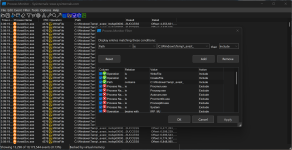
Okay, I ran a new experiment. I asked Process Monitor to show me every CreateFile and WriteFile event occuring in C:\Windows\Temp\_avast_\.

I downloaded a 4.5 GB archive over HTTPS and watched two minutes of the same 4K video on YouTube. After this, Process Monitor's filter showed me 13,298 WriteFile events to the temp folder.

Screenshot 2026-02-18 152022.png

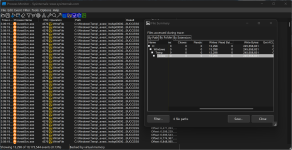
The file summary revealed a total of ~245.65 MB written.

Screenshot 2026-02-18 152128.png

Only watching the same two minutes of 4K video (without the 4.5 GB download) resulted in ~91.35 MB written.

Are we sure that no other antiviruses need to write blocks of data while scanning network streams? I may just disable HTTPS scanning after all.
 
Last edited by a moderator:
I can confirm that disabling HTTPS scanning eliminated the temp folder writing. Well, better late than never.

I don't believe the benefits outweigh the cost. Antiviruses rely on an MITM that reduces privacy to decrypt the stream, and it will still be able to detect the file once the download is completed normally.

Microsoft Defender doesn't perform HTTPS decryption despite it being widespread in the industry.
 
Last edited by a moderator:
Are we sure that no other antiviruses need to write blocks of data while scanning network streams?
Yeah, No HTTPS scanning = No writes for network streaming. ESET has no network stream-related writes on YouTube. Avast's HTTPS scanning writes more than other AV products in my test, even for normal browsing, as I explained in above comments.
I can confirm that disabling HTTPS scanning eliminated the temp folder writing. Well, better late than never.

I don't believe the benefits outweigh the cost. Antiviruses rely on a MITM that reduces privacy to decrypt the stream, and it will still be able to detect the file once the download is completed normally.

Microsoft Defender doesn't perform HTTPS decryption despite being widespread in the industry.
Yeah, I agree. The benefits don't outweigh the negatives. Bitdefender perhaps has the best strategy for this. Their whitelist to skip HTTPS scanning is very large. They whitelist by certificate issuer, it seems (I'm not 100% sure) and maybe their malware researchers choose which sites should always be scanned based on prevalence and threat telemetry.