New Update CyberLock 8.0

I see that you got the Microsoft Defender update one week before me. I presume it's released progressively and it's not immediately available for all Windows' users.
Possibly though I am in England so that might be a factor.

On a different note, liking the Smart Firewall default rules to block LOL bins in windows firewall. Been thinking of using WFC along side it but not sure if that's really needed given that CL can create block rules for unsafe files anyway.
 
I installed Windows Firewall Control some years ago and I'm still using it. At the moment I haven't enabled CyberLock firewall, I don't know if enabling both they could conflict or if they can coexist without issues.
 
I installed Windows Firewall Control some years ago and I'm still using it. At the moment I haven't enabled CyberLock firewall, I don't know if enabling both they could conflict or if they can coexist without issues.
Cool. They coexist without issues. the Smart Firewall just creates some block rules like Andy Ful's Firewall Hardening does but they are visible in WFC when I had a brief test with it. Will give WFC another go ;)
 
Thanks for the info. I'll enable CyberLock's firewall then.
Yeah, works just fine without issue. They'll show up in WFC rules like the below ;)
1747949860709.png
 
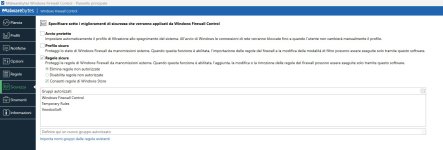
I just remembered that I had enabled "Safe rules" in WFC Security settings so first I manually added VoodooSoft in authorized groups and after that I set CyberLock firewall to recommended to successfully populate WFC with VoodooSoft rules too.

WFC Security settings.jpg
 
Last edited:
I just remembered that I had enabled "Safe rules" in WFC Security settings so first I manually added VoodooSoft in authorized groups and after that I set CyberLock firewall to recommended to successfully populate WFC with VoodooSoft rules too.

View attachment 288722
Great. I hadn't enabled those protections in WFC but I probably should and probably secure profile. Anyway glad it's working. Back on topic, look forward to Danb's response to the defender update blocks.
 
can you guys please send me your DeveloperLog.log file: C:\ProgramData\CyberLock\DeveloperLog.log
Hi Dan,
I used Notepad++ to extract the rows containing only the references to msmpeng.exe and mpdefendercoreservice.exe. If you also need my full C:\ProgramData\CyberLock\DeveloperLog.log please let me know.
 

Attachments

Hey Guys,

Here is the latest version of CyberLock, there were two bug fixes and a few minor optimizations. There was a bug that was blocking Hasleo Backup and also Microsoft Defender, both should be fixed in this version, but if you guys find anything that needs to be fixed, please let me know!

CyberLock 8.02
SHA-256: bc9c3eb8baf5f6d199cfde1049e42c06fe334f1af5ab1457cf5664e02274d0b7

Thank you Guys!
 
Hey Guys,

Here is the latest version of CyberLock, there were two bug fixes and a few minor optimizations. There was a bug that was blocking Hasleo Backup and also Microsoft Defender, both should be fixed in this version, but if you guys find anything that needs to be fixed, please let me know!

CyberLock 8.02
SHA-256: bc9c3eb8baf5f6d199cfde1049e42c06fe334f1af5ab1457cf5664e02274d0b7

Thank you Guys!
Nice one thanks! Installed without issue, I exited running CL first.
 
Hi Dan, slight glitch using 8.02. I have the setting for "Show Whitelist Cloud tray icon" turned off however when I turn my computer back on in the morning it is turned back on, happens everyday. Thanks.
Oops... I think I know exactly what the issue is, it will be fixed in the next version, thank you!
 
@Digmor Crusher, I looked at the code and the change I had made was already corrected. Can you please email me your DeveloperLog.log? BTW, does this happen only when you restart your computer, or does it also happen if you exit CyberLock, and then start it again, without rebooting the computer?

BTW, I am pretty much finished updating all of the apps, and I have always wanted to explore the possibility of implementing a LLM into VoodooAi, so that is what I have been working on. It looks like it might turn into a massive project (in order to do it correctly), but I think it might be pretty cool. I should know in a few days if it will be worth implementing or not. Then again, with the progress they are making with LLM's, even if it is not viable at this point, it should be soon... and we will be ready for it ;).
 
Hi Dan, slight glitch using 8.02. I have the setting for "Show Whitelist Cloud tray icon" turned off however when I turn my computer back on in the morning it is turned back on, happens everyday. Thanks.
I also had that problem. Settings keep reverting to default. Until I made this changes. Not sure if it is related.
Screenshot 2025-05-31 125316.png
Screenshot 2025-05-31 125123.png
 
I also had that problem. Settings keep reverting to default. Until I made this changes. Not sure if it is related.
View attachment 288885View attachment 288886
Thank you... yes, either one of these might be the cause for users who have been running CyberLock for a long time, since so much has changed in the desktop software and in the web management console. @Digmor Crusher should disable the Synchronize and backup my Settings to the cloud, or if he wants to use the web management console to adjust the settings, then enable the setting. The "Use the same settings for all users" option might work as well because it give you a brand new settings file.

Also, you can always reset the settings file by clicking on the CyberLock 8.02 at the very bottom left, and Click the Restore Default Settings button at the bottom middle. Settings can become corrupt over time, especially with all of the changes we have had the last couple of years. But new users should not experience this issue, and hopefully moving forward we will not have any more changes to the settings.
 

You may also like...