New Update CyberLock 8.0

That is great to hear! The .db files are protected in that nothing can read or write to them except CyberLock. As far as permissions on the actual .db files go, no software does this as far as I know... this could turn into a real pain for the user and for the backup software (and other utilities). Besides, CyberLock automatically protects these files from malware since it does not allow the malware to run in the first place.


I have pinpointed the cause for the problems mentioned to be the fact that i have several programs installed that use Ms Visual ..., just as CL does. I monitor the installation of these program with HiBit uninstaller, and at a later point when i uninstall any of them, that affects CL badly. Especially Logi Option+ which i install and uninstall rather often. CL does not warn or promt in any way during an uninstall, and after the uninstall CLs function is damaged.

So the self protection of CL has room for improvement.

It should be easily for you to reproduce this by doing a monitored and also standard installing of LO+ with CL, and install and uninstall LO+ a couple of times.
 
99 year license! What, and to who, do I have to do in order to get a 99 year license!?
Its right on the website.
Screenshot 2025-07-20 222833.png
 
I monitor the installation of these program with HiBit uninstaller, and at a later point when i uninstall any of them, that affects CL badly. Especially Logi Option+ which i install and uninstall rather often.
I mentioned these to you in my previous posts.

So the self protection of CL has room for improvement.
I'm unsure, but I believe software or security solutions don't monitor uninstallation or dependencies. I could remove Kaspersky dependencies with no issues, if I recall correctly.
 
  • Like
Reactions: danb
I have pinpointed the cause for the problems mentioned to be the fact that i have several programs installed that use Ms Visual ..., just as CL does. I monitor the installation of these program with HiBit uninstaller, and at a later point when i uninstall any of them, that affects CL badly. Especially Logi Option+ which i install and uninstall rather often. CL does not warn or promt in any way during an uninstall, and after the uninstall CLs function is damaged.

So the self protection of CL has room for improvement.

It should be easily for you to reproduce this by doing a monitored and also standard installing of LO+ with CL, and install and uninstall LO+ a couple of times.
A lot of apps install the C++ runtime, and I am not aware of any that protect it from being uninstalled, it is an interesting point though, and worth looking into. I will look into this when I get a chance, thank you!
 
A lot of apps install the C++ runtime, and I am not aware of any that protect it from being uninstalled, it is an interesting point though, and worth looking into. I will look into this when I get a chance, thank you!

The only program in this mentioned scenario that needs to protect its C++ from being even remotly tampered with, is CL. Which it did not. Because of that it was rendered useless. So, as mentioned, room for improvement for CLs self protection is possible.
 
The only program in this mentioned scenario that needs to protect its C++ from being even remotly tampered with, is CL. Which it did not. Because of that it was rendered useless. So, as mentioned, room for improvement for CLs self protection is possible.
Are you saying that other products detect when the C++ runtimes are uninstalled? I have never heard of this, but if there is an example, please let me know, thank you.
 
Are you saying that other products detect when the C++ runtimes are uninstalled? I have never heard of this, but if there is an example, please let me know, thank you.
I have removed dependencies of quite a few programs and security solutions, and none detected it. They also didn't remove dependencies when I uninstalled them.
 
  • Like
Reactions: danb
Are you saying that other products detect when the C++ runtimes are uninstalled? I have never heard of this, but if there is an example, please let me know, thank you.

I am saying, what i am saying, in post #261.

Which is, to be even clearer, that uninstalling a program like Logi Option +, that uses C++, as CL does, damages the C++ of CL and makes it non-functional.
 
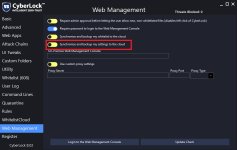
I am having some issues. I have a couple of settings that keep resetting after i reboot my pc. I have already tried to completely remove cyberlock with revo uninstaller and install it again but no luck. The specific settings that keep being reset are.

Autopilot goes back to smart mode.
WhitlistCloud > "Notify me when new Not safe items are detection scans" goes back to off.
UI Tweaks > "Enable Sandbox button in user prompts" goes back to off.
These are probably the default settings of the application. How can i fix this issue? I would like my settings to be saved and applied on reboot.
 
  • Like
  • Wow
Reactions: oldschool and danb
I also have a similar problem. For me, the situation that after restarting or turning on and off of my computer, Cyberlock does not start with Windows. I have to do it manually every time. Can tips on this problem.
 
  • Like
  • Wow
Reactions: oldschool and danb
I am having some issues. I have a couple of settings that keep resetting after i reboot my pc. I have already tried to completely remove cyberlock with revo uninstaller and install it again but no luck. The specific settings that keep being reset are.

Autopilot goes back to smart mode.
WhitlistCloud > "Notify me when new Not safe items are detection scans" goes back to off.
UI Tweaks > "Enable Sandbox button in user prompts" goes back to off.
These are probably the default settings of the application. How can i fix this issue? I would like my settings to be saved and applied on reboot.

Is this setting enabled for you? If so, disable it.
 

Attachments

  • Screenshot 2025-07-25 082600.jpg
    Screenshot 2025-07-25 082600.jpg
    97.6 KB · Views: 112
  • Like
Reactions: RSE9 and danb
I am having some issues. I have a couple of settings that keep resetting after i reboot my pc. I have already tried to completely remove cyberlock with revo uninstaller and install it again but no luck. The specific settings that keep being reset are.

Autopilot goes back to smart mode.
WhitlistCloud > "Notify me when new Not safe items are detection scans" goes back to off.
UI Tweaks > "Enable Sandbox button in user prompts" goes back to off.
These are probably the default settings of the application. How can i fix this issue? I would like my settings to be saved and applied on reboot.
Thank you for letting me know! I wonder if there is a conflict between Revo and CyberLock? There are a handful of people that have this issue, but most users do not have this issue.

If you could email me your C:\ProgramData\CyberLock\DeveloperLog.log and C:\ProgramData\CyberLock\DeveloperServiceLog.log to support at cyberlock.global, there may be a clue to help us fix this issue.
 
  • +Reputation
Reactions: ErzCrz
I also have a similar problem. For me, the situation that after restarting or turning on and off of my computer, Cyberlock does not start with Windows. I have to do it manually every time. Can tips on this problem.
That is odd, thank you for letting me know! If you could email me your C:\ProgramData\CyberLock\DeveloperLog.log and C:\ProgramData\CyberLock\DeveloperServiceLog.log to support at cyberlock.global, there may be a clue to help us fix this issue.
 
  • +Reputation
Reactions: icotonev and ErzCrz

You may also like...