
when I try to launch the app.Or are you talking about the actual app itself?


Open MalwareTips from your Home Screen or desktop. Follow discussions, find answers and pick up where you left off.
If you cannot find an install option, update your browser or use its bookmark option to keep MalwareTips close.
After installation, open the app and sign in. Enable push notifications in Preferences if you want alerts. On iPhone and iPad, push requires a Home Screen web app and iOS or iPadOS 16.4 or later.
Sign in to manage notificationsInstallation is optional. Your notification settings stay under your control.
when I try to launch the app.Or are you talking about the actual app itself?

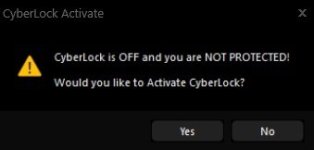
Can you please post a screenshot of the exact prompt that is annoying? I want to make sure I get the one you are talking about, thank you!Also, and this has been bugging me for a long time, is it possible to actually auto re-activate Cyberlock and not just prompt the user to turn it back on? That prompt is annoying, especially when the option to automatically activate is turned on.
View attachment 296145
That is odd... I just tested every single binary in Hard_Configurator_setup_7.0.1.1, and they all had save verdicts. Is this the same version you are using? Can you please post the hash and I can look into it?when I try to launch the app.

Can you please post a screenshot of the exact prompt that is annoying? I want to make sure I get the one you are talking about, thank you!
Yes, one we release to the public, and after we wait a couple of weeks, then the auto update and update check will work. I always wait as long as possible, that way companies do not have to install the update on al of their endpoints. Thank you!

@n8chavez not sure I agree with you on this one, sometimes when I have CL off, I want it off and staying off... my 2 cents (fwiw)
if I follow, 8.48 official public release (or I installed it 03 Feb). 9.00 was beta, 9.01 was perhaps official early release, and 9.02 is expect very soon and expected stable it will become a public release. that is my unofficial understanding...So the latest official i do have?

@n8chavez not sure I agree with you on this one, sometimes when I have CL off, I want it off and staying off... my 2 cents (fwiw)
I will paste the latest version belowSo the latest official i do have?
.
I carefully reviewed and tweaked all of the prompts in the latest version pasted below. You should be able to disable this prompt by disabling the "Notify me after X minutes if CyberLock is off. These prompts are tricky though because we do not want to prompt if it really is not necessary, but we do want to prompt when it is necessary. But I think we have it about right... this is something we have refined over the years. Thank you!
Hey Guys,
Here are the latest versions of our software. These should be ready for public release, but if you find anything please let me know!
The only thing I need to finish up are the CyberLock Rules, but that is going to take a while because I am completely redoing them from scratch.
CyberLock 9.02
SHA-256: c58cc75e5a5889950632e3f1f18ffadf86eacc68504afc2f4017e791bad389bd
SiriusGPT 1.02
SHA-256: 2b32120f1e1a8d8ff30df363667479ae8b04e44410281abef69ff6a1e6a28f2f
SiriusLLM 1.02
SHA-256: cfe5f3d878d86f472788fe3be9efd2e11891b82f385ed9fc89065ee629673094
DefenderUI 2.02
SHA-256: 05f61bfc42b9796ba00bd648770deb2ebc458a63838e179d4956dacf444194b0
DefenderUIPro 2.02
SHA-256: 429d77b117be2114ef6fe193db6e616d1430add386e1ff50ce807041f0f7ce3c
DefenderUISilent 2.02
SHA-256: e09a763fad4f2173ad22959998b80421834dfcc222ff53acbb19fc1ca2b23c08
WDAC Lockdown 2.02
SHA-256: 15ce36cf8de30b3e26039f0736adefcc1bb7c9055b7159fbc7fd07dc49a5d632
Thank you guys!
Dan
Yes, they need a complete rebuildThat's good, because I think the rules have needed a rebuild for a while now.
.
On the tray icon, you probably have to click the up arrow button to find the new tray icons. Or go into Taskbar Settings in Windows / Other System Tray Icons and make sure both of the correct CyberLock icons are enabled... there might be more than a couple.Hello,
I've installed CyberLock 9.02 on top of 9.01 but both tray bar's icons are missing (I had both CyberLock icon and Sirius icon with CyberLock 9.01). C:\Program Files\CyberLock\CyberLock.exe and C:\Program Files\CyberLock\CyberLockService.exe are running. Furthermore CyberLock.exe is constantly accessing the SSD, approximately 300,000 kb per second. I rebooted but the issue persists and both tray bar's icons are still missing so I had to manually end both processes to avoid excessive wear of SSD.
View attachment 296236


Members who viewed this thread in the last 5 minutes

