

The MalwareTips app
Your community, one tap away.
Open MalwareTips from your Home Screen or desktop. Follow discussions, find answers and pick up where you left off.
- Home Screen access
- Optional push alerts
- Your community
You're ready to explore.Explore what's new
Installation instructions
iPhone & iPad
- Open MalwareTips in Safari and tap Share. You may need to open the Page Menu first.
- Choose Add to Home Screen. If it is not listed, use Edit Actions to add it.
- Keep Open as Web App enabled if shown, then tap Add.
Android
- Open MalwareTips in Chrome or another browser that supports app installation.
- Open the browser menu and look for Install app, Install and create shortcut, or Add to Home screen.
- Choose Install and confirm. Wording varies by browser.
Desktop
- Chrome: use the install icon in the address bar, or the menu under Cast, save and share.
- Edge: open the menu, then More tools, Apps and Install this site as an app.
- Safari on Mac: choose Share or File, then Add to Dock. Firefox on Windows: look for the web apps button in the address bar.
If you cannot find an install option, update your browser or use its bookmark option to keep MalwareTips close.
Keep up with your conversations
After installation, open the app and sign in. Enable push notifications in Preferences if you want alerts. On iPhone and iPad, push requires a Home Screen web app and iOS or iPadOS 16.4 or later.
Sign in to manage notificationsInstallation is optional. Your notification settings stay under your control.
You are using an out of date browser. It may not display this or other websites correctly.
You should upgrade or use an alternative browser.
You should upgrade or use an alternative browser.
New Update Defender Hardening Console Executable
- Thread starter Trident
- Start date
Other security for Windows, Mac, Linux
506 Replies
75,140 Views
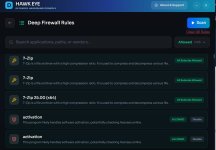

If they are pointing to the same path, they should be deduplicated when you relaunch the software.@Trident Hello, I just noticed some duplicated Deep Firewall Control's rules, both in blocked, like the above screenshot, than in allowed. What could be the reason of that ?
View attachment 296058
If they are pointing to different files/paths then it would be the expected behaviour.

This is an excellent tool. I really appreciate how informative it is, especially when analyzing unfamiliar websites. The interface is visually appealing, and the graphics are well-designed. It provides detailed explanations about any suspicious characteristics it detects on a website, which makes it easy to understand potential risks. It also works very well alongside Windows Defender, making it a strong complementary security solution. When I tested it against spam emails, it successfully blocked nearly every malicious page I attempted to access. Overall, this tool shows great potential to become one of the leading web protection services available.
It will start blocking even more soon, as more features will be integrated.This is an excellent tool. I really appreciate how informative it is, especially when analyzing unfamiliar websites. The interface is visually appealing, and the graphics are well-designed. It provides detailed explanations about any suspicious characteristics it detects on a website, which makes it easy to understand potential risks. It also works very well alongside Windows Defender, making it a strong complementary security solution. When I tested it against spam emails, it successfully blocked nearly every malicious page I attempted to access. Overall, this tool shows great potential to become one of the leading web protection services available.
Although some sites are not fully blocked, the following notification is displayed. This can be controlled in settings to which @nickstar1 doesn't have access yet.
It took insane number of optimisations to render these notifications in the sub-200 millisecond speed level.

It took insane number of optimisations to render these notifications in the sub-200 millisecond speed level.
Very much looking forward to future improvements.Although some sites are not fully blocked, the following notification is displayed. This can be controlled in settings to which @nickstar1 doesn't have access yet.
It took insane number of optimisations to render these notifications in the sub-200 millisecond speed level.
View attachment 296059

Gandalf_The_Grey
Level 86
Verified
Honorary Member
Top Poster
Content Creator
Well-known
Forum Veteran
Looks and runs great hereYou can download an early trial of Helios Web Marshall from here:
deploy.hea-p.com/executable/HeliosSetup.exe
Web Marshall has its own background service, you can choose to install only Web Marshall.
This is not the finalised product, but it is very close.
Download Protection logics need to be tweaked.
The extension will not work without the installed instance of Web Marshall.

I am looking forward to seeing the finished product.
There is a detailed log in ProgramData how exactly the extension operates. I left it on purpose, for transparency.Looks and runs great here
I am looking forward to seeing the finished product.

fwiw -- I reconsidered putting the app & ext on my host win10 (I have to make an image) but will try it on win10_vm with MSD soon. I recall some weeks ago you mentioned it would be ready by 03 March, (iirc) is that still the timeline?

According to this post, there may be a slight drawback regarding WFCNo, Deep Firewall Control isn't a firewall. After a Deep Firewall Control's scan it creates its own allow / block rules based on exe's reputation. If you are looking for a firewall I can suggest what currently I'm using: the 3rd party firewall Windows 11 Firewall Control (formerly Sphinx Software Windows 10 Firewall Control) https://malwaretips.com/threads/windows-10-firewall-control-sphinx-software-opinions.108168/post-1130015 and Binisoft / Malwarebytes Windows Firewall Control which is a enhanced GUI for managing the Windows Firewall New Update - Windows Firewall Control - Updates Thread
Both softwares are free of charge. If you have some questions about them you can post them on the dedicated thread. I'll reply there.
Deep Firewall Scan rules
View attachment 296051


AV-Comparatives Post in thread 'Consumer Summary Report 2025'
It has one negative point, it allow svchost.exe for all processes in the pre-configured rule "Windows update".WFC has a better layout and options (full screen mode) and rules that can be easily verified in VirusTotal


It could be a bit later because Talon initially wasn’t planned.fwiw -- I reconsidered putting the app & ext on my host win10 (I have to make an image) but will try it on win10_vm with MSD soon. I recall some weeks ago you mentioned it would be ready by 03 March, (iirc) is that still the timeline?
Now it’s planned and executed, it just needs to be integrated.
The rest is pretty much done.
There is no other way this could be executed.According to this post, there may be a slight drawback regarding WFC
AV-Comparatives Post in thread 'Consumer Summary Report 2025'
It has one negative point, it allow svchost.exe for all processes in the pre-configured rule "Windows update".WFC has a better layout and options (full screen mode) and rules that can be easily verified in VirusTotal
WFP (Windows Filtering Platform) allows creation of rule either by file path or by PID.
Technically it could be done, but the software will have to re-examine all the running processes, get the PID of the one that is associated with Windows Update and block the rest.
It will have to be performed on every start.
Majority of the firewalls create rules by file path.
No problem, it wasn't so much about your software, but about WFC in general. I remember at one time BD Firewall Alert Mode was alerting after every software update driving some members nuts with continual notifications. I personally ditched WFC in favor of letting Avast firewall handle things.There is no other way this could be executed.
WFP (Windows Filtering Platform) allows creation of rule either by file path or by PID.
Technically it could be done, but the software will have to re-examine all the running processes, get the PID of the one that is associated with Windows Update and block the rest.
It will have to be performed on every start.
Majority of the firewalls create rules by file path.
I got a little tired of the WFC "Allow this?" rule fatigue (even though it quiets down after awhile)
 So IMO, yours is wonderful, more of what I'd want to use
Yeah, it was about this software.No problem, it wasn't so much about your software, but about WFC in general. I remember at one time BD Firewall Alert Mode was alerting after every software update driving some members nuts with continual notifications. I personally ditched WFC in favor of letting Avast firewall handle things.
I got a little tired of the WFC "Allow this?" rule fatigue (even though it quiets down after awhile)
The upcoming HEAT is very different.
New Update has now been pushed.
There are over 300 performance, security and stability fixes, plus UI enhancements.


Other changes:
-Junk cleanup now allows you to view the files and folders that will be cleaned
-Aggressive scan is now more aggressive and comes with a warning
-Network scan is way quicker and more reliable
-The entire scan flow UX has been redesigned from scratch
-The application startup times have been improved
-The settings that are locked behind tamper protection are now more accurately reflected
-Admin elevation is now required by default. Previously, a number of bugs occurred when the app was executed as non-admin, including scan crashes and inability to change Defender settings.
-Various bugs resolved in remediation and PUA removal
I've worked with all vendors to ensure that false positive detections on the software have been cleared. At one point there were over 25 detections on VT which delayed the release - this is to be expected with unsigned software that is rather new.
Shout out to Webroot who have been extremely professional in the process - Webroot took their time to apologize and write a response (their detection was PUA.Gen).
Several other companies also stood out with the way they handle false positives reported by developers (mainly those business-first vendors).
However, there are several companies like Kaspersky, Trend Micro, Eset, Avast and so on who did not produce detections in the first place.
Despite my communication with Ionut from Bitdefender, their Perflogger detection persists and causes several other solutions to keep detecting. Inout ensured me that the detections should be cleared with the next few updates, but this hasn't happened.
I've sent a follow up email to Bitdefender.
As always, please use the following links to download the official copy of this software:
Portable:
Installer/uninstaller
There are over 300 performance, security and stability fixes, plus UI enhancements.
Other changes:
-Junk cleanup now allows you to view the files and folders that will be cleaned
-Aggressive scan is now more aggressive and comes with a warning
-Network scan is way quicker and more reliable
-The entire scan flow UX has been redesigned from scratch
-The application startup times have been improved
-The settings that are locked behind tamper protection are now more accurately reflected
-Admin elevation is now required by default. Previously, a number of bugs occurred when the app was executed as non-admin, including scan crashes and inability to change Defender settings.
-Various bugs resolved in remediation and PUA removal
I've worked with all vendors to ensure that false positive detections on the software have been cleared. At one point there were over 25 detections on VT which delayed the release - this is to be expected with unsigned software that is rather new.
Shout out to Webroot who have been extremely professional in the process - Webroot took their time to apologize and write a response (their detection was PUA.Gen).
Several other companies also stood out with the way they handle false positives reported by developers (mainly those business-first vendors).
However, there are several companies like Kaspersky, Trend Micro, Eset, Avast and so on who did not produce detections in the first place.
Despite my communication with Ionut from Bitdefender, their Perflogger detection persists and causes several other solutions to keep detecting. Inout ensured me that the detections should be cleared with the next few updates, but this hasn't happened.

I've sent a follow up email to Bitdefender.
As always, please use the following links to download the official copy of this software:
Portable:
Installer/uninstaller
Last edited:
What's coming up in the next release:
-Real Time Firewall (under consideration). In this case the software name will change to Privacy + Hardening
-Logs
Helios Web Marshall and Talon have now been complete. I am waiting for the updated extension to be reviewed and published on Chrome Store. The updated extension is already on Mozilla store.
If you are using Firefox and you've previously downloaded Web Marshall, PM me for the update.
The product is officially launching in a few days.


Talon will be available as a standalone extension as well, for Linux users.
-Real Time Firewall (under consideration). In this case the software name will change to Privacy + Hardening
-Logs
Helios Web Marshall and Talon have now been complete. I am waiting for the updated extension to be reviewed and published on Chrome Store. The updated extension is already on Mozilla store.
If you are using Firefox and you've previously downloaded Web Marshall, PM me for the update.
The product is officially launching in a few days.
Talon will be available as a standalone extension as well, for Linux users.
Last edited:
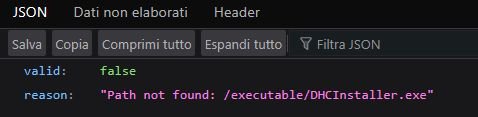
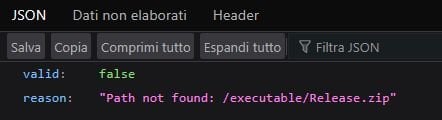
I just edited, it is deploy, not download.Hello, when I click on the links the download doesn't start but a webpage is opened. I'm using Firefox
View attachment 296629
View attachment 296630

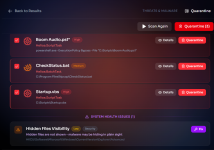
I tested all the scans and they were rather quick considering I've a lot of software and videogames on my system. I ran also a Deep Firewall Scan and I particularly like the colored icons which identify the rules by Categories (Communication, Gaming, Security etc.) I don't remember if they were already present in the previous version.
Nice work !





Nice work !
Recently browsing
Members who viewed this thread in the last 5 minutes
You may also like...
-

-

-
-

-
M
- Opera
- Maciej Kocemba
- · 0