

The MalwareTips app
Your community, one tap away.
Open MalwareTips from your Home Screen or desktop. Follow discussions, find answers and pick up where you left off.
- Home Screen access
- Optional push alerts
- Your community
You're ready to explore.Explore what's new
Installation instructions
iPhone & iPad
- Open MalwareTips in Safari and tap Share. You may need to open the Page Menu first.
- Choose Add to Home Screen. If it is not listed, use Edit Actions to add it.
- Keep Open as Web App enabled if shown, then tap Add.
Android
- Open MalwareTips in Chrome or another browser that supports app installation.
- Open the browser menu and look for Install app, Install and create shortcut, or Add to Home screen.
- Choose Install and confirm. Wording varies by browser.
Desktop
- Chrome: use the install icon in the address bar, or the menu under Cast, save and share.
- Edge: open the menu, then More tools, Apps and Install this site as an app.
- Safari on Mac: choose Share or File, then Add to Dock. Firefox on Windows: look for the web apps button in the address bar.
If you cannot find an install option, update your browser or use its bookmark option to keep MalwareTips close.
Keep up with your conversations
After installation, open the app and sign in. Enable push notifications in Preferences if you want alerts. On iPhone and iPad, push requires a Home Screen web app and iOS or iPadOS 16.4 or later.
Sign in to manage notificationsInstallation is optional. Your notification settings stay under your control.
You are using an out of date browser. It may not display this or other websites correctly.
You should upgrade or use an alternative browser.
You should upgrade or use an alternative browser.
New Update Defender Hardening Console Executable
- Thread starter Trident
- Start date
Other security for Windows, Mac, Linux
506 Replies
75,140 Views
F
ForgottenSeer 123960
An unsigned binary containing the string "Defender" in its name is a textbook heuristic trigger. It falls under "Social Engineering" or "Impersonation" rules. Most EDRs (Endpoint Detection and Response) would typically block this execution immediately simply because it attempts to occupy a trusted namespace without a certificate. The reason "only a few AVs blocked it" is likely because it falls into the "Greyware" or "Potentially Unwanted Program" (PUP) category. It is not self-replicating malware (a virus), it is a tool that requires a user to click buttons to do damage. Many AV engines hesitate to block "Administrative Tools" unless they are widely abused.

New version has been pushed and it has been uploaded to MS proactively.
In this new version there are minimal changes to the application, the changes are mainly to the cloud backend.
Reputation-based detections have now been integrated.
Example: Helios:Malware!Rep1, Rep2 and Rep3.
These deterministic detections have been implemented to reduce false positives and allow certain heuristics to be less aggressive.
Due to the updated cloud backend, older versions of the application will fall back to local heuristics but won't be able to use the AI or reputation lookup.
In this new version there are minimal changes to the application, the changes are mainly to the cloud backend.
Reputation-based detections have now been integrated.
Example: Helios:Malware!Rep1, Rep2 and Rep3.
These deterministic detections have been implemented to reduce false positives and allow certain heuristics to be less aggressive.
Due to the updated cloud backend, older versions of the application will fall back to local heuristics but won't be able to use the AI or reputation lookup.
Planned for the next update:
Exclusions analysis will go local. My tests show that currently the exclusions analysis is quite straightforward. To make the application more private (even though data is not stored), this analysis will be handled by heuristics and not AI. This will also reduce the processing time.
EULA addition: this will be necessary to improve the application legitimacy. It will only have to be accepted once and never again.
Cleanup script/tool: although I’ve went quite gentle on storage and there are no writes to registry whatsoever, there are some files and folders created. Fortunately, that’s quite straightforward too and easy to cleanup. I can do an executable as well, your feedback here would be appreciated.
Botnet IoC: currently the application uses heuristics to detect botnet activity (which is actually better to spot 0 days).
The next version will enable cloud botnet lookup.
Scan profile: now that reputation analysis has been integrated, 2 profiles will appear under scan.
One will detect only known malicious connections and files (suitable as second-opinion scanner), whilst the other one will enable the aggressive heuristics (suitable to be ran on heavily infected systems or when there are clear signs of infection).
The scan profile explanations will be added to the UI.
Exclusions analysis will go local. My tests show that currently the exclusions analysis is quite straightforward. To make the application more private (even though data is not stored), this analysis will be handled by heuristics and not AI. This will also reduce the processing time.
EULA addition: this will be necessary to improve the application legitimacy. It will only have to be accepted once and never again.
Cleanup script/tool: although I’ve went quite gentle on storage and there are no writes to registry whatsoever, there are some files and folders created. Fortunately, that’s quite straightforward too and easy to cleanup. I can do an executable as well, your feedback here would be appreciated.
Botnet IoC: currently the application uses heuristics to detect botnet activity (which is actually better to spot 0 days).
The next version will enable cloud botnet lookup.
Scan profile: now that reputation analysis has been integrated, 2 profiles will appear under scan.
One will detect only known malicious connections and files (suitable as second-opinion scanner), whilst the other one will enable the aggressive heuristics (suitable to be ran on heavily infected systems or when there are clear signs of infection).
The scan profile explanations will be added to the UI.
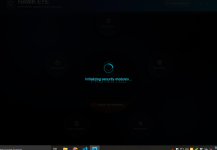
This happens when the backend fails silently.
The backend fails silently because the application is written on modern stack for which not all systems have been updated.
Please install the VS C++ redistributable from this website and try again.
This is an official Microsoft package.

Gandalf_The_Grey
Level 86
Verified
Honorary Member
Top Poster
Content Creator
Well-known
Forum Veteran
Uploading to MS proactively was a great thing to do, no warning when downloading through Edge and no detection by MS Defender anymoreNew version has been pushed and it has been uploaded to MS proactively.
In this new version there are minimal changes to the application, the changes are mainly to the cloud backend.
Reputation-based detections have now been integrated.
Example: Helios:Malware!Rep1, Rep2 and Rep3.
These deterministic detections have been implemented to reduce false positives and allow certain heuristics to be less aggressive.
Due to the updated cloud backend, older versions of the application will fall back to local heuristics but won't be able to use the AI or reputation lookup.

The Helios Quick Scan has a false positive, msdtc.exe:
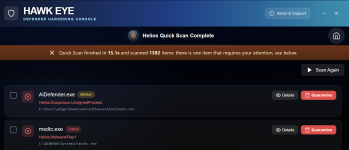

This is probably a detection of the malicious LOLBin control feature.Uploading to MS proactively was a great thing to do, no warning when downloading through Edge and no detection by MS Defender anymore
The Helios Quick Scan has a false positive, msdtc.exe:
View attachment 294599
Just so you know, Helios does not delete critical system files as part of remediation.
These processes have been deemed suspicious based on command line analysis, so remediation merely terminates them.
Anyway, I will review whether it is worth including MSDTC service at all in the protected LOLBin space.
Could you please retry the scan?Uploading to MS proactively was a great thing to do, no warning when downloading through Edge and no detection by MS Defender anymore
The Helios Quick Scan has a false positive, msdtc.exe:
View attachment 294599
Gandalf_The_Grey
Level 86
Verified
Honorary Member
Top Poster
Content Creator
Well-known
Forum Veteran
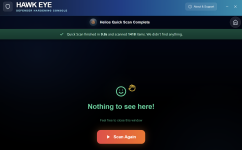

Didn't work. It's still stuck.Please install the VS C++ redistributable from this website and try again.
https://aka.ms/vc14/vc_redist.x64.exe
Is it the same if you execute as admin? It seems some people have this issue, I am unable to reproduce on my side.Didn't work. It's still stuck.
What AV are you using?
New version has been pushed and it has been uploaded to Microsoft. It may take a bit of time for them to process.
Huorong and Rising promised to clear the detection and it looks like they have created a stable exclusion.
McAfee responded that they will clear the detection and it's been done. Microsoft exclusion is unstable and linked to the version info. When I change the version info strings, the detection reappears. I've not yet received response from ClamAV/Cisco.
-Refined user interface, fixed an issue where it appeared cropped on lower resolution screens
-Added EULA
-Added scan profiles
-Removed the initial loading state. Now even on machines where the Defender State can't be pulled, the application loads and allows scan to be ran.
-Exclusion analysis now local
Huorong and Rising promised to clear the detection and it looks like they have created a stable exclusion.
McAfee responded that they will clear the detection and it's been done. Microsoft exclusion is unstable and linked to the version info. When I change the version info strings, the detection reappears. I've not yet received response from ClamAV/Cisco.
-Refined user interface, fixed an issue where it appeared cropped on lower resolution screens
-Added EULA
-Added scan profiles
-Removed the initial loading state. Now even on machines where the Defender State can't be pulled, the application loads and allows scan to be ran.
-Exclusion analysis now local

New executable is now blocked by Smart App ControlNew version has been pushed and it has been uploaded to Microsoft. It may take a bit of time for them to process.
Huorong and Rising promised to clear the detection and it looks like they have created a stable exclusion.
McAfee responded that they will clear the detection and it's been done. Microsoft exclusion is unstable and linked to the version info. When I change the version info strings, the detection reappears. I've not yet received response from ClamAV/Cisco.
-Refined user interface, fixed an issue where it appeared cropped on lower resolution screens
-Added EULA
-Added scan profiles
-Removed the initial loading state. Now even on machines where the Defender State can't be pulled, the application loads and allows scan to be ran.
-Exclusion analysis now local

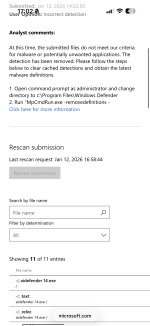
No idea, on the submission portal, the progress of the detection moved like this:New executable is now blocked by Smart App Control
First, it detected Program:Acapew.A!ml
The executable was dissected with the entire composition (.text, _rdata, pdata and so on scanned individually).
Right now, the detection changed from Acapew to Wacatac.h however on every section, it displays “an analyst has determined that this file is normal. It does not exhibit malicious or unwanted behaviour”. Soon, the detection will disappear completely till I change the about info again…
This is the exhausting path of all devs with security software

This is one of the cases where Helios will help.
Example: malicious HTA file is not detected by Defender.
Hash: 24ef77b150ff7ebc30d8cb7234fd2cec8a15a58128e8e2441e259b7d3de1e66c
Defender alone would not handle this malware.
Protections: MSHTA is blocked from accessing the web anyway, through Deep Firewall Control.
The script sets persistence.
Response:

Remediation terminates the process, deletes the persistence and the initial script (I will update the UI so it doesn't display "Quarantine" but "Process" and displays information what will happen on remediation.
Helios combines expertise in fileless and evasive malware detection with reputation from different providers on executables.
Example: malicious HTA file is not detected by Defender.
Hash: 24ef77b150ff7ebc30d8cb7234fd2cec8a15a58128e8e2441e259b7d3de1e66c
Defender alone would not handle this malware.
Protections: MSHTA is blocked from accessing the web anyway, through Deep Firewall Control.
The script sets persistence.
Response:
Remediation terminates the process, deletes the persistence and the initial script (I will update the UI so it doesn't display "Quarantine" but "Process" and displays information what will happen on remediation.
Helios combines expertise in fileless and evasive malware detection with reputation from different providers on executables.

MSHTA appears as an infected file not a victimThis is one of the cases where Helios will help.
Example: malicious HTA file is not detected by Defender.
Hash: 24ef77b150ff7ebc30d8cb7234fd2cec8a15a58128e8e2441e259b7d3de1e66c
Defender alone would not handle this malware.
Protections: MSHTA is blocked from accessing the web anyway, through Deep Firewall Control.
The script sets persistence.
Response:
View attachment 294617
Remediation terminates the process, deletes the persistence and the initial script (I will update the UI so it doesn't display "Quarantine" but "Process" and displays information what will happen on remediation.
Helios combines expertise in fileless and evasive malware detection with reputation from different providers on executables.
Yes, there is room for UI improvement.MSHTA appears as an infected file not a victim
Recently browsing
Members who viewed this thread in the last 5 minutes
You may also like...
-

-

-
-

-
M
- Opera
- Maciej Kocemba
- · 0