

The MalwareTips app
Your community, one tap away.
Open MalwareTips from your Home Screen or desktop. Follow discussions, find answers and pick up where you left off.
- Home Screen access
- Optional push alerts
- Your community
You're ready to explore.Explore what's new
Installation instructions
iPhone & iPad
- Open MalwareTips in Safari and tap Share. You may need to open the Page Menu first.
- Choose Add to Home Screen. If it is not listed, use Edit Actions to add it.
- Keep Open as Web App enabled if shown, then tap Add.
Android
- Open MalwareTips in Chrome or another browser that supports app installation.
- Open the browser menu and look for Install app, Install and create shortcut, or Add to Home screen.
- Choose Install and confirm. Wording varies by browser.
Desktop
- Chrome: use the install icon in the address bar, or the menu under Cast, save and share.
- Edge: open the menu, then More tools, Apps and Install this site as an app.
- Safari on Mac: choose Share or File, then Add to Dock. Firefox on Windows: look for the web apps button in the address bar.
If you cannot find an install option, update your browser or use its bookmark option to keep MalwareTips close.
Keep up with your conversations
After installation, open the app and sign in. Enable push notifications in Preferences if you want alerts. On iPhone and iPad, push requires a Home Screen web app and iOS or iPadOS 16.4 or later.
Sign in to manage notificationsInstallation is optional. Your notification settings stay under your control.
You are using an out of date browser. It may not display this or other websites correctly.
You should upgrade or use an alternative browser.
You should upgrade or use an alternative browser.
New Update Defender Hardening Console Executable
- Thread starter Trident
- Start date
Other security for Windows, Mac, Linux
506 Replies
75,140 Views


I just went trought this thread, and wow at the speed in pushing those frequently updates, i must again admit that youre multitalent
whenever i get my testing laptop back i give this a try, i dont run unsigned exes on my main device for reason, even i trust people in MalwareTips, and most of security products advised in here. probably sounds paranoid but im currently running dui
anyways just random shower think, but how much these tools you provide, costs to you ? Like having website, hosting, possible sertificate on file, if you need to get help with costs, you could setup buy me a coffee or something
whenever i get my testing laptop back i give this a try, i dont run unsigned exes on my main device for reason, even i trust people in MalwareTips, and most of security products advised in here. probably sounds paranoid but im currently running dui
anyways just random shower think, but how much these tools you provide, costs to you ? Like having website, hosting, possible sertificate on file, if you need to get help with costs, you could setup buy me a coffee or something

Thanks for your kind words.I just went trought this thread, and wow at the speed in pushing those frequently updates, i must again admit that youre multitalent
whenever i get my testing laptop back i give this a try, i dont run unsigned exes on my main device for reason, even i trust people in MalwareTips, and most of security products advised in here. probably sounds paranoid but im currently running dui
anyways just random shower think, but how much these tools you provide, costs to you ? Like having website, hosting, possible sertificate on file, if you need to get help with costs, you could setup buy me a coffee or something
For now, I am absorbing all costs, including the upcoming EV/OV signature (leaning more towards EV). For other costs, as a startup I am getting credits.
The biggest cost is the threat intelligence actually, but I will not be offering mediocre products, just for the sake of offering something. The project was launched recently, but the databases are massive and growing by the second.
Though refinements are needed (mainly time is required for them and tests), I will not be slapping “Next Gen” labels on products that aren’t even as good as the current gen.
I am happy because I managed to get the right contracts with the right vendors.

@Trident
Hello,
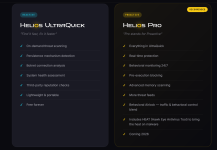
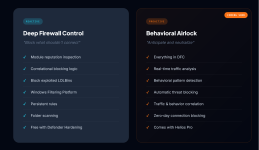
I recently discovered Defender Hardening Console which is a very interesting software and I'm planning to install it soon on my system. On official website Defender Hardening Console | Configure Hidden Windows Defender Settings I noticed that you plan to release Helios Pro in 2026, which includes Behavioral Airlock. Helios Pro has added features compared to the free versions Helios UltraQuick and Deep Firewall Control. Can you tell me approximately when Helios Pro is expected to be released ? Moreover I presume it will be subscription-based, maybe with a option for a lifetime license.
Thanks in advance
Hello,
I recently discovered Defender Hardening Console which is a very interesting software and I'm planning to install it soon on my system. On official website Defender Hardening Console | Configure Hidden Windows Defender Settings I noticed that you plan to release Helios Pro in 2026, which includes Behavioral Airlock. Helios Pro has added features compared to the free versions Helios UltraQuick and Deep Firewall Control. Can you tell me approximately when Helios Pro is expected to be released ? Moreover I presume it will be subscription-based, maybe with a option for a lifetime license.
Thanks in advance
Attachments
Last edited:
Hello @Avethil and thanks for your interest.
AiDefender/DHC is a portable tool, no installation needed.
As to Hawk Eye Antivirus Tool (HEAT), I do not have a set release date. It is expected in the next few months.
This project (no real time protection) was great way to warm up for the other one.
After releasing HEAT with real time protection and Behavioural Airlock, there will be a period of at least a year, during which the software will be free.
After a year, I will examine licensing, prices, as well as how exactly the licensing check will be integrated (likely in a Rust-based binary) to avoid piracy.
AiDefender/DHC is a portable tool, no installation needed.
As to Hawk Eye Antivirus Tool (HEAT), I do not have a set release date. It is expected in the next few months.
This project (no real time protection) was great way to warm up for the other one.
After releasing HEAT with real time protection and Behavioural Airlock, there will be a period of at least a year, during which the software will be free.
After a year, I will examine licensing, prices, as well as how exactly the licensing check will be integrated (likely in a Rust-based binary) to avoid piracy.

You're doing a great job man. Wishing you the best of luck.Hello @Avethil and thanks for your interest.
AiDefender/DHC is a portable tool, no installation needed.
As to Hawk Eye Antivirus Tool (HEAT), I do not have a set release date. It is expected in the next few months.
This project (no real time protection) was great way to warm up for the other one.
After releasing HEAT with real time protection and Behavioural Airlock, there will be a period of at least a year, during which the software will be free.
After a year, I will examine licensing, prices, as well as how exactly the licensing check will be integrated (likely in a Rust-based binary) to avoid piracy.
@Trident
Thank you for the quick reply and for the infos on the matter. The 1-year trial period (minimum) for using Hawk Eye Antivirus Tool (HEAT) is very welcome so anyone can try it for a long period, not the usual 30 days, before decide whether to proceed with the purchase or not (better the first ). Excellent.
Some days ago I opened a new thread on Wilders Security Forums about Defender Hardening Console https://www.wilderssecurity.com/threads/defender-hardening.458951/
Keep up the good work !
Thank you for the quick reply and for the infos on the matter. The 1-year trial period (minimum) for using Hawk Eye Antivirus Tool (HEAT) is very welcome so anyone can try it for a long period, not the usual 30 days, before decide whether to proceed with the purchase or not (better the first
). Excellent.Some days ago I opened a new thread on Wilders Security Forums about Defender Hardening Console https://www.wilderssecurity.com/threads/defender-hardening.458951/
Keep up the good work !
Last edited:
Thanks for starting this subject, I’ve replied there.@Trident
Thank you for the quick reply and for the infos on the matter. The 1-year trial period (minimum) for using Hawk Eye Antivirus Tool (HEAT) is very welcome so anyone can try it for a long period, not the usual 30 days, before decide whether to proceed with the purchase or not (better the first
Some days ago I opened a new thread on Wilders Security Forums about Defender Hardening Console https://www.wilderssecurity.com/threads/defender-hardening.458951/
Keep up the good work !
I've some issues to run AiDefender.exe. Just to be sure first I installed https://aka.ms/vc14/vc_redist.x64.exe, rebooted the PC but when I ran AiDefender.exe, even with Admin Rights, it seems stuck in reading security configuration, some minutes already have passed. The only other cybersecurity software active is Microsoft Defender AV
Attachments

Can you try temporarily turning off the defender tamper protection? I am trying to figure out what’s causing this.I've some issues to run AiDefender.exe. Just to be sure first I installed https://aka.ms/vc14/vc_redist.x64.exe, rebooted the PC but when I ran AiDefender.exe, even with Admin Rights, it seems stuck in reading security configuration, some minutes already have passed. The only other cybersecurity software active is Microsoft Defender AV
Anyway, in the next update there will be a change how settings are being read.
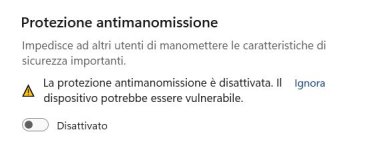
I did it, ran AiDefender.exe with Admin rights but the result is the same as before. My OS is Windows 11 Pro 24H2 (Build 26100.7623)Can you try temporarily turning off the defender tamper protection? I am trying to figure out what’s causing this.
Attachments
NP, I'll wait for the next update.Anyway, in the next update there will be a change how settings are being read.
One of the OrbiCircles is hidden behind the title bar, what's your screen resolution? That is another bug.NP, I'll wait for the next update.
It's 1920 x 1080what's your screen resolution?

Where can I find a download link for this?
Sorry in advance
Sorry in advance
Recently browsing
Members who viewed this thread in the last 5 minutes
You may also like...
-

-

-
-

-
M
- Opera
- Maciej Kocemba
- · 0