New Update Defender Hardening Console Executable

I see that the blue big button on the top rights point to AIDefender.exe.
The combination of the 2 will be called Hawk Eye QuickSecure and the executable will be QuickSecure.exe, 9mb in size.

It is a bootstrapper that extracts everything and then launches an installer where users can choose what they want.
 
Is there a separate HEAT scanner? The website says it's portable.
The "Scan and Clean" section includes 3 types of scans and also a junk cleaner, as you can see

DHC.jpgHeat Scanner.jpg

I tested all the 3 scans without issues, please see my post here New Update - Defender Hardening Console Executable and the next two posts.
Also this one New Update - Defender Hardening Console Executable and the reply from Trident.
 
Last edited:
The "Scan and Clean" section includes 3 types of scans and also a junk cleaner, as you can see

View attachment 295954View attachment 295955
And it’s placed in the middle, partially filling the circle to indicate that Defender is what provides most of the protection, the scan is addition to it.

That’s the OrbitUI.

Nothing is random or randomly placed 😆

Scan looks better in the upcoming version.
 
Last edited:
Extension published on Firefox store and Malwarebytes has cleared the false positive on the website.

The talon intro page will soon go live on the website.
 
Mozilla store says "This add on is required so the C++ backend for Helios Web Marshall can block malicious domains and downloads." -- and that's the only info I'm seeing. This may have been asked and answered (I got no sleep last night) I'm running librewolf in fedora, if I install HWM it will work as intended, ie, as it would in windows with whatever it might need ie IIRC you said something about 2 parts to this the other day. If there's more info in the Mozilla store, not displaying on my screen... :sleep:
 
Mozilla store says "This add on is required so the C++ backend for Helios Web Marshall can block malicious domains and downloads." -- and that's the only info I'm seeing. This may have been asked and answered (I got no sleep last night) I'm running librewolf in fedora, if I install HWM it will work as intended, ie, as it would in windows with whatever it might need ie IIRC you said something about 2 parts to this the other day. If there's more info in the Mozilla store, not displaying on my screen... :sleep:
It will not work on Linux at this time.
In a future update I may introduce a fallback so when there is no communication to the messaging host, the extension would still provide some functionality.
 
getting my bearings in win10 (host) firefox I installed Helios Web Marshall, and installed but not sure fully functioning...? :unsure: -- left-click of icon shows that it is scanning malwaretips.com -- service connected -- analyzing current website "pending" -- web protection ON -- session stats checked= 0 safe= 0. not being critical just trying to understand what I'm seeing, how it works, what to expect... ubo is set to block 3d-party scripts so wonder if that could have any effect on your extension? And sorry to ask again but now that I'm using extension in firefox on win10, does it need Defender Hardening Console to fully operate and if so, does it interact negatively with AndyFul's ConfigureDefender. (I've gotten very used to running fedora in VMware).
 
getting my bearings in win10 (host) firefox I installed Helios Web Marshall, and installed but not sure fully functioning...? :unsure: -- left-click of icon shows that it is scanning malwaretips.com -- service connected -- analyzing current website "pending" -- web protection ON -- session stats checked= 0 safe= 0. not being critical just trying to understand what I'm seeing, how it works, what to expect... ubo is set to block 3d-party scripts so wonder if that could have any effect on your extension? And sorry to ask again but now that I'm using extension in firefox on win10, does it need Defender Hardening Console to fully operate and if so, does it interact negatively with AndyFul's ConfigureDefender. (I've gotten very used to running fedora in VMware).

You can download an early trial of Helios Web Marshall from here:

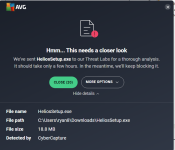
deploy.hea-p.com/executable/HeliosSetup.exe

Web Marshall has its own background service, you can choose to install only Web Marshall.

This is not the finalised product, but it is very close.

Download Protection logics need to be tweaked.

The extension will not work without the installed instance of Web Marshall.
 
You can download an early trial of Helios Web Marshall from here:

deploy.hea-p.com/executable/HeliosSetup.exe

Web Marshall has its own background service, you can choose to install only Web Marshall.

This is not the finalised product, but it is very close.

Download Protection logics need to be tweaked.

The extension will not work without the installed instance of Web Marshall.
10-4 I booked marked your post, so perhaps no more ask & answered questions (no promises) I will DL this tonight or tomorrow. thanks!!
 
You can download an early trial of Helios Web Marshall from here:

deploy.hea-p.com/executable/HeliosSetup.exe

Web Marshall has its own background service, you can choose to install only Web Marshall.

This is not the finalised product, but it is very close.

Download Protection logics need to be tweaked.

The extension will not work without the installed instance of Web Marshall.
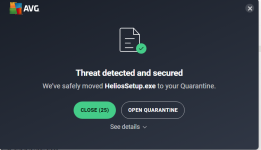
AVG did you dirty. I have submitted the file as a false positive.
 

Attachments

  • Screenshot 2026-02-28 161757.png
    Screenshot 2026-02-28 161757.png
    259 KB · Views: 63
  • Screenshot 2026-02-28 162026.png
    Screenshot 2026-02-28 162026.png
    173.7 KB · Views: 77
Does Deep Firewall Control allow blocking/pausing of connections until the user allows/denies the connection, ideally with a pop-up/notification?
 
Does Deep Firewall Control allow blocking/pausing of connections until the user allows/denies the connection, ideally with a pop-up/notification?
No, Deep Firewall Control isn't a firewall. After a Deep Firewall Control's scan it creates its own allow / block rules based on exe's reputation. If you are looking for a firewall I can suggest what currently I'm using: the 3rd party firewall Windows 11 Firewall Control (formerly Sphinx Software Windows 10 Firewall Control) https://malwaretips.com/threads/windows-10-firewall-control-sphinx-software-opinions.108168/post-1130015 and Binisoft / Malwarebytes Windows Firewall Control which is a enhanced GUI for managing the Windows Firewall New Update - Windows Firewall Control - Updates Thread
Both softwares are free of charge. If you have some questions about them you can post them on the dedicated thread. I'll reply there.

Deep Firewall Scan rules

Deep Firewall Scan rules.jpg
 
Last edited:
No, Deep Firewall Control isn't a firewall. After a Deep Firewall Control's scan it creates its own allow / block rules based on exe's reputation. If you are looking for a firewall I can suggest what currently I'm using: the 3rd party firewall Windows 11 Firewall Control (formerly Sphinx Software Windows 10 Firewall Control) https://malwaretips.com/threads/windows-10-firewall-control-sphinx-software-opinions.108168/post-1130015 and Binisoft / Malwarebytes Windows Firewall Control which is a enhanced GUI for managing the Windows Firewall New Update - Windows Firewall Control - Updates Thread
Both softwares are free of charge. If you have some questions about them you can post them on the dedicated thread. I'll reply there.

Deep Firewall Scan rules

View attachment 296051
Nice the LOLBINS feature, i have these rules in my ESET Firewall.