

The MalwareTips app
Your community, one tap away.
Open MalwareTips from your Home Screen or desktop. Follow discussions, find answers and pick up where you left off.
- Home Screen access
- Optional push alerts
- Your community
You're ready to explore.Explore what's new
Installation instructions
iPhone & iPad
- Open MalwareTips in Safari and tap Share. You may need to open the Page Menu first.
- Choose Add to Home Screen. If it is not listed, use Edit Actions to add it.
- Keep Open as Web App enabled if shown, then tap Add.
Android
- Open MalwareTips in Chrome or another browser that supports app installation.
- Open the browser menu and look for Install app, Install and create shortcut, or Add to Home screen.
- Choose Install and confirm. Wording varies by browser.
Desktop
- Chrome: use the install icon in the address bar, or the menu under Cast, save and share.
- Edge: open the menu, then More tools, Apps and Install this site as an app.
- Safari on Mac: choose Share or File, then Add to Dock. Firefox on Windows: look for the web apps button in the address bar.
If you cannot find an install option, update your browser or use its bookmark option to keep MalwareTips close.
Keep up with your conversations
After installation, open the app and sign in. Enable push notifications in Preferences if you want alerts. On iPhone and iPad, push requires a Home Screen web app and iOS or iPadOS 16.4 or later.
Sign in to manage notificationsInstallation is optional. Your notification settings stay under your control.
You are using an out of date browser. It may not display this or other websites correctly.
You should upgrade or use an alternative browser.
You should upgrade or use an alternative browser.
New Update Defender Hardening Console Executable
- Thread starter Trident
- Start date
Other security for Windows, Mac, Linux
506 Replies
75,140 Views
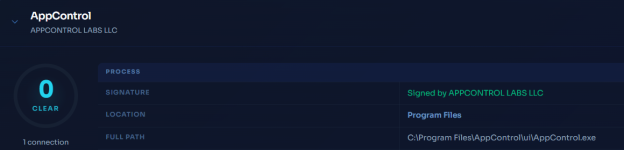
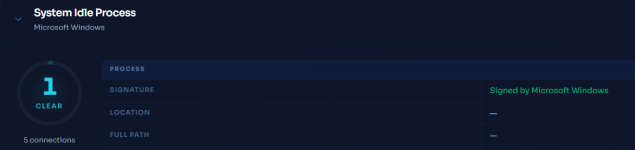

This is the overall computed risk factor. 1/100 means no risk.On the left of the processes there are infos like 0 Clear or 1 Clear (For System Idle Process) . What do those numbers mean ?
View attachment 296711View attachment 296712
@Trident
I must say that your work shows a remarkable attention to detail and graphics, same for the website. I'm sure it will be like this for your future projects too.
Thanks!
It looks even better in future versions.
New version has been released.
Network monitor has been updated to a higher version, and this comes with a better UI and better scoring.

Network monitor has been updated to a higher version, and this comes with a better UI and better scoring.

It's a big improvement over the previous World Map GUI. If it doesn't involve too much work it would be nice to add the ability to zoom in / out the World map with the mousewheel (better) and / or with plus and minus buttons. It could be useful if the dots are concentrated in a specific area. Furthermore after removing AiDefender.exe from Microsoft Defender's exclusions, I ran the new version and it isn't flagged anymore as a malware so I'm going to update the Wilders Security Forum's thread as promised.
Last edited:
There will be more improvements to the world map, including the ability to zoom in.It's a big improvement over the previous World Map UI. If it doesn't involve too much work it would be nice to add the ability to zoom in / out the World map with the mousewheel (better) and / or with plus and minus buttons. It could be useful if the dots are concentrated in a specific area. Furthermore after removing AiDefender.exe from Microsoft Defender's exclusions, I ran the new version and it isn't flagged anymore as a malware so I'm going to update the Wilders Security Forum's thread as promised.

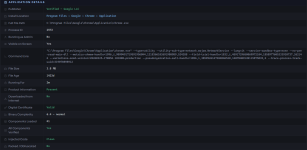
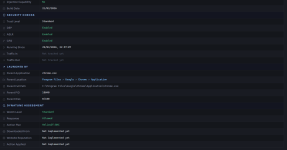
The GUI here is transitioning more to a UX but there will be more improvements to the UX. There are around 600 factors considered for the process score.Compared to the previous version there are more infos about the processes connecting to Internet and with a better GUI
I've noticed that when I start DHC Network Monitoring, msedgewebview2.exe process starts to write on the disk at a constant rate. I don't use Microsoft Edge and it occurs only when I start DHC network monitoring. When I exit from DHC network monitoring the disk writing suddenly stops.


Yes, the UI is based on Edge WebView.I've noticed that when I start DHC Network Monitoring, msedgewebview2.exe process starts to write on the disk at a constant rate. I don't use Microsoft Edge and it occurs only when I start DHC network monitoring. When I exit from DHC network monitoring the disk writing suddenly stops.
View attachment 296724
There are several frameworks that facilitate UIs, including those for AVs. One of them is the QT WebEngine (Trend Micro previously, now pretty much phased out), the other one is Electron and the third one is Chromium Embedded Framework (Gen Digital which is now transitioning to WebView). There are now several more modern ones like Tauri/Neutralino (also WebView). There are several other UI frameworks like Sciter, WPF, Winforms and others, but they all have various downsides.
For my projects I went directly for WebView. So the disk write/read is a result of the backend passing the information to the frontend, which is then rendered.
The background service will not have this disk write as everything will happen in memory and the cache will be dumped periodically, as well as on service shutdown.
A new version has been released.
The network monitor module has been boosted to a higher version, and this brings over a 100 performance optimisations, several bug fixes including better process resolution, and ability to zoom in on the network map. The UX has undergone a lot of optimisations as well and is now heavily GPU-accelerated. The multi-threading for network monitor in this version has been changed.
The version has been submitted to Microsoft.
The network monitor module has been boosted to a higher version, and this brings over a 100 performance optimisations, several bug fixes including better process resolution, and ability to zoom in on the network map. The UX has undergone a lot of optimisations as well and is now heavily GPU-accelerated. The multi-threading for network monitor in this version has been changed.
The version has been submitted to Microsoft.
Last edited:
There will be a rebranding when the real time firewall/network monitor is released.View attachment 296731
@danb could we possibly check this? I understand the detection due to the name though.
The new name will be privacy + hardening and some hardening will be managed continuously, on as-needed basis.
Defender Hardening Console is starting to undersell the capabilities.

RoboMan
Level 39
Verified
Honorary Member
Top Poster
Content Creator
Well-known
High Reputation
Forum Veteran
I'm having the worst time trying to run the latest update (first time trying to install it).
First it was blocked by CyberLock (manually allowed it).
Then it was blocked by Windows Defender. Manually added as an exclusion. Wouldnt even let me access the file through exclusions module. Had to disable real time protection and cloud protection to even whitelist it. Once whitelisted, after UAC prompt, the file doesn't run at all (no errors whatsoever).
Don't know what to do.
First it was blocked by CyberLock (manually allowed it).
Then it was blocked by Windows Defender. Manually added as an exclusion. Wouldnt even let me access the file through exclusions module. Had to disable real time protection and cloud protection to even whitelist it. Once whitelisted, after UAC prompt, the file doesn't run at all (no errors whatsoever).
Don't know what to do.
Hello,
thank you for releasing so quickly the updated version with the ability to zoom in / out the World map. I noticed a minor issue: when zooming out the map with the mousewheel, the map won't zoom out but the Defender Hardening Window scrolls down instead. I got the same message from CyberLock like the user RoboMan, I allowed AiDefender.exe but Microsoft Defender didn't flag it as malware. Microsoft Defender "Allowed threats" and "Exclusions" don't contain any item.
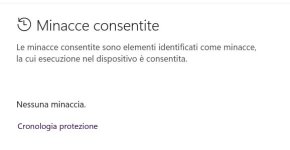
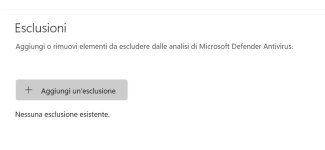
thank you for releasing so quickly the updated version with the ability to zoom in / out the World map. I noticed a minor issue: when zooming out the map with the mousewheel, the map won't zoom out but the Defender Hardening Window scrolls down instead. I got the same message from CyberLock like the user RoboMan, I allowed AiDefender.exe but Microsoft Defender didn't flag it as malware. Microsoft Defender "Allowed threats" and "Exclusions" don't contain any item.
Last edited:
As you wrote zoom in and not zoom out too, I guess it's not possible to zoom out with the mousewheel but only with the minus button.ability to zoom in on the network map.
I also notice that "Home" is set to London so I presume that currently it's not possible to determinate the IP address location of the user.
Last edited:
G
@RoboMan, try the release.zip
yeah, there will be a few improvements more comingAs you wrote zoom in and not zoom out too, I guess it's not possible to zoom out with the mousewheel but only with the minus button.
I also notice that "Home" is set to London so I presume that currently it's not possible to determinate the IP address location of the user.
@RoboMan, try the release.zip
Recently browsing
Members who viewed this thread in the last 5 minutes
You may also like...
-

-

-
-

-
M
- Opera
- Maciej Kocemba
- · 0