

The MalwareTips app
Your community, one tap away.
Open MalwareTips from your Home Screen or desktop. Follow discussions, find answers and pick up where you left off.
- Home Screen access
- Optional push alerts
- Your community
You're ready to explore.Explore what's new
Installation instructions
iPhone & iPad
- Open MalwareTips in Safari and tap Share. You may need to open the Page Menu first.
- Choose Add to Home Screen. If it is not listed, use Edit Actions to add it.
- Keep Open as Web App enabled if shown, then tap Add.
Android
- Open MalwareTips in Chrome or another browser that supports app installation.
- Open the browser menu and look for Install app, Install and create shortcut, or Add to Home screen.
- Choose Install and confirm. Wording varies by browser.
Desktop
- Chrome: use the install icon in the address bar, or the menu under Cast, save and share.
- Edge: open the menu, then More tools, Apps and Install this site as an app.
- Safari on Mac: choose Share or File, then Add to Dock. Firefox on Windows: look for the web apps button in the address bar.
If you cannot find an install option, update your browser or use its bookmark option to keep MalwareTips close.
Keep up with your conversations
After installation, open the app and sign in. Enable push notifications in Preferences if you want alerts. On iPhone and iPad, push requires a Home Screen web app and iOS or iPadOS 16.4 or later.
Sign in to manage notificationsInstallation is optional. Your notification settings stay under your control.
You are using an out of date browser. It may not display this or other websites correctly.
You should upgrade or use an alternative browser.
You should upgrade or use an alternative browser.
New Update Defender Hardening Console Executable
- Thread starter Trident
- Start date
Other security for Windows, Mac, Linux
506 Replies
75,137 Views




Yeah, there are spikes on the C++ side so these spikes will have to be eliminated before it becomes a background service.The CPU usage of msedgewebview2.exe is noticeable lower than with the previous version.
Now
View attachment 296735
Before
View attachment 296737
The spikes of about 10% are caused by the scoring engine, so I am exploring various optimisations that don’t compromise the functionality, mainly with hashing and pre-computed tables.
For now it’s ok to have them.
Btw this is very close to the behavioural airlock, only the hooking is missing.
But it’s also time to think of digital signature because these false positives are driving me mad.

If the World map isn't visible (i.e I scroll down the Defender Hardening Console's window to hide it) the msedgewebview2.exe disk usage drops from about 1020 K / s to 20 K / s.I've noticed that when I start DHC Network Monitoring, msedgewebview2.exe process starts to write on the disk at a constant rate. I don't use Microsoft Edge and it occurs only when I start DHC network monitoring. When I exit from DHC network monitoring the disk writing suddenly stops.
It means WebView is caching something but I am not sure what exactly it deems worthy of caching. I will need to investigate and potentially disable caching for this component.If the World map isn't visible (i.e I scroll down the Defender Hardening Console's window to hide it) the msedgewebview2.exe disk usage drops from about 1020 K / s to 20 K / s.
The map should live entirely in RAM.
It is likely the disk shader cache.I can say that if I scroll up the Defender Hardening Console's window to show again the World map, the msedgewebview2.exe disk usage raises to about 1200 K / s, currently.
I will shortly send you a modified version, see if the disk activity persists.
On my system I can see 0.1 mb activity.
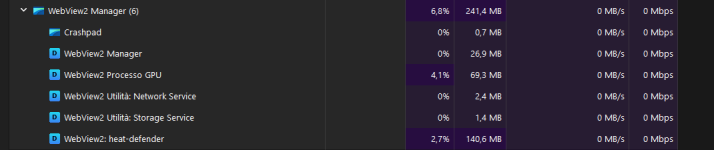
The CPU usage of msedgewebview2.exe, even with the World Map not visible, is back to 5-6 %. I don't know why, some time ago it was only 0.6% 
*edited* The CPU usage of msedgewebview2.exe raises to 5-6 % if I enable the "History" switch / button. If I disable it, the CPU usage is back to 0.6 %, max 1.5 %. I tried 2 times in a row and I can confirm this behavior, compared to the previous post, when History was enabled and CPU usage raised to 6.8 %.
World Map visible, History disabled
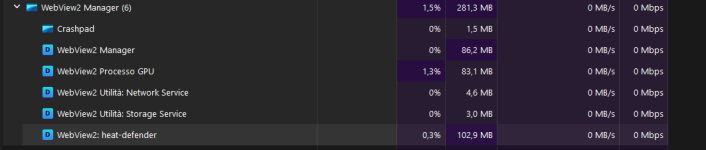
*edited* The CPU usage of msedgewebview2.exe raises to 5-6 % if I enable the "History" switch / button. If I disable it, the CPU usage is back to 0.6 %, max 1.5 %. I tried 2 times in a row and I can confirm this behavior, compared to the previous post, when History was enabled and CPU usage raised to 6.8 %.
World Map visible, History disabled
Last edited:
The CPU usage of msedgewebview2.exe, even with the World Map not visible, is back to 5-6 %. I don't know why, some time ago it was only 0.6%
*edited* The CPU usage of msedgewebview2.exe raises to 5-6 % if I enable the "History" switch / button. If I disable it, the CPU usage is back to 0.6 %, max 1.5 %. I tried 2 times in a row and I can confirm this behavior, compared to the previous post, when History was enabled and CPU usage raised to 6.8 %.
World Map visible, History disabled
View attachment 296739
Try this modified version
I will look at the repaints when history is enabled. Technically they should be the same, but I will check.
Could be just a side effect of having more data.
I tested the modified version. About msedgewebview2.exe disk usage, when the World Map is visible, the values are similar to the previous version but they were already negligible, according to Windows Task Manager. The big improvement is on the CPU usage because now, even with History enabled, it has reached max 2.2 % but most of the time it stays at 1.0 % or lower.
Nice work, in so brief time.
Process Lasso Task manager (World map visible, History enabled)

Nice work, in so brief time.
Process Lasso Task manager (World map visible, History enabled)

But in the previous version, the animation for the world map was the stunning 60 fps and the disk usage is likely the result of caching 20 composite layers (which the map consists of) x 60 times a second. I will find a balance between performance and experience in the next few versions.I tested the modified version. About msedgewebview2.exe disk usage, when the World Map is visible, the values are similar to the previous version but they were already negligible, according to Windows Task Manager. The big improvement is on the CPU usage because now, even with History enabled, it has reached max 2.2 % but most of the time it stays at 1.0 % or lower.
Nice work, in so brief time.
Process Lasso Task manager (World map visible, History enabled)
View attachment 296740
The history adds more lines - these can be disabled.
The map is designed for real time overview.
Yeah, maybe I will leave it at around 24 fps.It's very important the CPU usage reduction because before, with History enabled, I clearly distinguished the CPU fan's noise, now it's silent.
Or else I will see what I can offload to the GPU.
I've a question: the connection history is saved end encrypted in C:\ProgramData\Hawk Eye Analysis\DHC\DynaTune\DTCache.bin . I guess the connection history is always recorded, even if the History button is disabled so pressing the button just shows it. Or is it saved only if the History button is enabled (i.e yellow colored button) ?
The history button just controls the display, as long as the monitor is running, it records in history.I've a question: the connection history is saved end encrypted in C:\ProgramData\Hawk Eye Analysis\DHC\DynaTune\DTCache.bin . I guess the connection history is always recorded, even if the History button is disabled so pressing the button just shows it. Or is it saved only if the History button is enabled (i.e yellow colored button) ?
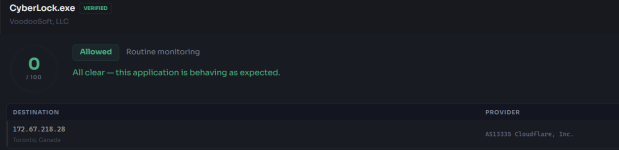
The World Map shows a Firefox connection to Toronto and indeed it is so but also CyberLock is connecting to the same node and The World map doesn't show it. Am I missing something ? Moreover Firefox has 5 connections to Toronto, to different IP addresses, but the World map just shows "1 connection" The map shows the current connections as the "History" button isn't enabled.

Last edited:
Recently browsing
Members who viewed this thread in the last 5 minutes
You may also like...
-

-

-
-

-
M
- Opera
- Maciej Kocemba
- · 0