Open MalwareTips in Safari and tap Share. You may need to open the Page Menu first.
Choose Add to Home Screen. If it is not listed, use Edit Actions to add it.
Keep Open as Web App enabled if shown, then tap Add.
Android
Open MalwareTips in Chrome or another browser that supports app installation.
Open the browser menu and look for Install app, Install and create shortcut, or Add to Home screen.
Choose Install and confirm. Wording varies by browser.
Desktop
Chrome: use the install icon in the address bar, or the menu under Cast, save and share.
Edge: open the menu, then More tools, Apps and Install this site as an app.
Safari on Mac: choose Share or File, then Add to Dock. Firefox on Windows: look for the web apps button in the address bar.
If you cannot find an install option, update your browser or use its bookmark option to keep MalwareTips close.
Keep up with your conversations
After installation, open the app and sign in. Enable push notifications in Preferences if you want alerts. On iPhone and iPad, push requires a Home Screen web app and iOS or iPadOS 16.4 or later.
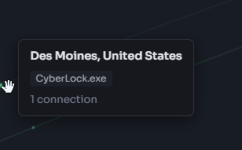
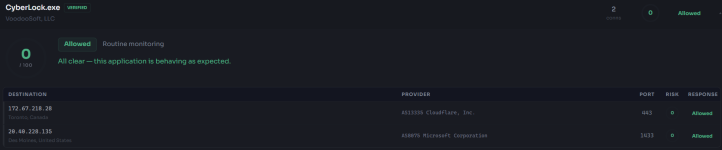
The World Map shows a Firefox connection to Toronto and indeed it is so but also CyberLock is connecting to the same node and The World map doesn't show it. Am I missing something ? Moreover Firefox has 5 connections to Toronto, to different IP addresses, but the World map just shows "1 connection" The map shows the current connections as the "History" button isn't enabled.
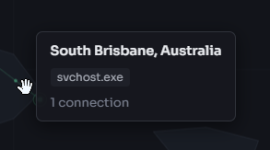
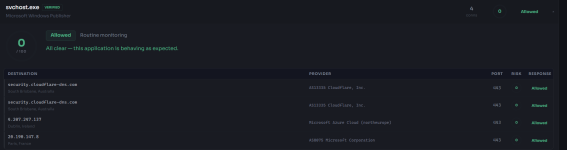
Apart from the missing CyberLock connection, it seems the all the nodes on the World map just show "1 connection" even if there are more. Another example is svchost.exe. 2 out of 4 connections are to South Brisbane
Apart from the missing CyberLock connection, it seems the all the nodes on the World map just show "1 connection" even if there are more. Another example is svchost.exe.
I can confirm the issue has been logged and fixed in 1.99 under the reference HDTUIWM1012.
It will disappear with the future updates.
The problem was every connection constructs another node.
So when there are multiple connections, you have multiple nodes but they are stacked on top of each other.
Along with these issues:
1.99 HDTUI — Bug Fixes & Improvements
Fixed an issue where connection glow colours on the world map could appear stale after a risk score update, showing green instead of the correct threat colour until the map was panned or zoomed.
Fixed the map zoom scroll intercepting the page — scrolling over the map to zoom in or out no longer simultaneously scrolls the panel behind it.
Fixed the dashboard statistics panel showing inflated connection counts and inaccurate verification percentages when the History view was enabled, as it was counting closed historical connections alongside live ones.
Fixed a rare timing issue where updated network enrichment data (such as a newly resolved hostname or ISP) could be silently skipped during a scoring cycle, delaying its reflection in the risk assessment.
Improved memory efficiency of the connection history tracker to prevent gradual memory growth during extended monitoring sessions.
Fixed the map cursor not changing to a closed hand while dragging to pan.
Fixed the connection tooltip being clipped off-screen when hovering over destinations near the left edge of the map.
Significantly reduced CPU usage from the traffic graph by replacing a software-rendered blur effect with a GPU-accelerated glow. The previous implementation performed two full-canvas blur passes eight times per second, which was one of the heaviest operations in the entire panel.
Expanded process details (risk breakdown, connection list, security checks) are now only rendered when the row is actually open. Previously, all content was rendered in the background even when hidden, which caused unnecessary work when many processes were listed.
Improved search responsiveness — filtering the connection list by keyword is now substantially faster, particularly when monitoring a large number of connections.
Ring gauge animations no longer restart when the underlying value hasn't changed, reducing redundant visual work during routine data refreshes.
Eliminated a redundant data processing pass that occurred on every update when the History view was not active.
Gradient objects used in the traffic graph are now created once per draw rather than being rebuilt on every data point.
Fixed the traffic graph rendering incorrectly when fewer than 100 data points were available, causing readings to cluster on the left side of the chart instead of spanning the full width.
Fixed an issue where individual connection risk scores could appear stale in an expanded process row if another connection in the same group had a higher score — the row would not visually update because the group's overall maximum hadn't changed.
Fixed the install location label occasionally displaying an unexpected path when the file was not located in a standard directory.
Fixed the fade-in animation leaving behind invisible wrapper elements in the page structure after completing, which accumulated over time.
Fixed the new connection highlight marker persisting indefinitely on connections instead of clearing after a brief period.
For firefox it will work. For Edge it will not because the C++ now expects some parameters to be passed from the extension. These parameters won’t be passed by 1.1.0 which is the current version on Chrome Store. I will not leave the Linux users behind either. You will have a working extension soon.
I will finish with the network monitor by then so I can focus on Web Marshall for a while.