

The MalwareTips app
Your community, one tap away.
Open MalwareTips from your Home Screen or desktop. Follow discussions, find answers and pick up where you left off.
- Home Screen access
- Optional push alerts
- Your community
You're ready to explore.Explore what's new
Installation instructions
iPhone & iPad
- Open MalwareTips in Safari and tap Share. You may need to open the Page Menu first.
- Choose Add to Home Screen. If it is not listed, use Edit Actions to add it.
- Keep Open as Web App enabled if shown, then tap Add.
Android
- Open MalwareTips in Chrome or another browser that supports app installation.
- Open the browser menu and look for Install app, Install and create shortcut, or Add to Home screen.
- Choose Install and confirm. Wording varies by browser.
Desktop
- Chrome: use the install icon in the address bar, or the menu under Cast, save and share.
- Edge: open the menu, then More tools, Apps and Install this site as an app.
- Safari on Mac: choose Share or File, then Add to Dock. Firefox on Windows: look for the web apps button in the address bar.
If you cannot find an install option, update your browser or use its bookmark option to keep MalwareTips close.
Keep up with your conversations
After installation, open the app and sign in. Enable push notifications in Preferences if you want alerts. On iPhone and iPad, push requires a Home Screen web app and iOS or iPadOS 16.4 or later.
Sign in to manage notificationsInstallation is optional. Your notification settings stay under your control.
You are using an out of date browser. It may not display this or other websites correctly.
You should upgrade or use an alternative browser.
You should upgrade or use an alternative browser.
New Update Defender Hardening Console Executable
-
 Thread starter
Trident
Thread starter
Trident
- Start date
- 506 Replies
- 76,331 Views

Yes, the threat above was picked up entirely by heuristics, as I have not wired the connection and file reputation modules. So this is in paranoid mode, in automatic mode it would have been blocked. Once the reputation modules have been integrated, remediation will be integrated as well. It has all been developed, it just needs to be wired.
Last edited:
Hawk Eye has now completed a full migration to Rust.
The upcoming HEAT completely taps into the Rust ecosystem, memory safety and robust multi-threading.
WebView2 has been dumped in favour of fully pre-compiled UI that uses 15x less memory and 4-5x less CPU.
Along with new OOBE and signature sound profile.
The upcoming HEAT completely taps into the Rust ecosystem, memory safety and robust multi-threading.
WebView2 has been dumped in favour of fully pre-compiled UI that uses 15x less memory and 4-5x less CPU.
Along with new OOBE and signature sound profile.

WebView2 has been dumped in favour of fully pre-compiled UI that uses 15x less memory and 4-5x less CPU.

Busy, busy indeed and these pages barely scratch the surface to be honest. It makes me happy@Trident - You have been one busy beaver. The presentation looks great, amazing. And only you as developer? Wow!

If you ask someone what they’ve built and they can’t pull detailed documentation, you can only assume they’ve built nothing!
I have a vision from all these years of testing, criticising and being on here so this helps a lot. I am not going back and forth (with the main logics), I know where I want to go and what needs to be done.
It is just the stack that took time to choose. The first versions used to work as PowerShell script (some people remember). Then it was .Net 11, dropped quickly, then it was C++ but I started to dislike the minimalistic and permissive compiler. Rust is way stricter.

If that's what I'm thinking, "the Rust programming language." How cool. Hugs, my friend!Hawk Eye has now completed a full migration to Rust.

It is the Rust programming language indeed.If that's what I'm thinking, "the Rust programming language." How cool. Hugs, my friend!
After a holiday, back to it now.
During my holiday, I spent loads of time playing with Slint.
I was constantly torn:
-Precompiled machine code UIs are extremely performant and light but it is hard to achieve the UX I wanna achieve.
-Web wrappers and views make it easy but performance is gone.
AI cannot just do it, i tried, the results were ranging from atrocious to disgusting.
So, after a few months, I’ve mastered machine-level UIs and the result is OrbitLive.
The next generation of OrbitUI that features ActiveMotion (visible in video) and ActiveInfo (not visible yet). ActiveInfo displays all the information at a glance before the user has even clicked. For example the system monitor background will be split in 2 halfs. Half 1 will display cpu usage as a vertical graph, half 2 will display ram usage.
I hope users will love this UI as much as I enjoyed creating it.
During my holiday, I spent loads of time playing with Slint.
I was constantly torn:
-Precompiled machine code UIs are extremely performant and light but it is hard to achieve the UX I wanna achieve.
-Web wrappers and views make it easy but performance is gone.
AI cannot just do it, i tried, the results were ranging from atrocious to disgusting.
So, after a few months, I’ve mastered machine-level UIs and the result is OrbitLive.
The next generation of OrbitUI that features ActiveMotion (visible in video) and ActiveInfo (not visible yet). ActiveInfo displays all the information at a glance before the user has even clicked. For example the system monitor background will be split in 2 halfs. Half 1 will display cpu usage as a vertical graph, half 2 will display ram usage.
I hope users will love this UI as much as I enjoyed creating it.
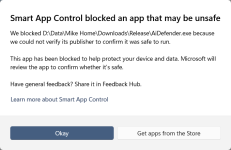

Smart App Control blocks applications in Windows 11 based on a combination of cloud-based reputation, code signing validity, and behavioral analysis.Hello, not sure if this is the correct place for this, but I downloaded the installer version and the portable and I get this now, don't know how long it's been like this. I don't open the interface all that often. Do I need to disable Smart App Copntrol?
If an app is unsigned, has an invalid signature, or lacks a trusted reputation in Microsoft’s cloud database, Smart App Control will block it from running to prevent potential malware or unauthorized system changes.
In the case of AiDefender It verifies if the executable is signed by a certificate issued by a Trusted Root Certificate Authority (CA) within the Microsoft Trusted Root Program, and if i recall well it is not yet signed, this triggers the block, meaning you need to disable Smart App Control to use it.

I had osarmor blocking Defender hardening consol as well
Recently browsing
Members who viewed this thread in the last 5 minutes
You may also like...
-
-

-
-

-
M
- Opera
- Maciej Kocemba
- · 0