New Update DefenderUI by VoodooShield - Turn on Hidden Security Features of Microsoft Defender

DefenderUI 1.44
SHA-256: f734785eeb99c90cd1bac20bf0f297c49a255723bd749cbce3e8fec337a09a10

DefenderUIPro 1.44
SHA-256: c3457e3286f220a272ec79c862f2eb07e8ca46cafbbbdb75d32cc61b3671864b

DefenderUISilent 1.44
SHA-256: 0d972415589f3f24fff6c089dda65cd1b2c613894f604fbb4183fd2f5303191d
Thanks for the updates (y)
The DefenderUI 1.44 installer gives me version 1.40.
 
Hello,
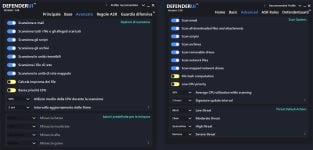
I've just installed DefenderUI 1.44 (Italian language) and I've selected the Recommended profile but I need some help. As you can see from the attached screenshot, on the left there is DefenderUI 1.44. In Threat Default Actions section I can't open the drop down menus and they show nothing, compared to the screenshot on official DefenderUI website, on the right.
Thank you in advance

DefenderUI comparison with website screenshot.jpg
 
Last edited:
  • Like
Reactions: danb
Hello,
I've just installed DefenderUI 1.44 (Italian language) and I've selected the Recommended profile but I need some help. As you can see from the attached screenshot, on the left there is DefenderUI 1.44. In Threat Default Actions section I can't open the drop down menus and they show nothing, compared to the screenshot on official DefenderUI website, on the right.
Thank you in advance

View attachment 292113
You have to disable Defender's Tamper Protection in order to enable those options. Also, if you click on the i icon on the bottom right on that section of the screen, it also tells you this information as well.
 
Last edited:
DefenderUI 1.44
SHA-256: 6fab498eefb0c84609f42b28c1539feabe4c4e1d1892ce1a38564d04d985d309

DefenderUIPro 1.44
SHA-256: c3457e3286f220a272ec79c862f2eb07e8ca46cafbbbdb75d32cc61b3671864b

DefenderUISilent 1.44
SHA-256: 751b56d1a75c69b60564022e4ef9699f5d2734e92f9b90ba72f2bca3d28a7c6e
Website still says 1.34. Is this beta?
 
  • Like
Reactions: danb
DefenderUI 1.44
SHA-256: 6fab498eefb0c84609f42b28c1539feabe4c4e1d1892ce1a38564d04d985d309

DefenderUIPro 1.44
SHA-256: c3457e3286f220a272ec79c862f2eb07e8ca46cafbbbdb75d32cc61b3671864b

DefenderUISilent 1.44
SHA-256: 751b56d1a75c69b60564022e4ef9699f5d2734e92f9b90ba72f2bca3d28a7c6e
DefenderUISilent ???
 
  • Like
Reactions: danb
  • Like
Reactions: danb and goodjohnjr
Hello Dan,
I notice that DefenderUI has a option to start it at Windows boot. Is there a particular advantage to have it always active or you can simply run it when you need to change its settings and after that you can safely close it ?
 
Hello Dan,
I notice that DefenderUI has a option to start it at Windows boot. Is there a particular advantage to have it always active or you can simply run it when you need to change its settings and after that you can safely close it ?
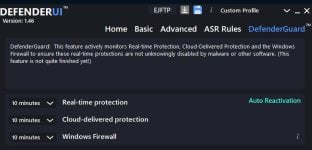
Check the "DefenderGuard" tab, that's the advantage. It helps perverting Windows Firewall and Defender from being disabled.
 
Check the "DefenderGuard" tab, that's the advantage. It helps perverting Windows Firewall and Defender from being disabled.
Thank you very much for the info. Better to keep DefenderUI always active then. Anyway that feature isn't quite finished yet so I think Dan can explain what does he mean with that. Does DefenderGuard currently offer a partial protection ?

DefenderUI Defender Guard.jpg
 
Last edited:
I also don't understand why the minimum is 5 minutes and not instantly.
According to the info button, it's the time after which the protections automatically reactivate after the user, not malware or another software, has disabled them. I assume the reason is that if the user forgets to re-enable them they automatically reactivate after the selected period of time (5 or 10 minutes should be enough, I don't know what could be the reason for a longer period of time or to disable automatic reactivation). Also I don't understand why a user should disable those protections, maybe for doing some changes in DefenderUI settings, I would not know.
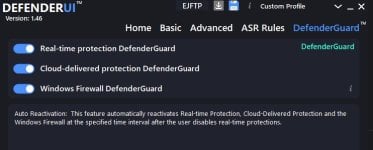
From this one might deduce that malware or other softwares cannot disable the 3 types of protection but is this really the case?

DefenderUI.jpg
 
Last edited:
  • Like
Reactions: simmerskool
Hey guys, thank you for the questions!

The reason why it says "This feature is not quite finished yet." is because we can make this feature even more robust, even though it works great the way it is.

We can add a 1 Minute option, but I figured 5 Minutes was the lowest anyone would really want.
 
Hey guys, thank you for the questions!

The reason why it says "This feature is not quite finished yet." is because we can make this feature even more robust, even though it works great the way it is.

We can add a 1 Minute option, but I figured 5 Minutes was the lowest anyone would really want.
I see. I thought the point of the feature was to enable the AV in case it got disabled by malware, not user need.
 
  • Like
Reactions: simmerskool