New Update DefenderUI by VoodooShield - Turn on Hidden Security Features of Microsoft Defender

danb

From VoodooShield
Thread author
Verified
Top Poster
Developer
Well-known
Forum Veteran
May 31, 2017
2,157
12,540
3,078
Overland Park, KS


When Windows 11 was leaked, I was hoping we would see a usable Defender UI, but unfortunately it had not changed a bit. Defender is great under the hood but it is incredibly frustrating to use. It is also certainly not bulletproof and Redmond’s idea of zero trust is much different from mine, but at least it is something to work from.

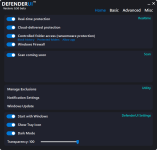
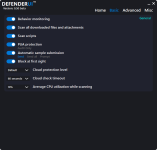
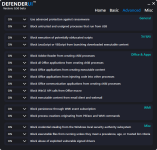
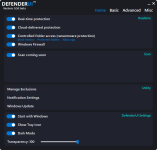
So I decided to build a fully functional Defender UI. Here are some preliminary screenshots, a beta version will be really in a week or two.
 

Attachments

  • Home.PNG
    Home.PNG
    28.5 KB · Views: 2,627
  • Home.PNG
    Home.PNG
    28.5 KB · Views: 2,338
  • Basic.PNG
    Basic.PNG
    24.7 KB · Views: 2,251
  • Advanced.PNG
    Advanced.PNG
    44.7 KB · Views: 2,420
Really beautifully and elegantly done! It certainly has enough options.

The only thing I would add is a "Prevent Malware From Ever Infecting This System" button (with the default setting of OFF so Folk Like Me can have few giggles).
 
Last edited:
Is this what is next for voodoo shield the UI looks good?
Yeah, one of the main reasons I am building this app is to build a template for the new VS design. So VS will have the same template / theme once we hear everyone's ideas and have everything finalized.
 
Really beautifully and elegantly done! It certainly has enough options.

The only thing I would add is a "Prevent Malware From Ever Infecting This System" button (with the default setting of OFF so Folk Like Me can have few giggles).
Thank you CS, I appreciate that!

Your wish is my command ;).

CS.PNG


And here is what it does...

CS2.PNG
 
I'm certainly not a fan of Windows Defender, but the effort you put into implementing a tool to control program settings deserves credit. Thanks.
Yeah, most people feel strongly one way or the other about Defender. I actually like it pretty well, but it is impossible to use and manage. Hopefully DUI will change that ;).
 
Really nice looking, maybe you could also include a dashboard about which part is on or off? Such as fireball: on/off, then something to click so u can see the details?
Thank you! I am not exactly sure what you mean. The toggle buttons you see indicate if a feature is on or off. There will certainly be all of the necessary details, but if I forget any that we need, please let me know!
 
Thank you! It will probably be free, it's hard to say for sure.

Something i see as an important change to the handling of Microsoft Defender is when it blocks/quarantines downloaded files, that can be way easier. Now it is quite cumbersome.

And of course, all in one place with a good overview is a success compared to now.
 
Something i see as an important change to the handling of Microsoft Defender is when it blocks/quarantines downloaded files, that can be way easier. Now it is quite cumbersome.

And of course, all in one place with a good overview is a success compared to now.
I agree. The difficulty with Defender is the complexity of post-processing.
 
Something i see as an important change to the handling of Microsoft Defender is when it blocks/quarantines downloaded files, that can be way easier. Now it is quite cumbersome.

And of course, all in one place with a good overview is a success compared to now.
Yeah, exactly, there are many frustrating features in Defender, and the goal of DUI is to solve all of these.
 

You may also like...