

First timer running DefenderUI v1.03 and using Win 11 Pro
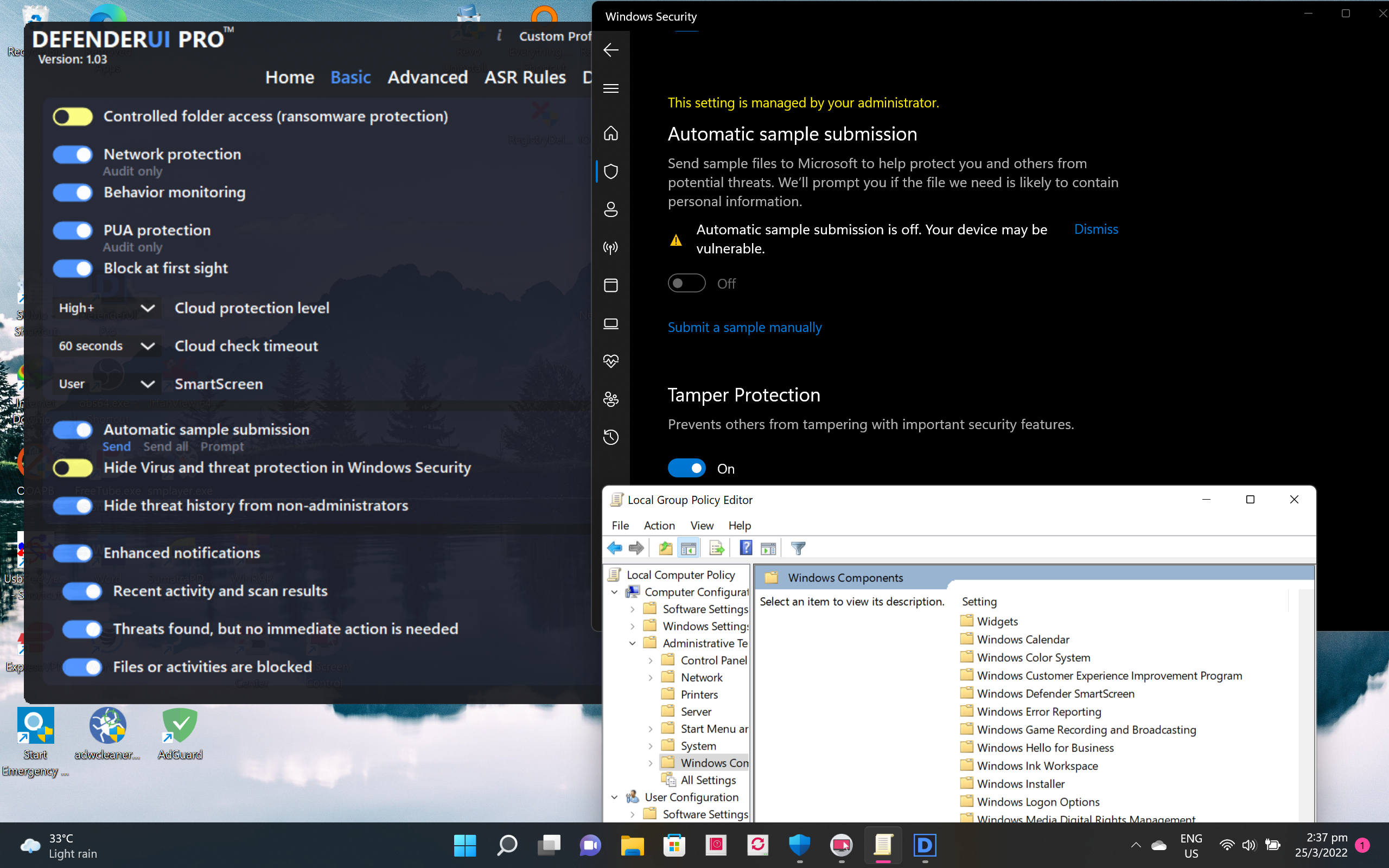 Questions
1) Why is Automatic Sample Submission enabled in DefenderUI but disabled in Windows Security? So is Block at First Sight working since Automatic Sample Submission must be enabled first? Does that means if I enabled a feature in DefenderUI the same feature will also be enabled in Windows Security?
EDIT : Problem solved. Answer below

 www.elevenforum.com
When I went to BAFS site and did the test it works
2) When I run gpedit.msc I cannot find Windows Defender Antivirus? Or has this component being removed in Win 11? Does that mean I cannot set Block at First Sight using Group Policy? I'm not running any 3rd-party AV
EDIT : Problem solved - should be looking at Microsoft Defender Antivirus instead of Windows Defender Antivirus.
3) The different security profiles (Recommended, Interactive, Aggressive, Default) corresponds to which i.e. Home, Basic, Advanced, ASR Rules and DefenderGuard? Or each security profile corresponds to all?
4) If I uninstall DefenderUI would the settings be reverted to default in Windows Security? Or I need to set to Default profile first before uninstalling?
1) Why is Automatic Sample Submission enabled in DefenderUI but disabled in Windows Security? So is Block at First Sight working since Automatic Sample Submission must be enabled first? Does that means if I enabled a feature in DefenderUI the same feature will also be enabled in Windows Security?
EDIT : Problem solved. Answer below
Enable or Disable Automatic Sample Submission for Microsoft Defender Antivirus in Windows 11
This tutorial will show you how to enable or disable automatic sample submission for Microsoft Defender Antivirus in Windows 11. Microsoft Defender Antivirus is an antivirus software that is included in Windows 11 and can help protect your device from viruses, malware, and other threats...
www.elevenforum.com
When I went to BAFS site and did the test it works
2) When I run gpedit.msc I cannot find Windows Defender Antivirus? Or has this component being removed in Win 11? Does that mean I cannot set Block at First Sight using Group Policy? I'm not running any 3rd-party AV
EDIT : Problem solved - should be looking at Microsoft Defender Antivirus instead of Windows Defender Antivirus.
3) The different security profiles (Recommended, Interactive, Aggressive, Default) corresponds to which i.e. Home, Basic, Advanced, ASR Rules and DefenderGuard? Or each security profile corresponds to all?
4) If I uninstall DefenderUI would the settings be reverted to default in Windows Security? Or I need to set to Default profile first before uninstalling?
Last edited:


