Advanced Plus Security Devjit's Security Config 2022

Last updated
May 5, 2022
How it's used?
For home and private use
Operating system
Windows 10
On-device encryption
Log-in security
Security updates
Allow security updates and latest features
User Access Control
Always notify
Smart App Control
Network firewall
Real-time security
F-Secure SAFE + Windows Firewall Control
RunbySmartscreen + Simple Windows Hardening
Firewall security
Microsoft Defender Firewall
About custom security
None
Periodic malware scanners
Emsisoft Emergency Kit (weekly)
Kaspersky Virus Removal Tool (monthly)
Malware sample testing
I do not participate in malware testing
Browser(s) and extensions
Microsoft Edge
Secure DNS
Quad9
Desktop VPN
Windscribe
Password manager
Bitwarden
Maintenance tools
Bleachbit Portable
Privazer Portable
File and Photo backup
Google Drive
System recovery
Macrium Reflect
Risk factors
    • Working from home
    • Browsing to popular websites
    • Opening email attachments
    • Buying from online stores, entering banks card details
    • Logging into my bank account
    • Gaming
What I'm looking for?

Looking for medium feedback.

Hello everyone this is my security config. I'm thinking about adding Simple Windows Hardening and RunbySmartscreen but I don't know if they are required if I'm using SysHardener and VoodooShield. Any suggestions and advice are welcome. :D

SysHardener latest update has been released very long time ago. You can replace it with Simple Windows Hardening.
ESET IS with tweaked/created HIPS rules should be enough, but you may prefer to keep VoodoShield ;)
 
SysHardener latest update has been released very long time ago. You can replace it with Simple Windows Hardening.
ESET IS with tweaked/created HIPS rules should be enough, but you may prefer to keep VoodoShield ;)
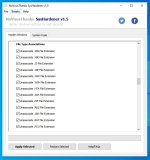
Yeah SH has been updated quite a while back. Shadow Defender also has been updated quite a while back. Till now SD works flawlessly on my PC and that's why I have kept it. I rarely use it when I test new softwares. Also these are the settings I use for SysHardener (just unassociate the file extension for script files) and till now these have worked perfectly for me. ESET IS has been tweaked but I have not added any HIPS or Firewall Rules. I have tweaked only the settings like enable detection of Potentially Unwanted Applications and Unsafe Applications and set the sensitivity of ESET to Aggressive. I've also set the Real-Time Protection to enable Advanced Heuristics/DNA Signatures and enable Runtime Packers.

SH.JPG
 
Last edited:
So my ESET license expires. Did a complete secure erase of my SSD and reinstalled Windows. Changed from ESET to Quick Heal Internet Security. Also added Simple Windows Hardening and RunbySmartscreen. For browser I've opted for Edge.
 
Last edited:
Does KVRT update its database? Or do I have to download the latest version every time? If it updates it's database then I have no problem in using KVRT.
You are right. Unfortunately, for KVRT it's still required to download the latest version from the homepage. Of course, it's a downside...
But I personally recommend KVRT due to it's ability scanning for possible system memory infections by malware.
 
Runbysmartscreen is my favorite tool from @Andy Ful , simple and very useful.

I’d use ESET and NPE. Malwarebytes is greatly improved as well recently. I stopped using Emsisoft when Windows Defender detected some of the Bitdefender signatures as a virus.
 
Thanks for your suggestions everyone. I've opted for Emsisoft Emergency Kit and Kaspersky Virus Removal Tool. I'll run a scan with EEK every week and a scan with KVRT every month(will download the latest version each time before scanning).
 
Last edited: