

The MalwareTips app
Your community, one tap away.
Open MalwareTips from your Home Screen or desktop. Follow discussions, find answers and pick up where you left off.
- Home Screen access
- Optional push alerts
- Your community
You're ready to explore.Explore what's new
Installation instructions
iPhone & iPad
- Open MalwareTips in Safari and tap Share. You may need to open the Page Menu first.
- Choose Add to Home Screen. If it is not listed, use Edit Actions to add it.
- Keep Open as Web App enabled if shown, then tap Add.
Android
- Open MalwareTips in Chrome or another browser that supports app installation.
- Open the browser menu and look for Install app, Install and create shortcut, or Add to Home screen.
- Choose Install and confirm. Wording varies by browser.
Desktop
- Chrome: use the install icon in the address bar, or the menu under Cast, save and share.
- Edge: open the menu, then More tools, Apps and Install this site as an app.
- Safari on Mac: choose Share or File, then Add to Dock. Firefox on Windows: look for the web apps button in the address bar.
If you cannot find an install option, update your browser or use its bookmark option to keep MalwareTips close.
Keep up with your conversations
After installation, open the app and sign in. Enable push notifications in Preferences if you want alerts. On iPhone and iPad, push requires a Home Screen web app and iOS or iPadOS 16.4 or later.
Sign in to manage notificationsInstallation is optional. Your notification settings stay under your control.
You are using an out of date browser. It may not display this or other websites correctly.
You should upgrade or use an alternative browser.
You should upgrade or use an alternative browser.
DigitalisPurpurea Chrome Extension virus
-
 Thread starter
langlang4
Thread starter
langlang4
- Start date
- 11 Replies
- 2,270 Views
- Status
- Not open for further replies.

langlang4
New Member
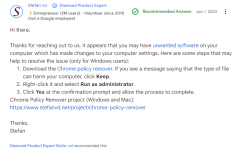
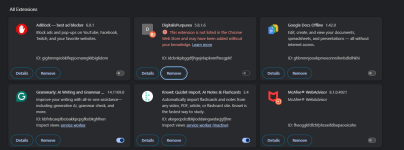
Hello, I have tried to remove the extension through the chrome policy remover (attached below) and by going on registry editor. Right now the extension is not active but it will not let me remove it. Can anyone help?
View attachment 283080View attachment 283081
Attachments

Hello ..! Welcome to MalwareTips..! 
My name is icotonev and I'm here to help you remove malware ..! Before we begin, please note the following:
Farbar Recovery Scan Tool - Fix
NOTICE: This script was written specifically for this user, for use on this particular machine. Running this on another machine may cause damage to your operating system that cannot be undone
Please download the attached file to the same folder where the Farbar tool is running from.
The location is listed in the 3rd line of the FRST.txt log you have submitted.
Run FRST and click Fix only once and wait.
The Computer will restart when the fix is completed.
It will create a log (Fixlog.txt) please post it to your reply.
In your next reply, please include:
My name is icotonev and I'm here to help you remove malware ..! Before we begin, please note the following:
- First, please keep in mind most of us at MalwareTips volunteer our assistance for your benefit in your time of need. Logs from malware diagnostic or removal programs can take some time to get analyzed. Also, have in mind that all the experts here are volunteers and may not be available to assist when you post. Please, be patient, while I analyze your logs.
- It is important to not run any tools or take any steps other than those I will provide for you.Also, do not uninstall or install any software during the procedure, unless I ask you to do so.
- Cracked or pirated programs are not only illegal, but also can make your computer a malware target. Having such programs installed, is the easiest way to get infected. Thus, no need to clean the computer, since, soon or later, it will get infected again. If you have such programs, please uninstall them now, before we start the cleaning procedure.
- Please perform all steps in the order they are listed. If things are not clear or you experience problems be sure to stop and let me know.
- Please attach all logs into your post unless otherwise requested.
- When your computer is clean I will let you know, provide instructions to remove tools and reports, and offer you information about how you can combat future infections.
- If you do not reply to your topic after 5 days I will assume it has been abandoned and I will close it.
- Download the Revo Uninstaller Free and save it on your Desktop.
- Double click on the exe file created on your Desktop to run the installer, and follow the instructions to install the program.
- Double click the program's icon to open it.
- Write in the search area, on the top left, the following program:
Code:
Chromstera
WebAdvisor by McAfee- Choose the Uninstall tab from the menu and let the program to create a Restore point.
- Choose Scan, and then the Advanced mode scan.
- Select all the Online Services items found, Delete and Next.
- Let the procedure be completed and click on Finish.
- Restart the computer.
Farbar Recovery Scan Tool - Fix
NOTICE: This script was written specifically for this user, for use on this particular machine. Running this on another machine may cause damage to your operating system that cannot be undone
Please download the attached file to the same folder where the Farbar tool is running from.
The location is listed in the 3rd line of the FRST.txt log you have submitted.
Run FRST and click Fix only once and wait.
The Computer will restart when the fix is completed.
It will create a log (Fixlog.txt) please post it to your reply.
- Copy/paste the following in the Search: box
Code:
Searchall: Chromstera- Click Search Files button
- When completed click OK and a Search.txt document will open on your desktop
- Аttach the report in your reply. If the file is too large zip and upload it here.
In your next reply, please include:
- Fixlog.txt
- Search report
Attachments
Last edited:
langlang4
New Member
Thanks for responding! This reply will be in two parts because I have tried a couple of things since the og post. Ther first part will be what I done on my own and the second is about your instructions
Part 1: I was able to get rid of the og extension from the photos and uninstalled and reinstalled chrome through the Ninite installer as it would not install itself with a firewall message poping up. After using chrome without the extension virus for a few hours today, it crashed and a new extension popped up: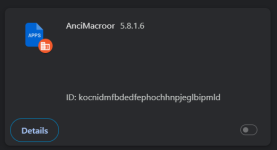
I deleted the ID by going through AppData/local/Google/Chrome/Userdata/default/extensions and deleting the ID folder. That switched the extension off but chrome still says that it is manged by an organization. I then checked Microsoft edge and realized that the first extension from chrome is also there; I didn't notice because I don't use that browser.
Part 2: Following your instructions I uninstalled some pirated games I got ages ago. I was able to get to the advanced mode part for chromstera but what are the online services that I have to delete? How do I know what they are? I wasn't exactly sure so and I don't want to do more harm so I decided to comfirm before moving on. I'm also not sure if I can advance scan web advisor and chromstera at the same time. Can I leave web advisor for now and deal with chromstera first?
Sorry for the long post and if anything that I did in part 1 messed up the procedure to fix things. This is my first time with a virus like this and I kinda panicked, plus a few other things were going on. Once again, thanks for responding! I know you guys are volunteers so it means a lot that this is a free service ^_^ Please take your time and let me know if I need to redo the logs again or if more information needs to be clarified! I don't think we are in the same time zone but I'll try and check the thread everyday so that I won't miss anything.
Part 1: I was able to get rid of the og extension from the photos and uninstalled and reinstalled chrome through the Ninite installer as it would not install itself with a firewall message poping up. After using chrome without the extension virus for a few hours today, it crashed and a new extension popped up:
I deleted the ID by going through AppData/local/Google/Chrome/Userdata/default/extensions and deleting the ID folder. That switched the extension off but chrome still says that it is manged by an organization. I then checked Microsoft edge and realized that the first extension from chrome is also there; I didn't notice because I don't use that browser.
Part 2: Following your instructions I uninstalled some pirated games I got ages ago. I was able to get to the advanced mode part for chromstera but what are the online services that I have to delete? How do I know what they are? I wasn't exactly sure so and I don't want to do more harm so I decided to comfirm before moving on. I'm also not sure if I can advance scan web advisor and chromstera at the same time. Can I leave web advisor for now and deal with chromstera first?
Sorry for the long post and if anything that I did in part 1 messed up the procedure to fix things. This is my first time with a virus like this and I kinda panicked, plus a few other things were going on. Once again, thanks for responding! I know you guys are volunteers so it means a lot that this is a free service ^_^ Please take your time and let me know if I need to redo the logs again or if more information needs to be clarified! I don't think we are in the same time zone but I'll try and check the thread everyday so that I won't miss anything.
langlang4
New Member
I should also ask asuming that the same FRST log I sent will still work with what I've done, where is the location that I should put the log you sent? Is it this one:Thanks for responding! This reply will be in two parts because I have tried a couple of things since the og post. Ther first part will be what I done on my own and the second is about your instructions
Part 1: I was able to get rid of the og extension from the photos and uninstalled and reinstalled chrome through the Ninite installer as it would not install itself with a firewall message poping up. After using chrome without the extension virus for a few hours today, it crashed and a new extension popped up:View attachment 283125
I deleted the ID by going through AppData/local/Google/Chrome/Userdata/default/extensions and deleting the ID folder. That switched the extension off but chrome still says that it is manged by an organization. I then checked Microsoft edge and realized that the first extension from chrome is also there; I didn't notice because I don't use that browser.
Part 2: Following your instructions I uninstalled some pirated games I got ages ago. I was able to get to the advanced mode part for chromstera but what are the online services that I have to delete? How do I know what they are? I wasn't exactly sure so and I don't want to do more harm so I decided to comfirm before moving on. I'm also not sure if I can advance scan web advisor and chromstera at the same time. Can I leave web advisor for now and deal with chromstera first?
Sorry for the long post and if anything that I did in part 1 messed up the procedure to fix things. This is my first time with a virus like this and I kinda panicked, plus a few other things were going on. Once again, thanks for responding! I know you guys are volunteers so it means a lot that this is a free service ^_^ Please take your time and let me know if I need to redo the logs again or if more information needs to be clarified! I don't think we are in the same time zone but I'll try and check the thread everyday so that I won't miss anything.
" (C:\Program Files (x86)\Lenovo\VantageService\4.0.75.0\LenovoVantageService.exe ->) (Lenovo -> Lenovo) C:\Program Files (x86)\Lenovo\VantageService\4.0.75.0\LenovoVantage-(DeviceSettingsSystemAddin).exe "?

Hi,
For some unknown reasons to me some items have shown their faces again, other are new.
Before we proceed with this fix I just want to let you know that this CHCP setting is located in Cuba for the ISPEmpresa de Telecomunicaciones de Cuba, S.A
Tcpip\..\Interfaces\{e7ceea2c-aa38-4346-9998-a4dbe9bd5ed1}: [DhcpNameServer] 152.206.1.2
If you feel safe with this fine. Forget it.
If not add this line: Ir forget it if you know of it.
Tcpip\..\Interfaces\{e7ceea2c-aa38-4346-9998-a4dbe9bd5ed1}: [DhcpNameServer] 152.206.1.2
under the Comment: Items from the FRST.TXT log that will be removed from the Registry - after you have downloaded it and save the file before running the fix.
<<<>>>.
Please download the attached Fixlist.txt file to the same folder where the Farbar tool is running from.
The location is listed in the 3rd line of the FRST.txt log you have submitted.
Run FRST and click Fix only once and wait.
The Computer will restart when the fix is completed.
It will create a log (Fixlog.txt) please post it to your reply.
===
Please post the Fixlog.txt and let me know what problem persists.
For some unknown reasons to me some items have shown their faces again, other are new.
Before we proceed with this fix I just want to let you know that this CHCP setting is located in Cuba for the ISPEmpresa de Telecomunicaciones de Cuba, S.A
Tcpip\..\Interfaces\{e7ceea2c-aa38-4346-9998-a4dbe9bd5ed1}: [DhcpNameServer] 152.206.1.2
If you feel safe with this fine. Forget it.
If not add this line: Ir forget it if you know of it.
Tcpip\..\Interfaces\{e7ceea2c-aa38-4346-9998-a4dbe9bd5ed1}: [DhcpNameServer] 152.206.1.2
under the Comment: Items from the FRST.TXT log that will be removed from the Registry - after you have downloaded it and save the file before running the fix.
<<<>>>.
Please download the attached Fixlist.txt file to the same folder where the Farbar tool is running from.
The location is listed in the 3rd line of the FRST.txt log you have submitted.
Run FRST and click Fix only once and wait.
The Computer will restart when the fix is completed.
It will create a log (Fixlog.txt) please post it to your reply.
===
Please post the Fixlog.txt and let me know what problem persists.
Attachments
- Status
- Not open for further replies.
Recently browsing
Members who viewed this thread in the last 5 minutes
You may also like...
-
 MalwareTips News 13 npm packages caught stealing Chrome extension data
 -
 New Update AVG's latest browser extension
 -

-
- H