dllhost.exe *32 COM surrogate virus

The ComboFix /Uninstall doesn't seem to be doing anything, and I can see ComboFix is still on the desktop. Maybe because McAfee has quarantined it already? The popup is still open from McAfee with the options of Restart Now or Restart Later. What should I do?
 
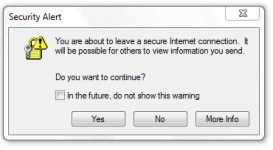
I did the restart and then ran ComboFix /uninstall which then worked. I got the warning after it started to turn off the McAfee again, which I did and then after it was done, turned it back on. I then ran the Delfix. When I logged into email from IE, I got this popup which I don't recall getting before. Is this a concern? No COM Surrogate so far in task manager.
upload_2014-11-5_8-30-59.png
 
I said No to the above popup and it continued to go to my email anyway. Then I logged out and got the same popup. I then closed the IE window.
 
I've been using the same apps as before, all evening and so far no recurrences of COM Surrogate replication, or accompanying weird popup surveys. Do I dare say, "This house is clean!!!"
This was a tough one. Thanks so much for your repeated help. I certainly couldn't have done it without you, just using regular virus cleaners. Thanks so much!
 
Thanks!


Download DelFix by Xplode and save it to your desktop.
  • Run the tool by right click on the
    51a5ce45263de-delfix.png
    icon and Run as administrator option.
  • Make sure that these ones are checked:
    • Remove disinfection tools
    • Purge system restore
    • Reset system settings
  • Push Run and wait until the tool completes his work.
  • All tools we used should be gone. Tool will create an report for you (C:\DelFix.txt)
The tool will also record healthy state of registry and make a backup using ERUNT program in %windir%\ERUNT\DelFix
Tool deletes old system restore points and create a fresh system restore point after cleaning.