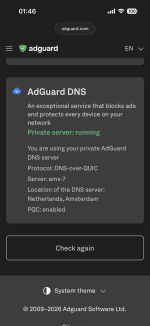
Sophisticated setup for me; I prefer simplicity, such as your WHHL.Cloutflare ZT legacy


Open MalwareTips from your Home Screen or desktop. Follow discussions, find answers and pick up where you left off.
If you cannot find an install option, update your browser or use its bookmark option to keep MalwareTips close.
After installation, open the app and sign in. Enable push notifications in Preferences if you want alerts. On iPhone and iPad, push requires a Home Screen web app and iOS or iPadOS 16.4 or later.
Sign in to manage notificationsInstallation is optional. Your notification settings stay under your control.
Sophisticated setup for me; I prefer simplicity, such as your WHHL.Cloutflare ZT legacy

FP for what? Blocking NRD is the best protection against phishing, those domains usually die within 1-2 hours.When using NextDNS, I disable NRD; it throws too many FP blocks.

Sophisticated setup for me; I prefer simplicity, such as your WHHL.

This is exactly the cause of FP blocks; even after adding to allow list, the domain is changed and need to re-add again.I watch illegal streaming, which uses NRDs, thus I use DNS without it

Same experience and I remember they blamed it to their data providerLast time I tried ControlD, it failed NRDs! How the hell do you fail that? It is dumb proof, if the domain is less then 30 days old, you block it, but they cheated!
All the aresenal (DNS, browser extension, AV web protection) adds a little to my protection.Using Cloudflare ZT at home is like using a microscope as a hammer for driving nails.
But, this is a really good hammer and can be handy as a screwdriver too.
Their documentation is easy to follow. I configured my settings based on itSophisticated setup for me; I prefer simplicity, such as your WHHL.
 developers.cloudflare.com
I do not need their minimal increase of dns-based protection compared to NextDNS or ControlD; feasibility is not in their favor, too much setup for minimal gain.Their documentation is easy to follow. I configured my settings based on it
If that was the only case, I could have accepted it, but they are on my blocklist, they basically told me to f*** off after reporting some issues they did not want to deal with.Same experience and I remember they blamed it to their data provider
you'll never know until you try it.I do not need their minimal increase of dns-based protection compared to NextDNS or ControlD; feasibility is not in their favor, too much setup for minimal gain.
Reason I got rid ControlD because of service got worse and their unprofessionalism.If that was the only case, I could have accepted it, but they are on my blocklist, they basically told me to f*** off after reporting some issues they did not want to deal with.
As a start point, I do not prefer installing extra apps, if I can do the job without.you'll never know until you try it.
View attachment 294678
you can use CFZT without installing any app. Just copy your custom DoH/DoT address and paste it on your browser.As a start point, I do not prefer installing extra apps, if I can do the job without.
So I never thought of installing CFZT or AG or even Yoga or Technetium.
DoH in browser settings is more than required for me.
Like NextDNS?you can use CFZT without installing any app. Just copy your custom DoH/DoT address and paste it on your browser.

The problem in this thread is many members judge Cloudflare Zero Trust despite never trying it. Yes, it might be complicated for newbies, but once you get familiar with Cloudflare Zero Trust dashboard, it's so easy to use. You don't even utilize entire dashboard, just two pages; nothing else.you'll never know until you try it.
P.S this is the Policies for my Home Router. I don't use Cloudflare on my personal devices. I use my VPN's DNS
View attachment 294678
Literally like NextDNS, you still get IPv4/IPv6 DNS address and personal DoT/DoH address so you can use it without Cloudflare app installed. If you opt to install their Cloudflare WARP app, you're also getting free, unlimited and fast VPN along with your DNS.Like NextDNS?
I would like their website link to try.
Yes. Just like any DNS services that offers DoH/DoT addressesLike NextDNS?
I would like their website link to try.

When using NextDNS, I disable NRD; it throws too many FP blocks.
So using ControlD with Hagezi list is almost equal to NextDNS for me.

The website domain get changed after few days, and I have to repeat the process again and again.Try adding the domain to the whitelist, exit, and restart your browser.
The website domain get changed after few days, and I have to repeat the process again and again.
domain.*Members who viewed this thread in the last 5 minutes