Serious Discussion DNS Providers for Home Users – Still Cloudflare/Quad9, or Did NextDNS/Control D Finally Win?

What DNS provider(s) do you force on your home network / PC?

  • Cloudflare 1.1.1.1 (or 1.1.1.2/3) – speed king

  • Quad9 – best free malware/phishing blocking

  • Google 8.8.8.8 – I don’t care, just works

  • NextDNS – worth the config time and (sometimes) the $20/year

  • Control D – NextDNS but better UI and free tier actually good

  • AdGuard DNS – most aggressive ad/tracker blocking for free

  • Mullvad DNS / DNSCrypt – paranoid zero-log gang

  • My ISP’s DNS – yes I’m that guy

  • Self-hosted (Pi-hole, AdGuard Home, Technitium, etc.)

  • Mix – different DNS per device/profile


Results are only viewable after voting.
DNS doesn't matter for gaming. DNS doesn't have any effect on gaming whatsoever.
You’re confusing connection latency with infrastructure routing. You are right that DNS won't lower your in-game ping, once the UDP stream is active, the phonebook is closed, but saying it has "no effect whatsoever" may be a bit off. Modern games rely on Geo-DNS to assign you to the nearest CDN for massive patch downloads and regional matchmaking clusters, if a sloppy DNS resolver sends you to a node three states away, your download speeds tank and your lobby times out. Game UIs (store, chat, friends lists) are constant API calls, if your ISP’s default DNS chokes on those lookups, the game hangs and disconnects regardless of your ping. It’s not a speed hack, it’s basic plumbing.
 
Last edited by a moderator:
  • Like
Reactions: Zero Knowledge
@Divergent I'm not the forum nanny, or conscience, but you do some wonderful work until you add words like "technically illiterate" it's a bit harsh. How about, "it may be a bit off, here's why I think,...."
@Marko :) has been incredibly helpful on this forum, especially for me today. Just sayin :)
Illiterate meaning in this case "lacking general knowledge" was not meant to be offensive but I understand what you are saying and how it can be perceived.
 
I havent used a DNS since the old NortonDNS (dont know if its still available) soooo i guess im that guy, just using the one built into my router lol
And that is a terrible idea. Even if you live in a country where ISPs don't track user activity or censor the internet.

DNS servers from all ISPs throughout the world are simply the worst choice. They aren't backed by anycast which means once it goes down, you "lose" internet connection until they fix it; they usually do not support basic security standards like DNSSEC and do not protect you from third parties intercepting/modifying DNS queries. Not to mention, they are really slow in DNS resolution.

Even if you don't care about your ISP seeing what websites you visit, you should use at least some kind of public non-filtering DNS like 1.1.1.1, and preferably DoH. DNSSEC protects you so websites can't manipulate DNS records, it speeds up browsing the web and even if DNS servers from your ISP fail, you still have normal internet access.
 
Long years ago, before gaining enough knowledge, when I call ISP tech support after facing troubles with my internet connectivity, they advise using Google dns instead of their own.
I started using OpenDNS, then switched to Google and eventually switched to 1.1.1.1 once Cloudflare launched it. Had ISP DNS servers fail multiple times, you should saw faces of family members when I was the only one at home that had functional internet. 🤣

Eventually, I did changed DNS on router so internet works all the time for everyone.
 
It's not as good as AV web protection or browser security extension, but it do help.
Sometimes blocks websites missed by those two.
This.

Long years ago, before gaining enough knowledge, when I call ISP tech support after facing troubles with my internet connectivity, they advise using Google dns instead of their own.
On the router level?

I started using OpenDNS, then switched to Google and eventually switched to 1.1.1.1 once Cloudflare launched it. Had ISP DNS servers fail multiple times, you should saw faces of family members when I was the only one at home that had functional internet. 🤣

Eventually, I did changed DNS on router so internet works all the time for everyone.
When I tried NextDNS last year, I did like it, but I also like my AV browser extensions. Also, when using a VPN it bypasses the DNS, at least NextDNS using the Windows app to connect to it. If I were to change the DNS on my Asus router, will it bypass my AV browser extensions web filtering for it's own? So far, my connection through my ISP has been very stable over the last ten years of on and off service with them. Do I just keep using what I'm using and am happy with (if it ain't broke, don't fix it), especially since I can play with a VPN once in awhile, and the sites are still being scanned by the extensions?
 
And that is a terrible idea. Even if you live in a country where ISPs don't track user activity or censor the internet.

DNS servers from all ISPs throughout the world are simply the worst choice. They aren't backed by anycast which means once it goes down, you "lose" internet connection until they fix it; they usually do not support basic security standards like DNSSEC and do not protect you from third parties intercepting/modifying DNS queries. Not to mention, they are really slow in DNS resolution.

Even if you don't care about your ISP seeing what websites you visit, you should use at least some kind of public non-filtering DNS like 1.1.1.1, and preferably DoH. DNSSEC protects you so websites can't manipulate DNS records, it speeds up browsing the web and even if DNS servers from your ISP fail, you still have normal internet access.
Thank you, i promptly switched to Quad9 (y)(y)
 
When I tried NextDNS last year, I did like it, but I also like my AV browser extensions. Also, when using a VPN it bypasses the DNS, at least NextDNS using the Windows app to connect to it. If I were to change the DNS on my Asus router, will it bypass my AV browser extensions web filtering for it's own? So far, my connection through my ISP has been very stable over the last ten years of on and off service with them. Do I just keep using what I'm using and am happy with (if it ain't broke, don't fix it), especially since I can play with a VPN once in awhile, and the sites are still being scanned by the extensions?
A third-party DNS won't circumvent web filtering by an antivirus.

Flexibility with my DNS actually inspired me to rely primarily on Cloudflare WARP instead of a traditional VPN for day-to-day. It's free, fast, and offers encryption and IP masking like a VPN.

WARP+ access normally costs, but it came complimentary with my free-tier Cloudflare Zero Trust account.
 
When I tried NextDNS last year, I did like it, but I also like my AV browser extensions. If I were to change the DNS on my Asus router, will it bypass my AV browser extensions web filtering for it's own?
DNS doesn't have any effect on your browser extensions. You can use both NextDNS and your AV browser extension together without any issues. Moreover, if you enable security filters and threat intelligence in NextDNS, you get more advanced protection as they will complement each other.
Also, when using a VPN it bypasses the DNS, at least NextDNS using the Windows app to connect to it.
Take a look at your VPN client's settings. Some VPN providers allow you to change the DNS servers which will be used during VPN connection. Windscribe does, and it even lets you use DNS-over-HTTPS.

If your VPN client doesn't allow you to do that, you can use Secure DNS feature in your web browser. That setting will override any other DNS server you have set because web browser has the main word.

By priorities:
1. Web browser
2. VPN/DNS app
3. DNS in Windows, network adapter settings
4. DNS from router

If you disable DoH in your web browser, VPN/DNS app will be used. If you don't have any, DNS set in Windows will be used. If you didn't set any, then DNS from the router will be used.

Personally, I have DoH enabled in browser all the time, in case WARP app (which I use to implement DNS system-wide) fails.
So far, my connection through my ISP has been very stable over the last ten years of on and off service with them. Do I just keep using what I'm using and am happy with (if it ain't broke, don't fix it), especially since I can play with a VPN once in awhile, and the sites are still being scanned by the extensions?
If I were you, I'd change even if everything works perfect for you. It's better to use big provider's DNS than an ISP one. If not for the speed, then just for the sake of security (DNSSEC, DoH,...).
Thank you, i promptly switched to Quad9 (y)(y)
Excellent choice!
 
A third-party DNS won't circumvent web filtering by an antivirus.

Flexibility with my DNS actually inspired me to rely primarily on Cloudflare WARP instead of a traditional VPN for day-to-day. It's free, fast, and offers encryption and IP masking like a VPN.

WARP+ access normally costs, but it came complimentary with my free-tier Cloudflare Zero Trust account.
Nice tip, if I can save the cost of renewing my Proton paid VPN this year :)
 
A third-party DNS won't circumvent web filtering by an antivirus.

Flexibility with my DNS actually inspired me to rely primarily on Cloudflare WARP instead of a traditional VPN for day-to-day. It's free, fast, and offers encryption and IP masking like a VPN.

WARP+ access normally costs, but it came complimentary with my free-tier Cloudflare Zero Trust account.
YES. While I did use normal WARP before, I started using Zero Trust WARP+ and you can really feel difference in surfing as websites load much faster. Just make sure to use MASQUE protocol instead of WireGuard as it will give you better speeds and better encryption (it uses QUIC protocol).
Nice tip, if I can save the cost of renewing my Proton paid VPN this year :)
Yeah, the best thing is it's completely free for home and small teams. If you don't need unblocking geoblocked websites, then WARP+ is exactly what you need.
 
@Marko :)
Take a look at your VPN client's settings. Some VPN providers allow you to change the DNS servers which will be used during VPN connection. Windscribe does, and it even lets you use DNS-over-HTTPS.
I think I had recently checked if Proton could, but I believe it can't (I'll check it again). I think Nord has that ability. I appreciate the Windscribe tip as well :)
 
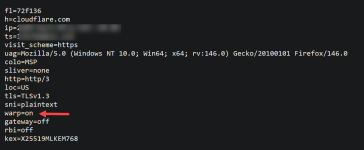
I installed the Windows app, and I'm using Cloudflare Warp. Is there anything I need to change? I in FF I changed to Enable DNS over HTTPS.

Cloudflare.png Warp on.png
 
I use DNS over HTTPS with Max Protection on my Firefox browser with Cloudflare as my service provider. Do I need to use a system-wide Domain Name System as well?
 
  • Like
Reactions: Parkinsond