Question DNS rebinding attacks

Please provide comments and solutions that are helpful to the author of this topic.
All MT members reporting passing the test with other dns providers than nextdns and ag dns where using FF?

I do not have controld app installed; just pasting the resolver in browser settings.
The ControlD Setup Utility isn't an app which requires installation. You just need to run it; enter resolver ID and press Connect. No need to install anything. It will set up DNS daemon through which all DNS traffic will go. Once you open ControlD Setup Utility again and disconnect, it's removed and all traces of ControlD are deleted. Simple as that!
According to Marko, only FF has a different way of handling doh, the remaining chormium browsers behave in a similar way; what applies to brave, apply to the rest.
Yes. Because when Edge adopted Chromium, it also adopted Chromium code for DoH. DoH in Firefox works in a different way. @TairikuOkami already presented that Chromium based browsers leak unencrypted DNS requests.
 
Yes. Because when Edge adopted Chromium, it also adopted Chromium code for DoH. DoH in Firefox works in a different way
Yes, I got it; what I mean, not all members who reported passing the test used FF, that means the browser is not the issue.
 
  • Like
Reactions: Divine_Barakah
Yes, I got it; what I mean, not all members who reported passing the test used FF, that means the browser is not the issue.
I have closely followed this thread and to me it seems the issue is on your side. I am very curious to find out what caused the test to fail on your device.
 
The same modem router? the same ISP?
Exactly that's the point. It is not the DNS. It's either configuration or ISP or the router. For example, ISPs in Egypt are very aggressive when it comes to using custom DNS. I've had a hard time using Next DNS on my Android devices as it always failed to connect. I had to use the app to setup NextDNS DNS over HTTPS config. That does not mean the problem is with NextDNS, right ? That's the point I'm trying to make.
 
Exactly that's the point. It is not the DNS. It's either configuration or ISP or the router. For example, ISPs in Egypt are very aggressive when it comes to using custom DNS. I've had a hard time using Next DNS on my Android devices as it always failed to connect. I had to use the app to setup NextDNS DNS over HTTPS config. That does not mean the problem is with NextDNS, right ? That's the point I'm trying to make.
I can easily say there is a problem on my side if all DNS providers failed the test; what is perplexing here two providers already passed the test!
 
  • Like
Reactions: Divine_Barakah
I can easily say there is a problem on my side if all DNS providers failed the test; what is perplexing here two providers already passed the test!
Go to the test site again, disable ad blocker and any other content blocker you have installed. Then open the DevTools, switch to Networking tab. Now run the test once with DNS resolvers that fail the test, screenshot and repeat the test with NextDNS. At the end, post the screenshots here. This will give us at least some ide what is happening and why.

Also, visit dnscheck.tools with ControlD, take a screenshot, then visit it with NextDNS and take the screenshot again. Just make sure to hide your IP address.

That is... if you want to test it. Because as of now, you didn't show any desire to find the answer to what is happening. 🤷‍♂️
 
I do not have controld app installed; just pasting the resolver in browser settings.
Windows 11 allows to use DOH/DOT without installing any app, on 10 you can use yogadns.com. Disable DOH in the browser and try it system wide.
Code:
netsh dns add global doh=yes
netsh dns set global doh=yes ddr=yes
netsh dns add encryption server=76.76.2.2 dohtemplate=https://freedns.controld.com/p2 autoupgrade=yes udpfallback=no
netsh dns add encryption server=76.76.2.2 dothost=p2.freedns.controld.com:853 autoupgrade=yes udpfallback=no

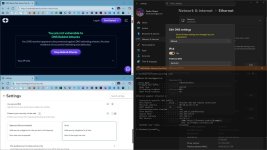
capture_11302025_122602.jpg
 
Windows 11 allows to use DOH/DOT without installing any app, on 10 you can use yogadns.com. Disable DOH in the browser and try it system wide.
Code:
netsh dns add global doh=yes
netsh dns set global doh=yes ddr=yes
netsh dns add encryption server=76.76.2.2 dohtemplate=https://freedns.controld.com/p2 autoupgrade=yes udpfallback=no
netsh dns add encryption server=76.76.2.2 dothost=p2.freedns.controld.com:853 autoupgrade=yes udpfallback=no

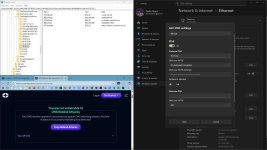
View attachment 293362
I adopt more simple approach; I apply it at the level of browser.
 
  • Applause
Reactions: Divine_Barakah
Go to the test site again, disable ad blocker and any other content blocker you have installed. Then open the DevTools, switch to Networking tab. Now run the test once with DNS resolvers that fail the test, screenshot and repeat the test with NextDNS. At the end, post the screenshots here. This will give us at least some ide what is happening and why.

Also, visit dnscheck.tools with ControlD, take a screenshot, then visit it with NextDNS and take the screenshot again. Just make sure to hide your IP address.

That is... if you want to test it. Because as of now, you didn't show any desire to find the answer to what is happening. 🤷‍♂️
Too much forensics for me.
Anyway, I have two DNS providers passing the test to use.
The title of the thread was not about a specific dns provider, it is concerning if I have to use a dns provider which does not pass the dns rebinding test, would that pose a great deal of security vulnerability?
 
  • Like
Reactions: Divine_Barakah
Windows 11 allows to use DOH/DOT without installing any app, on 10 you can use yogadns.com. Disable DOH in the browser and try it system wide.
Code:
netsh dns add global doh=yes
netsh dns set global doh=yes ddr=yes
netsh dns add encryption server=76.76.2.2 dohtemplate=https://freedns.controld.com/p2 autoupgrade=yes udpfallback=no
netsh dns add encryption server=76.76.2.2 dothost=p2.freedns.controld.com:853 autoupgrade=yes udpfallback=no

View attachment 293362
I used it like that, but switched to ControlD Setup Utility because entering DoH address in Network settings killed my internet connection. I saw few people on Reddit with identical issue and ControlD support said Windows built-in DoH tool doesn't work well except with few DoH DNS servers they have on their list.
 
Yes. Because when Edge adopted Chromium, it also adopted Chromium code for DoH. DoH in Firefox works in a different way. @TairikuOkami already presented that Chromium based browsers leak unencrypted DNS requests.
No, it does not. Browser cannot magically know the IP address of the DoH server unless the bootstrap IP is provided. Neither Chromium nor Firefox provide a separate bootstrap IP option. Firefox initially had it but removed it to simplify the process I assume.
So, each browser has to ask the system DNS to know the IP address.
When you setup DoH or DoT natively on Windows you have to put the DNS server IP, otherwise it won't work. Hence the command looks like this,
netsh dns add encryption server=94.140.14.14 dohtemplate=https://dns.adguard.com/dns-query autoupgrade=yes
Same for Android's Private DNS (DoT) option. I'm using Cloudflare Gateway but almost every 1.5 hour or so my phone has to resolve the IP address of the DoT address for which my router DNS is used.
1.png
 
Getting this error "an unknown error occred" when I running that test. I am using Quad9 as fallback on my laptop, using Brave with controlD (and OISD basic) and have NextDNS setup in my router.
 
  • Like
Reactions: simmerskool
The title of the thread was not about a specific dns provider, it is concerning if I have to use a dns provider which does not pass the dns rebinding test, would that pose a great deal of security vulnerability?
The problem is that something is causing it to fail and that misconfiguration might affect other security setting you do not know about. I would not just ignore it.
I used it like that, but switched to ControlD Setup Utility because entering DoH address in Network settings killed my internet connection. I saw few people on Reddit with identical issue and ControlD support said Windows built-in DoH tool doesn't work well except with few DoH DNS servers they have on their list.
Yes, it is pain to set it up in Windows. Edge works, but other browser nor Windows do not. It can be added manually, so Windows can use the template automatically.
But there seems to be the problem, DDR pulls out a different URL ending with /ads instead of /p2. Maybe ControlD changed it in the past and they forgot about it.

capture_11302025_153126.jpg
Code:
rem reg add "HKLM\System\CurrentControlSet\Services\Dnscache\Parameters\DohWellKnownServers\76.76.2.2" /v "DotFlags" /t REG_DWORD /d "4" /f
rem reg add "HKLM\System\CurrentControlSet\Services\Dnscache\Parameters\DohWellKnownServers\76.76.2.2" /v "DotHost" /t REG_SZ /d "p2.freedns.controld.com" /f
rem reg add "HKLM\System\CurrentControlSet\Services\Dnscache\Parameters\DohWellKnownServers\76.76.2.2" /v "DotPort" /t REG_DWORD /d "853" /f
rem reg add "HKLM\System\CurrentControlSet\Services\Dnscache\Parameters\DohWellKnownServers\76.76.2.2" /v "Template" /t REG_SZ /d "https://freedns.controld.com/p2" /f
So, each browser has to ask the system DNS to know the IP address.
Yet they work without it. I have even disabled DDR in Windows and ipv4only.arpa is blocked by DNS. :(
 
I would not just ignore it
I have been reassured by MT members reports that other dns providers passed the test, even if not the case on my side; now I can consider the test results for me invalid and to use any of the dns providers, and not to be limited to NextDNS and AdGuard DNS.

That's why I prefer to ask real persons, not AI bots.
 
I have been reassured by MT members reports that other dns providers passed the test, even if not the case on my side; now I can consider the test results for me invalid and to use any of the dns providers, and not to be limited to NextDNS and AdGuard DNS.

That's why I prefer to ask real persons, not AI bots.
If you're happy with just two DNS servers working for you, that's fine. Just be warned that your government can decide to block DNS servers any time they want. Also, NextDNS can stop functioning at any moment just like DNS0.eu did. This could leave you limited to just one option hence why I always like to have alternatives. In my country internet isn't censored nor anything (except illegal casinos) is blocked, but I still like to have alternatives if ControlD starts having issues.

I used AdGuard Public DNS before and I was satisfied until I found out there were other DNS servers, equally fast which provide more complete blocking experience. Funnily enough, I wouldn't try ControlD if AdGuard Public DNS didn't go down one day for several hours. 🤣
 
If you're happy with just two DNS servers working for you, that's fine. Just be warned that your government can decide to block DNS servers any time they want. Also, NextDNS can stop functioning at any moment just like DNS0.eu did. This could leave you limited to just one option hence why I always like to have alternatives. In my country internet isn't censored nor anything (except illegal casinos) is blocked, but I still like to have alternatives if ControlD starts having issues.

I used AdGuard Public DNS before and I was satisfied until I found out there were other DNS servers, equally fast which provide more complete blocking experience. Funnily enough, I wouldn't try ControlD if AdGuard Public DNS didn't go down one day for several hours. 🤣
I have no option apart from sticking with the two which passed the test on my side; if they are deprecated or blocked (they block only vpn here, not dns), then I will move the second best bet (ControlD and Mullvad).
 

You may also like...