RoboMan
Level 39
Verified
Honorary Member
Top Poster
Content Creator
Well-known
High Reputation
Forum Veteran
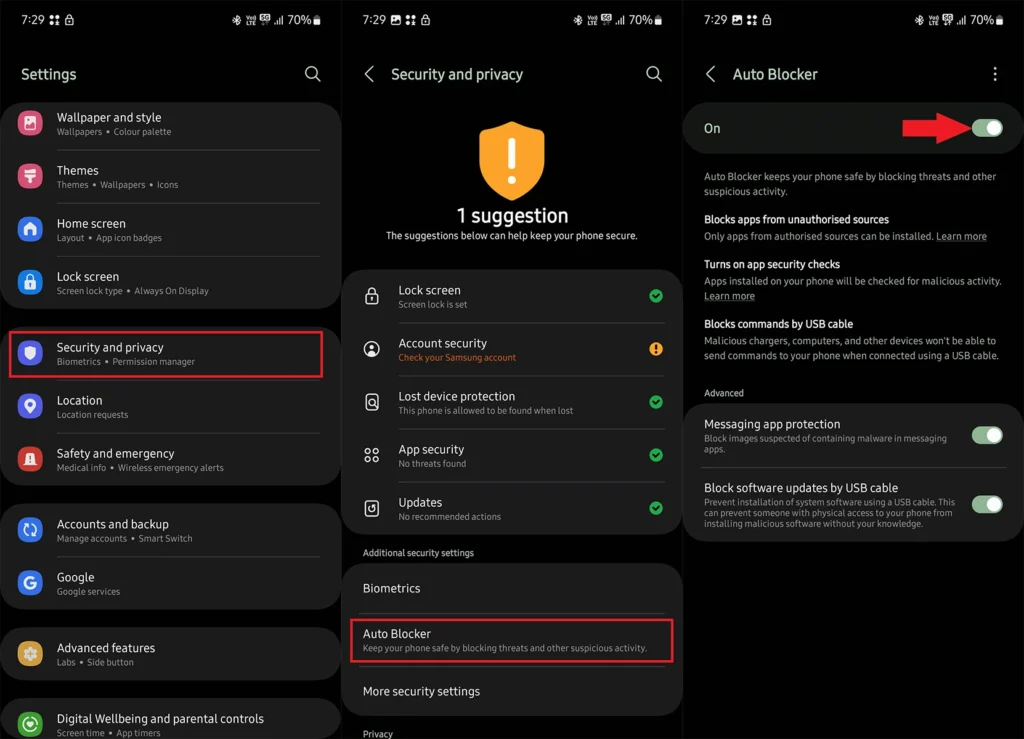
Samsung Galaxy devices include a built-in security feature called Auto Blocker, designed to reduce exposure to malicious applications, unauthorized software installations, and certain attack vectors. Its Maximum Restrictions mode adds further security controls, but also limits some device functionality.
Here's a breakdown of what each mode does and how its protections differ.
STANDARD AUTO BLOCKER
1. Blocks unauthorized app installations: Prevents installing apps from unauthorized sources, including APK files downloaded outside approved app stores.
2. Blocks malicious USB commands: Prevents certain potentially dangerous commands from being executed through USB connections.
3. Protects against malicious images: Helps protect against image-based attacks that exploit vulnerabilities in compatible messaging apps.
4. Blocks unauthorized USB software updates: Prevents unauthorized firmware or system software installations through USB connections.
MAXIMUM RESTRICTIONS
1. App protection: Scans applications for potential security threats.
2. Blocks device administrator activation: Prevents activating device administrator apps and work profiles.
3. Blocks 2G networks: Prevents connections to less secure 2G cellular networks.
4. Wi-Fi protection: Prevents automatic reconnection to certain insecure wireless networks.
5. Blocks links and previews: Restricts link access and message previews in compatible messaging apps.
6. Removes photo location data: Removes geolocation metadata when sharing images through supported features.
7. Blocks shared albums: Restricts shared album functionality in Samsung Gallery.
Note: The exact features and their availability may vary depending on the Galaxy device, One UI version, and software updates. Auto Blocker is an additional security layer, not a replacement for security updates, careful app permissions, or phishing awareness.
Here's a breakdown of what each mode does and how its protections differ.
STANDARD AUTO BLOCKER
1. Blocks unauthorized app installations: Prevents installing apps from unauthorized sources, including APK files downloaded outside approved app stores.
2. Blocks malicious USB commands: Prevents certain potentially dangerous commands from being executed through USB connections.
3. Protects against malicious images: Helps protect against image-based attacks that exploit vulnerabilities in compatible messaging apps.
4. Blocks unauthorized USB software updates: Prevents unauthorized firmware or system software installations through USB connections.
MAXIMUM RESTRICTIONS
1. App protection: Scans applications for potential security threats.
2. Blocks device administrator activation: Prevents activating device administrator apps and work profiles.
3. Blocks 2G networks: Prevents connections to less secure 2G cellular networks.
4. Wi-Fi protection: Prevents automatic reconnection to certain insecure wireless networks.
5. Blocks links and previews: Restricts link access and message previews in compatible messaging apps.
6. Removes photo location data: Removes geolocation metadata when sharing images through supported features.
7. Blocks shared albums: Restricts shared album functionality in Samsung Gallery.
Note: The exact features and their availability may vary depending on the Galaxy device, One UI version, and software updates. Auto Blocker is an additional security layer, not a replacement for security updates, careful app permissions, or phishing awareness.