
Question Does anyone else have issues logging into Outlook using the Firefox browser?

Please provide comments and solutions that are helpful to the author of this topic.

lokamoka820

Level 51
Thread author
Verified
Top Poster
Well-known
Mar 1, 2024
4,037
3
14,221
4,969
Banana Republic
Today I made the decision to switch all of my browsing to Firefox, so I imported my online accounts from Microsoft Edge to the Firefox browser. However, when I tried to log in, I only encountered the following problem with Outlook: "Password sign-in isn't available. Try another method.", I tried using the Brave browser, and everything worked as it should. This only occurs when using the Firefox browser. Has anyone else encountered this problem?
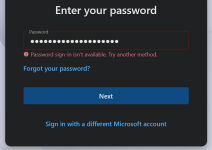
1785894074801.png
 
Since Outlook works in Brave and another member (@Sorrento) was able to sign in from LibreWolf, it doesn't seem to be a general Firefox compatibility issue.

It might be something specific to your Firefox profile (an extension or a privacy setting).

To narrow it down, you could try:
1-Opening Outlook in a Private Window.
2-Temporarily disabling your content-blocking/privacy extensions.
3-Testing with a fresh Firefox profile.
If it works in one of those clean environments, then you'll know the issue is likely related to your current Firefox configuration rather than Firefox itself. 🦊📧