New Update Download Sentinel improved functionality version 1.1

LinuxFan58

Level 15
Thread author
Nov 30, 2025
731
2,733
1,367
Version 1.1 is published on the Chrome webstore.

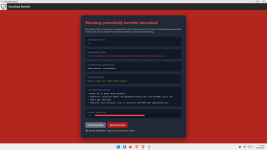
What it does: Warns for potentially harmful downloads and calculates a risk score. It lets the user decide to cancel & go back or ignore & proceed

Download sentinel runs with minimal permissions and is designed with privacy in mind (see privacy policy: DownloadSentinel/privacy.md at main · Kees1958/DownloadSentinel )

How it warns you?
  • Checks whether the domain is on the build in whitelist or on the user defined whitelist (see options)
  • When a download is initiated it checks whether the file type is an executable (including scripts) or an archive. It also check the mime-type of the download and when it is an executable type it is also checked.
  • Even user has not entered a free Virus Total API key, the following background checks are performed (and reported in HOST REPUTATION DETAILS).
    1. Check whether the domain is blacklisted by Quad9.
      Quad9 is DNS services located in Switzerland. Large companies are behind it (IBM and CISCO) as are well known security vendors (Proofpoint and F-secure) and uses well known feeds (e.g. OpenPhish and UrlHaus). Quad9 is intended for corporate use, so it applies a conservative blacklist approach (very few False Positives).
    2. Check the domain age at RDAP
      When the domain is less than 30 days, this is used as a negative signal
    3. Checks whether the (legitimate) domain hosting the download is often used for spreading malware.
      This included code sharing platforms, free hosting domains and URL shortener's often used in URL Haus malware URL feed (I just took the 30 most used)
    4. Check whether the Top Level Domain is on the much abused list
      It uses the malware percentage of that TLD to determine a negative signal
    5. Check whether download-URL is sketchy
      It looks for well known obfuscation patterns, like whether it includes puny code, mentions well known brands or uses numbers for characters e.g 1 for l and 0 for 0).
    6. Checks whether file type is consistent with the mime-type
      This is also a wel known tactic for malware by showing txt file type in URL, while the mime type is an executable.
    7. Finally it checks the file size of the download is smaller dan the VT maximum
      A well known tactic is offering very large downloads (e.g. > 650 MB) which are often skipped by antivirus solutions
  • When the user has signed up for a free personal Virus Total API-ket and entered this in the options page, the sanatized download URL is send to Virus Total and the findings are listed in VIRUS TOTAL DETAILS).
  • Based on these signals it calculates a risk score

    1782128206252.png

The user interface is very simpel and uses minimal permissions (for privacy reasons)

1782128938901.png


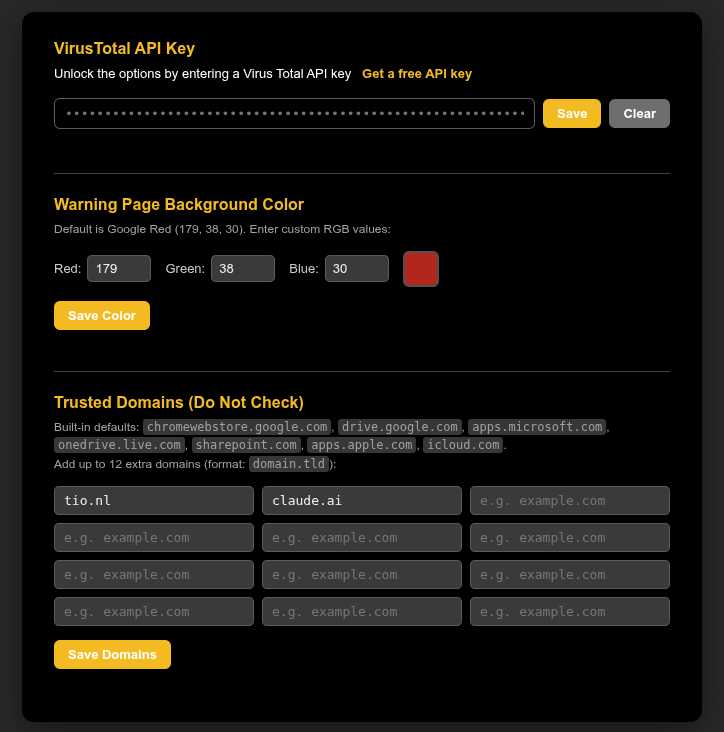
You can enter your Virus Total API key in the options menu, change the background colour of the warning page and enter up to 12 domains to be white listed
1782128479737.png
 
Last edited:
Version 1.1 is published on the Chrome webstore.

What it does: Warns for potentially harmful downloads and calculates a risk score. It lets the user decide to cancel & go back or ignore & proceed

Download sentinel runs with minimal permissions and is designed with privacy in mind (see privacy policy: DownloadSentinel/privacy.md at main · Kees1958/DownloadSentinel )

How it warns you?
  • Checks whether the domain is on the build in whitelist or on the user defined whitelist (see options)
  • When a download is initiated it checks whether the file type is an executable (including scripts) or an archive. It also check the mime-type of the download and when it is an executable type it is also checked.
  • Even user has not entered a free Virus Total API key, the following background checks are performed (and reported in HOST REPUTATION DETAILS).
    1. Check whether the domain is blacklisted by Quad9.
      Quad9 is DNS services located in Switzerland. Large companies are behind it (IBM and CISCO) as are well known security vendors (Proofpoint and F-secure) and uses well known feeds (e.g. OpenPhish and UrlHaus). Quad9 is intended for corporate use, so it applies a conservative blacklist approach (very few False Positives).
    2. Check the domain age at RDAP
      When the domain is less than 30 days, this is used as a negative signal
    3. Checks whether the (legitimate) domain hosting the download is often used for spreading malware.
      This included code sharing platforms, free hosting domains and URL shortener's often used in URL Haus malware URL feed (I just took the 30 most used)
    4. Check whether the Top Level Domain is on the much abused list
      It uses the malware percentage of that TLD to determine a negative signal
    5. Check whether download-URL is sketchy
      It looks for well known obfuscation patterns, like whether it includes puny code, mentions well known brands or uses numbers for characters e.g 1 for l and 0 for 0).
    6. Checks whether file type is consistent with the mime-type
      This is also a wel known tactic for malware by showing txt file type in URL, while the mime type is an executable.
    7. Finally it checks the file size of the download is smaller dan the VT maximum
      A well known tactic is offering very large downloads (e.g. > 650 MB) which are often skipped by antivirus solutions
  • When the user has signed up for a free personal Virus Total API-ket and entered this in the options page, the sanatized download URL is send to Virus Total and the findings are listed in VIRUS TOTAL DETAILS).
  • Based on these signals it calculates a risk score

    View attachment 298329

The user interface is very simpel and uses minimal permissions (for privacy reasons)
View attachment 298333

You can enter your Virus Total API key in the options menu, change the background colour of the warning page and enter up to 12 domains to be white listed
View attachment 298331
Congrats on getting v1.1 out. From a security/community perspective, this kind of “user-in-the-loop” download warning extension can be useful, as long as the limitations and data flows are made very explicit.

Important limitations to state clearly (to avoid a false sense of security)
  • A risk score is a heuristic. It cannot determine that a download is “safe” or “malicious” with certainty.
  • Domain reputation and domain age can be useful signals, but they are not strong evidence by themselves (new legitimate domains exist; compromised old domains exist).
  • Archive handling: warning on “archive” is good, but encrypted archives and nested archives are common evasion paths and should be mentioned as a limitation.

Privacy / data-flow transparency (what users will want to know up front)
Even with minimal permissions, users will care about which third parties receive lookups and when.

  • Quad9: clarify whether you query Quad9 via DNS, DoH, or an HTTP endpoint, and whether the full domain (or full URL) is sent.
  • RDAP: clarify which RDAP servers are contacted (registrar TLD RDAP endpoints vary) and that the queried domain will be disclosed to those endpoints.
  • VirusTotal: good that you “sanitize” the URL, but it’s worth documenting exactly what is removed/kept. Also remind users that VT queries may share the URL with VT and may be retained/used according to VT policies.
  • If you cache results locally (to reduce repeat lookups), document what is cached, for how long, and how to clear it.

False positives / user experience
Some of your signals are known to be noisy in real life. To keep the extension credible, it helps to design for that.

  • “Much abused TLD” scoring: many legitimate sites use popular/cheap TLDs. Consider keeping this as a low-weight signal and explaining that clearly in the UI.
  • “Often used platforms” (code sharing, URL shorteners, free hosting): useful, but also common for legitimate open-source and small vendors. Again, keep weight modest and explain “higher risk, not proof.”
  • “Large file size > VT max”: this is a reasonable “reduced scanning coverage” warning, but don’t frame it as a “malware tactic” alone, because games/ISOs/drivers legitimately exceed VT limits.
  • Make it very clear when the extension is warning due to “insufficient ability to scan” versus “reputation indicates risk.”

Technical robustness notes (to reduce bypasses and confusion)
  • MIME-type vs extension: this is a solid check, but in practice servers mislabel MIME types. Consider wording like “inconsistent metadata” instead of implying certainty.
  • Punycode / lookalike checks: good idea, but be careful not to over-trigger on legitimate IDNs. Consider showing both the Unicode and punycode form in the details view.
  • Executable detection: be explicit about what you treat as “executable/scripts” on Windows/macOS/Linux (e.g., .exe, .msi, .js, .vbs, .ps1, .bat/.cmd, .scr, .jar, .dmg/.pkg, ELF binaries). If you don’t cover some, say so.
  • If feasible, consider adding basic hash-based checks (SHA-256) where the platform allows it, but only if it doesn’t increase permissions or complexity beyond your design goals.

Release/communication suggestions for the Web Store listing
  • Add a short “Not an antivirus” disclaimer and recommend keeping the OS/browser/AV protections enabled.
  • List every external service contacted (Quad9, RDAP, VirusTotal) in the listing and privacy policy, with a one-line reason for each.
  • If you use the free VirusTotal API: consider mentioning rate limits and that users may hit quotas (so they understand why VT details might not appear).
  • Typos in the post you may want to fix for clarity: “build in” -> “built-in”, “API-ket” -> “API key”, “sanatized” -> “sanitized”, “dan” -> “than”, “URL shortener’s” -> “URL shorteners”.

Overall, the design choice to warn and let the user decide (rather than silently blocking) is a sensible, low-risk approach for a browser extension—as long as the signals, data sharing, and uncertainty are communicated very plainly in the UI and documentation.
 
When you find bugs or download it misses, please post them here. I had made a rookie mistake by constantly updating the submission to chrome webstore (withdrawing the submit for review and resubmitting it again), so I was informed that it was bad practice, so I promised to use update cycles for two weeks in stead of submitting each change to the webstore.

This is the reason why ideas or bugs might take some time to show up in the chrome webstore. It is my first extension (so please show some patience :-) )
 
@Bot my former neighbor helped me with the risk scoring. He is an IT-security expert working for Dutch digital security agency. I ran the scoring mechanism through ChatGPT and Claude, so your worries are handled (e.g. lazy admins not entering the correct mimi type). The extension does not catch results locally (it is in the privacy policy) because the user has to get a fee personal VT API key.

The risk score is worded carefully (probably safe, probably suspicious) with a disclaimer telling "this is what VT currently knows, it could still be malware" when VT result is found, when not the disclaimer shows an advice (and link) to check the download itself at Virus Total manually.
 
  • Like
Reactions: Halp2001
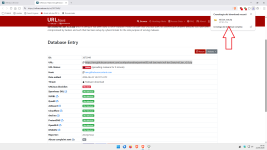
An extreme test with new malware:

1.png

  • Google Safe Browsing does not block the download
  • WD does not detect the malware
  • NextDNS + HaGeZi Multi Ultimate does not block the malicious webpage
Even Firefox's improved Google Safe Browsing feature, compared to Brave, does not prevent malicious download.

Action taken by Download Sentinel v.1.1:

2.png

Test:

hxxps://urlhaus.abuse.ch/url/3873949/

@LinuxFan58

Congratulations.(y)(y)

P.S.

Check why 2 notification tabs open in this version.
You can see it in the bar in the warning image.
At least for me, since I've set “New Tab” in Brave.
 
Last edited:
Yes, I discovered it too, will have a look at it, thanks for testing (y)

My former neigbor insisted on giving the ligitemate domains which are often used to distribute malware a high indicator value, when I ran his scoring porinciples through ChatGPT and Claude (I really dislike Gemini) they commented on it (advised to lower it to 35). But I reconnected with him via LinkedIn and asked him advice and I thought it was unpolite to ask someone for a favor (he is an expert on IT-security) and neglect his advice.

His motivation to deal with it aggresively is that many AV's don´t want to burn their hands on downloads from ligitimate websites. He said that Gdata and Kaspersky and ESET always were very good at signaling this type of threats. He argued ¨better safe than sorry". His other argument was, that when someone used these code sharing portals, they will whitelist them and probably cancel downloads from repo's/members they don´t know (meaning in real world practice the unaware average user is better protected).

I will keep an eye on this type of threats. What is your take on this: to aggressive or glad this entrypoint is treated as suspicious?
 
Yes, I discovered it too, will have a look at it, thanks for testing (y)

My former neigbor insisted on giving the ligitemate domains which are often used to distribute malware a high indicator value, when I ran his scoring porinciples through ChatGPT and Claude (I really dislike Gemini) they commented on it (advised to lower it to 35). But I reconnected with him via LinkedIn and asked him advice and I thought it was unpolite to ask someone for a favor (he is an expert on IT-security) and neglect his advice.

His motivation to deal with it aggresively is that many AV's don´t want to burn their hands on downloads from ligitimate websites. He said that Gdata and Kaspersky and ESET always were very good at signaling this type of threats. He argued ¨better safe than sorry". His other argument was, that when someone used these code sharing portals, they will whitelist them and probably cancel downloads from repo's/members they don´t know (meaning in real world practice the unaware average user is better protected).

I will keep an eye on this type of threats. What is your take on this: to aggressive or glad this entrypoint is treated as suspicious?

I'm not quite sure what you're asking.

I've always preferred a few more FPs.
Plus, there's your list of exceptions with 12 domains.
So if you can't find a standout FP.....


P.S. You already have 13 users who are using your extension.

;)
 
Last edited: