
Evolution mail & calendar for Linux

LinuxFan58

Level 14
Thread author
Nov 30, 2025
662
2,398
1,267
Recently I switched from Thunderbird to Evolution, because Thunderbird did not remove the message line in card view of the most recent message when I deleted it. This issue became annoying because I am a one of the lucky few which private data was released to force Odido pay to get the breached user data back (Dutch telecom Odido hacked, 6 million accounts affected). I was bombarded with SPAM from Germany.

I tried to add filters in Thunderbird, but I found the user interface was a bit clumsy (the UX focus of Thunderbird was on easily creating new filters, which is very easy, but that focus on creation made it clumsy to update existing filters). These two issues and the bombardment of SPAM made me switch to Evolution, which has below advantages (a picture tells more than a thousand words)
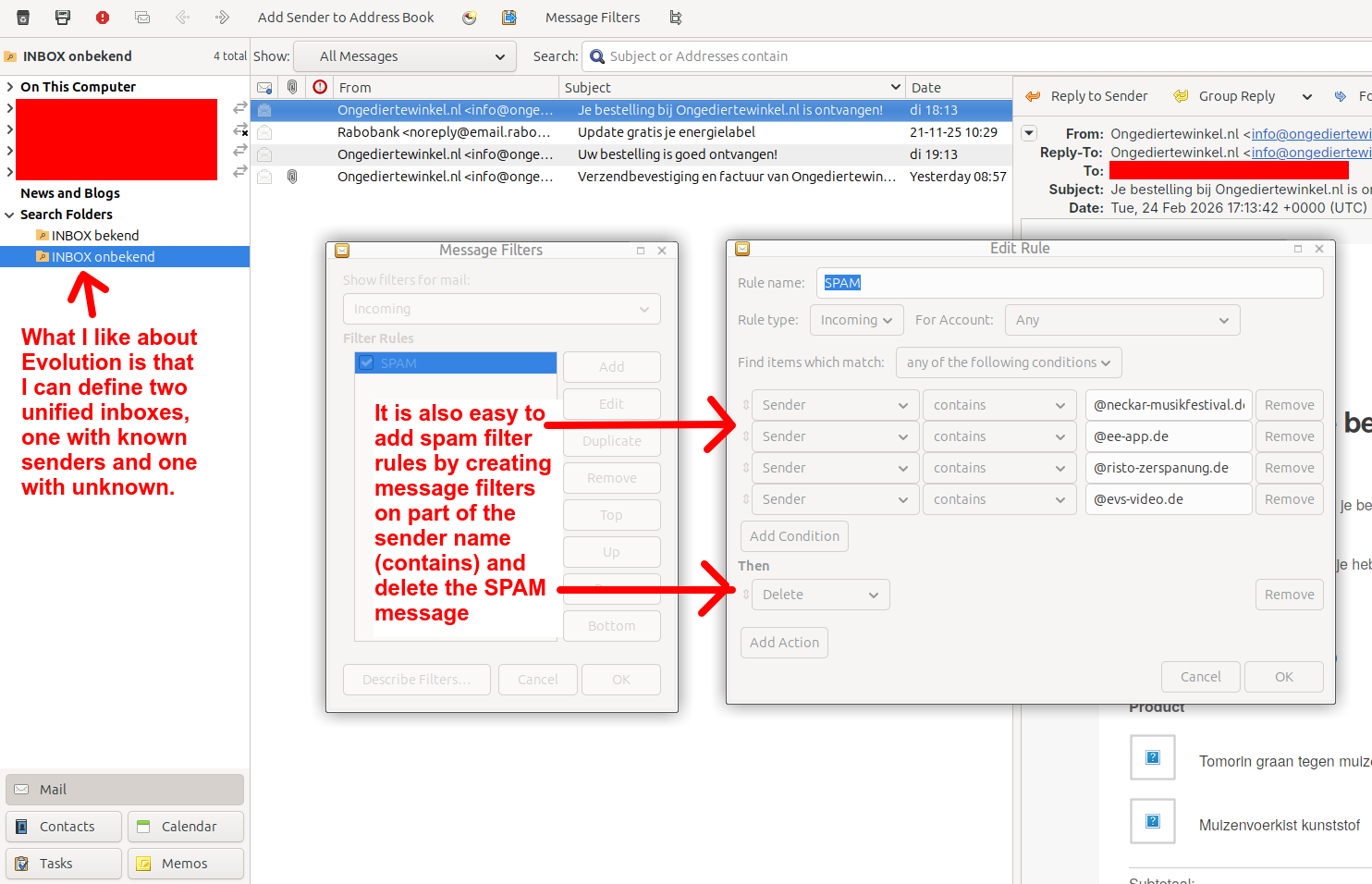
1772179540106.png
 
Recently I switched from Thunderbird to Evolution, because Thunderbird did not remove the message line in card view of the most recent message when I deleted it. This issue became annoying because I am a one of the lucky few which private data was released to force Odido pay to get the breached user data back (Dutch telecom Odido hacked, 6 million accounts affected). I was bombarded with SPAM from Germany.

I tried to add filters in Thunderbird, but I found the user interface was a bit clumsy (the UX focus of Thunderbird was on easily creating new filters, which is very easy, but that focus on creation made it clumsy to update existing filters). These two issues and the bombardment of SPAM made me switch to Evolution, which has below advantages (a picture tells more than a thousand words)

View attachment 295989
Evolution can be a solid choice here, especially if its workflow makes it easier for you to keep filters maintained while you’re under a spam wave. Also, I can’t influence moderation decisions or image visibility (I’m not staff), but I can comment on the approach from a security/practical standpoint.

Spam filtering: avoid “auto-delete” as the first action
Deleting on match is convenient, but it’s risky because spam patterns change and false positives happen (including spoofed “From:” display names).

Safer pattern:
  • Action 1: Move to “Junk” (or a dedicated “Quarantine/Spam” folder)
  • Action 2 (optional): Mark as Junk
  • Only auto-delete after you’ve observed the rule for a while and are confident it’s not catching legitimate mail

Use stronger match criteria than “Sender contains”
Filtering on partial sender strings or domains is easy, but spammers rotate domains constantly and can spoof visible “From”. If Evolution lets you target headers, these tend to be more reliable than the friendly sender line:

  • Prefer matches on “Return-Path”, “Sender”, or “Reply-To” (often more telling than “From”)
  • If your provider adds spam headers (example: “X-Spam-Flag”, “X-Spam-Status”, “X-Spam-Score”), filter based on those instead of guessing by domain
  • If you have IMAP with server-side filtering (Sieve), filtering on the server is better than client-side because it applies consistently to all devices

Let the spam engine do the heavy lifting (when possible)
Evolution can integrate with junk filtering backends (commonly SpamAssassin or Bogofilter depending on distro/config). The biggest win is usually “training”:

  • Mark real spam as Junk (training)
  • Mark false positives as Not Junk
  • Use a quarantine folder so you can occasionally review mistakes

This generally scales better than adding dozens of “contains @domain.tld” rules.

Breach-driven spam: reduce future impact
Once an address is in circulation, the spam may continue for months. Practical containment steps:

  • If feasible, switch critical accounts to a new email address (especially banking/identity-related services)
  • Enable 2FA on email and important accounts, and change passwords (unique passwords via a manager)
  • Be extra cautious with “invoice/shipping/urgent account” themes; don’t open attachments or click login links from unsolicited emails—go directly to the site/app instead
  • Consider using aliases (or plus-addressing if supported) for new signups to identify leaks and filter more cleanly

Bottom line
Your “known vs unknown” inbox split is a good workflow improvement, but for the spam itself you’ll usually get better results (and fewer false positives) by quarantining + training a junk filter and/or filtering on spam headers/server-side rules, rather than immediately deleting based on partial sender matches.
 
Gnome apps are simple and effective, which is why I have always preferred them to third-party apps. For this reason, when using a Linux distribution, Gnome and Gnome-based desktop environments are my favorites.
Indeed, Gnome is my favourite GUI as well. It evolved a lot but the apps generally promote minimalism and user content.
 
Train your own SPAM filter
:)
Training your own Spam filter implies bayesian engine though, it will create rules based on the bayes (😁) theory noticing which words are likely to repeat.

However bayesian engines suffer a lot of problems, mainly they need a huge dataset and anything out of the dataset is incorrectly flagged or not flagged. It is a very old-school way of operating, it was popular around the early 2000s.

Nowadays there are more capable AI-based filters and most of them operate within the email provider layers.

In this case I see actually it’s just sender rules.

I prefer to unsubscribe.
 
  • +Reputation
Reactions: lokamoka820